What should you look for when buying a card reader?
Start with the device you’ll save the copy to. Then decide whether you need to switch between different USB ports or connect extra devices to your laptop while copying.
Compact USB-C reader
Choose this option: if you’re copying directly to a compatible USB-C device and the reader has a slot for your dashcam card.
Keep in mind: having the right plug doesn’t guarantee that a phone can read the card’s file system; according to Anker, the Anker A8370 doesn’t have a USB-A plug.
Reader with USB-A and USB-C
Choose this option: if you switch between USB-A and USB-C devices on the go. UGREEN lists both plug types and SD and microSD slots for the 50706.
Keep in mind: check the supported card interface too; an advertised USB speed isn’t necessarily the transfer speed of your card.
USB-C hub with card slots
Choose this option: if you need extra ports or power as well as a card reader on a compatible laptop. Belkin lists these features for the AVC009fqSGY-V2.
Keep in mind: the extra hub features aren’t necessary for a card backup alone; check the exact model and your laptop’s requirements.
| What to consider |
What should you check? |
Who is it important for? |
| Copying to a phone |
Check the card slot, connection or adapter, readable card format and available storage. |
If I want to copy to my phone without a laptop, I need to know whether both the connection and card format will work. Around 36% of consumers say that copying directly to a phone is their main need. |
| Different USB ports |
Make a note of the ports on your devices and check that the reader works with both connections and your card format. |
If I switch between devices with USB-A and USB-C while travelling, I want to connect to both without needing an adapter. Around 29% of consumers prioritise using devices with different ports. |
| Transferring lots of clips |
Compare the interfaces of your card, reader and laptop; the reader interface alone doesn’t determine the transfer speed. |
If I’m copying lots of files to a laptop, I want the card and computer interfaces to work well together. Around 21% of consumers say transferring lots of clips to a laptop is their main need. |
| Extra laptop ports |
Check which ports you need, whether the laptop is compatible and whether the hub has the right card slot. |
If I need other laptop connections while copying, I want those features in the same setup. Around 14% of consumers prioritise combining a card reader with extra ports. |
Card readers and hubs at Joybuy
These Joybuy picks cover USB-C card backups, from standalone card readers to hubs with extra connections. For each model, check that the listed card slot fits your dashcam card and that your device is compatible.
 Image unavailable
Acer ODK6V0 7-in-1 USB-C hub
An option if you want to combine card reading with extra laptop connections on a compatible USB-C device.
The product name lists an SD and TF card reader, HDMI, USB ports and USB-C Power Delivery.
View at Joybuy
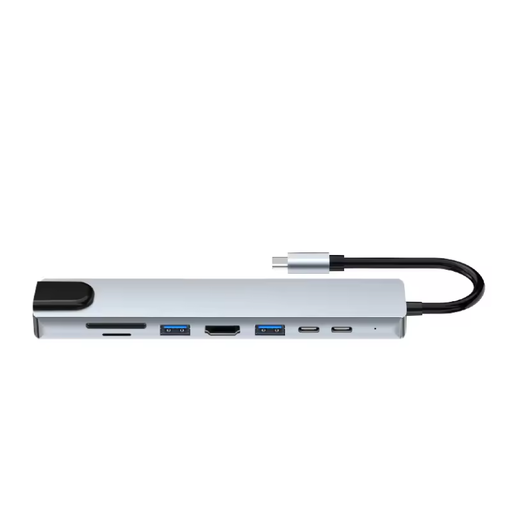 Image unavailable
Assortix ProHub 8 USB-C adapter
A good fit if you want a card reader and extra connections in one hub for a compatible laptop.
The product name lists SD and microSD slots; it also lists HDMI, Ethernet, USB ports and a USB-C charging function.
View at Joybuy
 Image unavailable
Kingston Technology USB3.2 Gen1 Workflow Dual-Slot SDHC/SDXC UHS-II card reader
An option if you want to copy clips from SDHC, SDXC or microSD cards to a computer.
The product name lists UHS-II and USB 3.2 Gen 1. The product description mentions an included USB-C cable and advises against disconnecting the reader during data transfer; interface specifications aren’t measured copy speeds.
View at Joybuy
 Image unavailable
Verbatim CMH-13 USB Type-C hub
Worth considering if you want to combine card reading with extra connections on a device with a spare USB-C port.
The product details list SD and microSD card formats, USB ports, HDMI and Power Delivery.
View at Joybuy
Frequently asked questions about backing up dashcam footage
How can I back up my footage on the go without losing the recording on the card?
Turn off your dashcam before removing the card, copy the files you want and open the copies to check them. Garmin warns that removing a card while the camera is on could result in data loss or damage. Keep the original until you’ve checked the copy; Nextbase explains that certain dashcams overwrite older files when the card is full.
Why doesn’t the memory card appear on my iPhone?
The connection or adapter and the card format need to be compatible with your iPhone. Apple Support lists a supported data format as a requirement; check under ‘Locations’ in the Files app to see whether the card appears. This doesn’t guarantee that every reader and card will work.
Which card reader should I choose if I use different devices while travelling?
Choose a reader with plug types that suit the devices you want to copy to, and check that the card slot fits your dashcam card. UGREEN lists USB-A, USB-C, SD and microSD for the 50706; if you choose a USB-C hub with extra ports, check your laptop’s requirements too.
Can I keep dashcam footage in the Netherlands and post it online?
According to the police, using a dashcam privately in the Netherlands isn’t prohibited, but you should take care when handling footage that shows identifiable people or traceable number plates. The police state that such footage must not be published in a way that identifies people, and that you should blur it before posting. The rules that apply also depend on how you use the footage.


