
Vandaag of morgen in huis

Kwaliteit gegarandeerd

Welkomstaanbiedingen ontgrendelen: GRATIS bezorging | Tot 80% korting | Gratis 30 dagen JoyPlus-proefperiode
Download de app
A dash cam for your car can help capture road situations, for example in the event of a collision, a dispute about right of way or damage while parking. Even so, not every camera is suitable for day-to-day use in the Netherlands. Marketing terms such as 4K, night vision and 24-hour monitoring only make sense when you also look at the full specifications.
A 4K dash cam creates large video files. Without a suitable microSD card, storage fills up quickly or recording errors can occur. Therefore check:
With loop recording, old files are normally overwritten. A G-sensor can save footage during a shock into a separate events folder, but always check whether this feature is present according to the product description.
A dash cam with night vision won’t automatically perform well in every dark street. Pay attention to the image sensor, aperture, HDR and image processing. According to their own information, brands such as 70mai and DDPAI say features like Night Owl Vision, NightVIS and STARVIS 2 can improve low-light capture. These are brand claims; actual brightness also depends on reflections, a clean windscreen, street lighting and the headlights of other vehicles.
If you mainly drive in the evening or early morning, take a look at the range of night vision dash cams.
A dash cam with parking mode can only keep recording when it receives power while the car is switched off. Many models require a separate hardwiring kit for this. Check whether 24-hour monitoring is actually included as standard or whether you need extra accessories.
Connecting to the fuse box must be done correctly. A suitable kit with low-voltage protection can help prevent the battery from discharging too far, but always follow the manufacturer’s installation instructions.
A dual dash cam front and rear records the road in front of and behind the car. That’s practical in a rear-end collision or for damage in busy city traffic. Check not only the front resolution, but also that of the rear camera. A combination of 4K front and 1080P rear is common.
A dash cam with a rear camera also requires cable routing along the headliner or sill. Measure in advance whether the supplied cable is long enough for your car.
A wide field of view, such as 130°, 140° or 150°, captures more of the lanes. An extremely wide angle can cause more distortion at the edges.
A dash cam with GPS can, according to the product information, attach speed, time, route and location to video files. That can be useful when looking back over a trip. Check whether GPS is built in or works via a separate module.
With a dash cam with Wi‑Fi and app, you can usually view and download footage directly to your phone. This means you don’t have to take the camera out of the car each time. Wi‑Fi is typically intended for the connection between camera and smartphone; it’s not the same as a permanent internet connection.
Functions such as ADAS and voice control are additional aids. According to the brands’ own information, they can give warnings for things like lane departure or a possible collision. Do not see these alerts as a substitute for your own attention while driving.
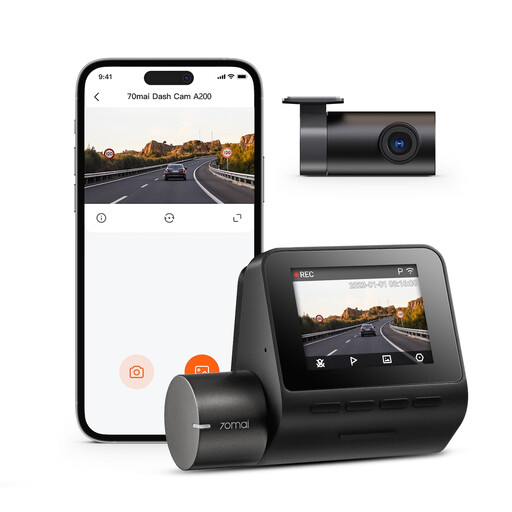
Why this fits the profile: This set includes a front and rear camera and is easy to use thanks to the 2-inch IPS screen and the 70mai app.
The product information clearly states that this is a dual‑channel set. The microSD card is not included, allowing you to factor in that cost upfront.
1080P front and rear, 130° field of view, front recording up to 60FPS, HDR and Wi‑Fi app control.
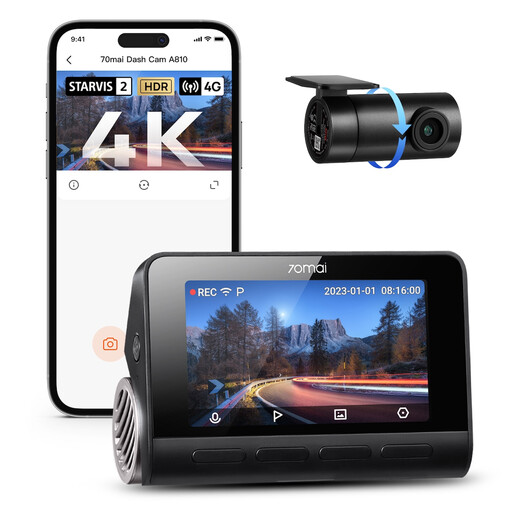
Why this fits the profile: Suitable for motorists who drive a lot and value high front resolution, GPS and extensive parking functions.
The product information lists the 4K front camera and 1080P rear camera separately, and the required UP04 hardwiring kit for parking functions. That way, important extras are visible before purchase.
Sony STARVIS 2 IMX678 front sensor, HDR, built‑in GPS, ADAS, voice control and support for 24‑hour monitoring with a separate kit.
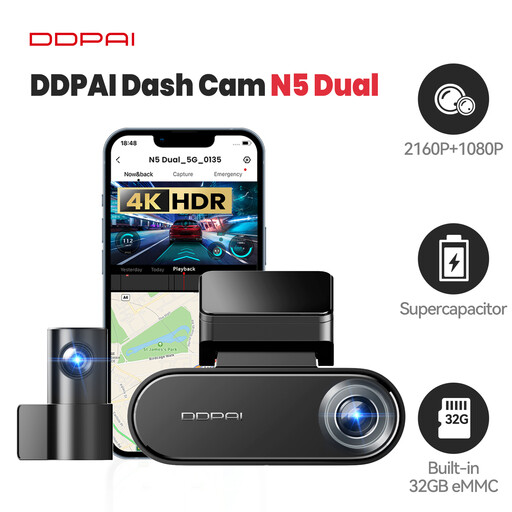
Why this fits the profile: A suitable choice for high‑mileage drivers, families and motorists who want to combine front and rear recording, fast file transfer and extra storage.
The specifications list 32GB internal eMMC storage and support for a microSD card up to 512GB. Parking mode does require a separately available hardwiring kit.
4K front and 1080P rear, built‑in GPS, 5GHz Wi‑Fi, DDPAI app and storage via eMMC plus microSD.
We’ve compiled a complete, up‑to‑date list of products that fully meet these strict selection criteria and comply with current European safety regulations.
Position the front camera so it doesn’t unnecessarily obstruct your view of the road. Behind the rear‑view mirror, the camera is usually less noticeable. Make sure the lens is clean and, after installation, check that the rear camera is aligned correctly.
Also keep an eye on the following:
A dash cam with an app makes checks easier, but Wi‑Fi or cloud features may have additional privacy and connectivity terms. Read the product and app terms before you enable permanent monitoring.
Using a dash cam is in principle allowed in the Netherlands, but privacy remains important. Don’t unnecessarily film private property and be careful when publishing or sharing footage online in which people or number plates are identifiable. For business use, such as with a taxi or fleet, additional privacy rules and internal procedures may apply.
Service life depends on usage, temperature, power supply and the quality of the memory card. A camera that records long journeys daily puts more strain on the card than a camera used only occasionally. Replace a worn card in good time and check that files are still being saved correctly. Models with a supercapacitor can, according to the product specification, be better suited to temperature fluctuations, but correct installation remains essential.
Factor in a microSD card, any hardwiring kit for parking mode and possible installation costs. With models that support 4G, there may also be mobile data costs or an additional subscription. So don’t just compare the price of the camera, but also the accessories needed for the features you actually want to use.
