Who is this guide for?

Host who wants to watch live

Wants to check before the guests arrive whether the right competition is available through an app or service they can access. NPO Start offers live streams of its TV channels; also check the information about the specific competition.

Viewer with an older smart TV

Already has a working screen, but wants to check whether the broadcaster’s app is available on it. The Consumers’ Association points out that apps can disappear from smart TVs; NLZIET lists a range of supported device platforms.

Viewer with unreliable Wi-Fi

Can connect a network cable to the TV and is therefore considering a media player with a built-in Ethernet port. According to Google, the Google TV Streamer has one.

What should you look for when choosing?

The app on your smart TV

Best if: the actual broadcaster’s app is available on your TV model.

Bear in mind: app support varies by model and may change.

A device with its own apps

Best if: your TV doesn’t have the app you need, or you want to control the broadcast with a remote.

Bear in mind: you’ll be adding another device and may need a subscription to the streaming service.

Casting from your phone

Best if: your chosen service supports casting and you want to use your phone as the remote.

Bear in mind: the app, phone and connection all need to be compatible; to cast NLZIET to Chromecast, your phone and receiver must be on the same Wi-Fi network.

Media player with Ethernet

Best if: there’s a usable network cable by the TV and you’d rather not rely on Wi-Fi alone.

Bear in mind: the cable and router need to suit your setup; Ethernet can’t guarantee an uninterrupted live stream.

What to consider What should you check? Who is this important to?
Access to the right live stream Check the competition, broadcast time, service and app on the exact TV model or device. As a host, I want to know before the evening whether the live stream I have in mind is actually available. Around 36% of consumers put access to the right broadcast first.
Connection while watching Check the Wi-Fi reception by the TV and whether a network cable and Ethernet port are available. If the Wi-Fi by my TV is unreliable, I want to know whether I can use a cable there. Around 29% of consumers make connection reliability their top priority.
Using the controls with guests Check whether the service has an app for the device and whether you want to use a remote or phone to control it. When I’m watching with guests, I want to be able to open the broadcast easily on the TV screen. Around 21% of consumers prioritise ease of use when watching together.
Picture and sound Make sure the connections and features suit your TV, and check what quality the service provides for the broadcast. If picture and sound matter a lot to me, I want to know whether the TV, device and stream are compatible. Around 14% of consumers prioritise picture and sound features that suit their setup.

Common buying mistakes

  • Assuming a streaming device gives you access to every competition

    Whether you can watch the competition depends on the specific broadcast and service, not just the hardware.

    First, look up the official broadcast information, then check whether the app is available on your TV or the device you’re considering.

    You may need a subscription to the streaming service itself.

  • Buying a separate player before checking your TV’s apps

    If the app you need already works on your TV, an extra media player may be an unnecessary purchase. App support varies by TV model.

    Check your TV’s app store and try watching the broadcast on it before choosing an extra device.

  • Assuming 4K or an audio format guarantees broadcast quality

    A device’s specifications don’t automatically determine the quality of the broadcast; your TV, audio equipment and stream must also support the format.

    Prioritise having access to the right app, then match the specifications to your screen, audio equipment and broadcast.

Brands to consider

Google

The Google TV Streamer is a media player with its own apps, a remote, Google Cast and built-in Ethernet.

  • Google lists up to 4K HDR at 60 frames per second and gigabit Ethernet for this model.
  • According to Google, a certified HDMI 2.1 cable is sold separately. Also check whether the broadcaster’s app is available.

Apple

Apple TV 4K is an option if you’re considering a tvOS device with a remote and Ethernet.

  • Apple lists HDMI and gigabit Ethernet for the fourth-generation Apple TV 4K reviewed.
  • Apple states that an HDMI cable is not included in the box. Check the version and whether the streaming app is available.

Xiaomi

The TV Box S (3rd Gen) is a Google TV box supplied with a remote and HDMI cable.

  • Xiaomi specifies 4K output, Wi-Fi, HDMI and 32 GB storage.
  • The published list of connections doesn’t mention a built-in Ethernet port. Check the version and whether the broadcaster’s app is available.

STRONG

The LEAP-S3PRO is a Google TV box with a remote and Google Cast. STRONG also lists a LAN connection.

  • STRONG lists features including 4K, Wi-Fi and LAN.
  • The product information lists different Android versions. Before buying, confirm which software version comes with the version on offer and check app availability separately.

Joybuy products

This Joybuy selection features smart TVs for anyone who wants to use the streaming app directly on their TV. Before buying, check whether the service showing the competition is available on the exact model.

LG OLED65C68LA 65-inch OLED Evo AI C6 4K Smart TV

LG OLED65C68LA 65-inch OLED Evo AI C6 4K Smart TV

A smart TV option if the broadcaster’s app is available for this model.

65-inch; 4K; OLED Evo AI C6.

View at Joybuy

LG 75NU800B6LA 75-inch NANO 4K UHD Smart TV

LG 75NU800B6LA 75-inch NANO 4K UHD Smart TV

A smart TV option if the broadcaster’s app is available for this model.

75-inch; NANO 4K UHD.

View at Joybuy
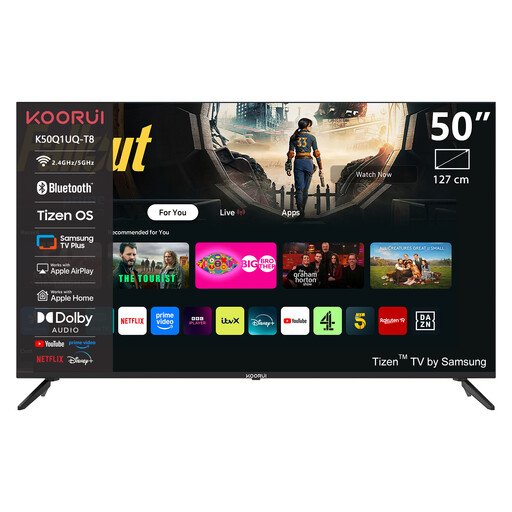
KOORUI K50Q1UQ-T8 50-inch 4K UHD QLED Smart TV

KOORUI K50Q1UQ-T8 50-inch 4K UHD QLED Smart TV

A smart TV option if the broadcaster’s app is available for this model.

50-inch; 4K UHD; QLED.

View at Joybuy

METZ 50MUF7000Z 50-inch Smart TV

METZ 50MUF7000Z 50-inch Smart TV

A smart TV option if the broadcaster’s app is available for this model.

50-inch; Google TV; Google Cast; Ethernet.

View at Joybuy

METZ 32MQF7030Z 32-inch HD QLED Smart TV

METZ 32MQF7030Z 32-inch HD QLED Smart TV

A smart TV option if the broadcaster’s app is available for this model.

32-inch; HD; QLED; Google TV; Chromecast.

View at Joybuy

Frequently asked questions

Do I need a paid subscription to watch the dance competition?

That depends on the competition and the broadcaster. NPO Start offers live streams of its TV channels; NLZIET requires a subscription. Check which service is showing the specific competition and what terms apply.

How do I get the device ready before the guests arrive?

Connect the device to the right HDMI input and power supply, connect it to the internet and install your chosen streaming app. Then test whether you can open the specific live stream. To cast NLZIET to Chromecast, your phone and receiver must be on the same Wi-Fi network.

What extra costs should I expect?

The streaming service may require a subscription. Google states that a certified HDMI 2.1 cable for the Google TV Streamer is sold separately; Apple says the same about an HDMI cable for the Apple TV 4K reviewed. Check what’s included with the exact version.

What are my rights when buying online in the Netherlands?

According to ACM ConsuWijzer, online purchases of products generally come with a statutory cooling-off period of up to 14 days after delivery, subject to exceptions. You’re also entitled to a product that, under normal use, does what you could reasonably expect; there is no fixed warranty period for all devices.

Are subtitles guaranteed during a live broadcast?

No, subtitles aren’t available for every live broadcast. NPO says that some programmes are subtitled live, and that there may be a delay. Check the specific broadcast and the app settings.
