Start by measuring the viewing distances, then assess the TV from the outermost seats too: a bigger screen won’t solve a limited viewing angle. The Dutch Consumers’ Association generally describes OLED TVs as offering a wider viewing angle, while LCD TVs can often be bright; viewing angles, reflections and motion handling vary by model. Compare the picture in the lighting you use at home, and check separately whether the sound is loud enough for everyone to hear the music and commentary.
Who is this choice relevant to?
A group seated to the sides
Do you want guests at either end of the sofa or elsewhere in the room to be able to follow the picture? Compare the TV’s viewing angle; the Dutch Consumers’ Association includes viewing angle as an important part of its TV assessments.
Viewers in a bright room
If you watch during the day or with the lights on, consider both brightness and reflections. The Dutch Consumers’ Association often describes LCD TVs as bright, but incoming light and screen reflections are still worth bearing in mind.
Fans of dance and music
Do you want to follow the choreography clearly and hear the music and commentary? Assess motion handling and sound separately; a quoted panel refresh rate alone doesn’t tell you how uneven movement will look.
What should you look for?
OLED TV
Best suited to when: people are seated around the room and good visibility from the side matters.
Bear in mind: reflections in your room and the viewing angle of the specific model.
LCD or Mini LED TV
Best suited to when: you often watch in a bright room and daytime visibility is a priority.
Bear in mind: viewing angle and reflections; with Mini LED, halos around bright objects can also vary by model.
Use the table to identify the main priority for your viewing set-up. Then choose a screen size based on your viewing distances and the space available.
| Buying consideration |
What to look for |
Who is this most important to? |
| Visibility from different seats |
Compare the same picture from the outermost seats and check the viewing angle and reflections for each model. |
If I want everyone, including those seated to the side, to be able to follow the competition, viewing angle comes first. This is the main priority for around 28% of consumers. |
| Fast movement |
Watch dance movements on the TV and compare the motion processing settings; Hz alone doesn’t guarantee flawless picture quality. |
If you mainly want to see smooth, lifelike choreography, pay attention to motion handling. This is the main priority for around 22% of consumers. |
| Light and reflections |
Compare brightness and reflections under your usual room lighting and from the seats that matter. |
If you often watch during the day or with the lights on, you’ll want to see the detail without distracting reflections. Visibility in bright conditions is the main priority for around 22% of consumers. |
| Size and positioning |
Measure viewing distances and available space. The Dutch Consumers’ Association suggests around 2.4 times the screen diagonal as a starting point, not a fixed rule. For wall mounting, also check the VESA pattern and the bracket’s weight capacity. |
If I need to make different viewing distances work with a fixed position for the TV, I want a size that fits practically. Around 17% of consumers put this first. |
| Music and commentary |
Listen to music and speech at a suitable volume, and check the connections if you want to use existing speakers. |
If you want to watch the competition without an extra audio system, check that the music and commentary are clear in your room. Sound is the main priority for around 11% of consumers. |
Common pitfalls
-
Only comparing the picture from directly in front
In a shared room, the picture may look less bright or colourful from the side.
View the model you’re considering from the outermost seats too, with the lighting set as you’d use it at home.
-
Assuming a high Hz rating guarantees smooth dance movements
With fast, uneven movement, generated intermediate frames can cause picture artefacts. The Dutch Consumers’ Association points out that image processing doesn’t produce the same results for every type of movement.
Compare moving scenes on the TV and try out its motion processing settings.
-
Choosing the biggest size without measuring first
A larger screen needs to suit your viewing distances and available space; it may also use more electricity.
Measure the seating distances and available space, compare nearby screen sizes, and if you’re wall-mounting the TV, check that the bracket suits its VESA pattern and weight.
Brands to compare
LG
Worth considering if you want to compare OLED TVs with a wide viewing angle.
- Tweakers describes the specific G5 as a bright OLED TV.
- That assessment doesn’t automatically apply to other models; consider reflections, screen size and sound on the version you’re looking at.
TCL
Worth considering if you want to compare bright Mini LED TVs for daytime viewing.
- Tweakers reviews the C8L/C89L and comments on the brightness of the specific C8L.
- Assess reflections in bright conditions, blooming in the dark and the viewing experience from the side for each model.
Samsung
According to the Dutch buying guide, its range includes both OLED and LCD/Mini LED models to compare, including the S90F and QN90F.
- The models reviewed use different screen technologies.
- Don’t judge viewing angle and reflections by the brand name alone; compare the specific model.
Philips
Worth considering if you’re looking for Ambilight as well as a particular screen technology.
- Tweakers lists the OLED810 as an OLED alternative.
- Ambilight is a separate preference and doesn’t in itself tell you anything about motion handling or visibility from seats to the side.
TVs at Joybuy
This selection includes OLED and QD-Mini LED TVs for watching together, with a range of screen sizes and features to compare against your seating distances and available space.
 No image available
OLED77G68LW 77-inch 4K OLED TV
This OLED model could suit a set-up with people seated around the screen; compare the viewing angle of this specific TV.
- 77-inch 4K OLED TV
- Native 120 Hz panel and VRR up to 165 Hz
- 60 W 4.2-channel audio system
View at Joybuy
 No image available
LG OLED65C68LA 65-inch OLED evo AI C6 4K Smart TV
The 65-inch size gives you a specific screen dimension to compare with your viewing distances and available space; check the model’s viewing angle for seats to the side.
- Native 120 Hz and VRR up to 165 Hz
- 40 W 2.2-channel sound
- Dolby Vision and Dolby Atmos
View at Joybuy
No image available
LG OLED55C68LA 55-inch OLED evo AI C6 4K Smart TV
The 55-inch version gives you another screen size to compare with the distance to your seats; assess the picture from the side too.
- Native 120 Hz and VRR up to 165 Hz
- 40 W 2.2-channel audio system
- Dolby Vision and Dolby Atmos
View at Joybuy
 No image available
TCL T8D 85-inch 4K QD-Mini LED Smart TV
Compare the 85-inch size with your available space and viewing distances; check reflections and picture quality from the outermost seats.
- Native 144 Hz
- Onkyo 2.1-channel sound
- VRR and Dolby Atmos
View at Joybuy
 No image available
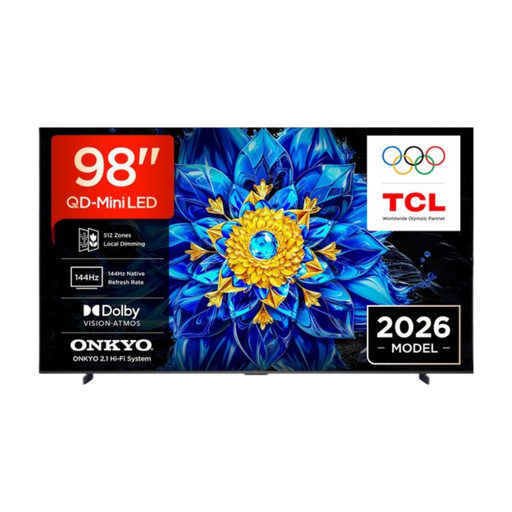
TCL T8D 98-inch 4K QD-Mini LED Smart TV
Check carefully that the 98-inch screen will fit in your room and that your viewing distances are suitable for this size.
- Native 100 Hz
- Google TV
- Dolby Atmos
View at Joybuy
Frequently asked questions
How do I choose a screen size when people are sitting at different distances?
Measure from the usual seats to the planned screen position. The Dutch Consumers’ Association suggests around 2.4 times the screen diagonal as a comfortable starting point, not a fixed rule; compare nearby sizes and check the TV’s overall dimensions.
Does 120 or 144 Hz automatically make a TV suitable for a dance competition?
No. A higher Hz rating doesn’t guarantee flawless rendering of fast, uneven movement. The Dutch Consumers’ Association explains that generated intermediate frames can cause picture artefacts, so compare moving scenes and the settings on the specific TV.
What should I check before mounting a TV on the wall?
Check that the bracket you choose is suitable for the specific TV’s VESA pattern and weight. Compatibility isn’t determined by screen size alone.
Is OLED or LCD/Mini LED better for a shared, bright room?
According to the Dutch Consumers’ Association, OLED is generally worth comparing when visibility from the side matters; LCD TVs can often be bright enough for daytime viewing. For the specific model, also compare reflections, viewing angle and picture quality under your room’s lighting.
How can I check whether the sound is loud enough for music and commentary?
Listen to music and speech at a suitable volume in the room where you’ll be watching. If you want to use existing speakers, check in advance that the connections will work with your set-up.


