What should you look for when choosing?
First check DAB+ reception where you usually listen. Then decide which controls, power options and additional listening sources you actually need.
The percentages show how the main buying priorities are divided for this use case.
| What to consider |
What to look for when buying |
Who might prioritise this? |
| Reception of your preferred station |
Check for DAB+ support and try the station where you plan to listen. If needed, move the radio or run another scan. |
If I want to hear a weather bulletin, my preferred station needs to work where I usually listen. Around 36% of consumers prioritise reception. |
| Quick tuning and clear speech |
Check that the controls and presets suit the way you listen, and assess speech at your usual listening volume. |
I want to switch on a quick update without spending ages searching through menus. Around 29% of consumers prioritise easy controls and spoken updates. |
| Power and portability |
Check which power source the radio uses and whether batteries or a rechargeable battery are included. |
If I want to use the radio somewhere without a mains socket, the power options need to suit. Around 21% of consumers prioritise portability or listening without a mains socket. |
| Additional listening sources |
Check whether the radio offers internet radio or Bluetooth. Internet radio requires a working internet connection, while Bluetooth plays audio from a paired device. |
I want to listen online or play audio from another device as well as using DAB+. Around 14% of consumers prioritise additional listening sources. |
Joybuy product selection
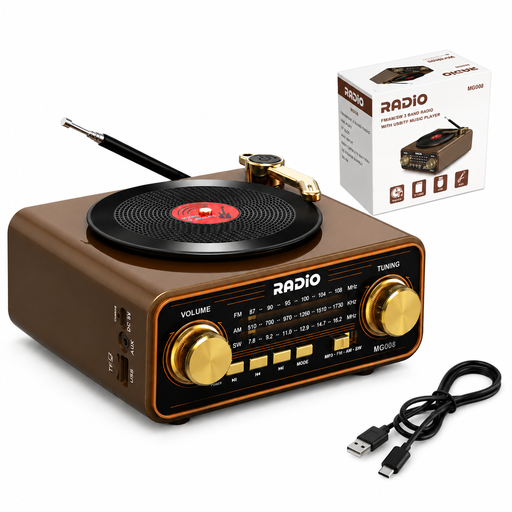
The Joybuy radio featured below is a portable model with AM, FM and shortwave reception. Check that the specific version supports DAB+ before choosing it for DAB+ weather updates.
 No image available
Retro wood-effect radio with Bluetooth 6.0, AM, FM and shortwave
This isn’t a confirmed match for DAB+ weather updates: the listed reception types are AM, FM and shortwave, and DAB+ support hasn’t been confirmed. Check DAB+ support and the CE marking on the specific version before choosing this model for that purpose.
The product name lists Bluetooth 6.0, USB-C, a TF card slot, AUX and a 2000 mAh battery.
View at Joybuy
Frequently asked questions
Can I receive NPO Radio 1 on any DAB+ radio?
NPO Radio 1 says it can be received via DAB+ across almost all of the Netherlands, but that doesn’t guarantee reception everywhere indoors. Run a full station scan and check reception where you want to listen.
What can I do if a station is missing?
Run a full scan using the ‘full scan’ or ‘auto tune’ function. NPO Radio 1 and Digital Radio NL recommend scanning again if you have reception problems. If the station is still missing, try moving the radio to another spot.
Will I automatically receive current KNMI weather warnings via DAB+?
No. DAB+ is a way to receive radio broadcasts; these radios haven’t been confirmed to have an automatic KNMI warning function. The KNMI issues warnings by area, so check the latest information for your region when the weather is severe or dangerous.
Do I need a subscription to listen via DAB+?
According to Digital Radio NL, you don’t need a subscription or registration for standard DAB+ over-the-air reception. Internet radio does require a working internet connection.
What guarantee applies to a radio bought in the Netherlands?
Statutory consumer rights apply in the Netherlands: the seller must put a faulty product right. There’s no fixed statutory guarantee period of two years; what you can expect from a product depends, among other things, on the product and the sales information.
Which product requirement should I check for a radio?
The Dutch Authority for Digital Infrastructure states that electrical, electronic and radio equipment placed on the market in Europe must carry the required CE marking. Check the marking on the specific version; a brand name or reception specification doesn’t confirm it.


