
Listener with a regular listening spot
Wants to receive NPO Radio 1 or another preferred station directly in the living room. NPO Radio 1 explains DAB+ reception; check it where you plan to put the radio.


Before choosing a DAB+ radio, check that you can receive the station you want at your usual listening spot. Then see whether speech is easy to follow at your normal volume. To catch up on programmes you’ve missed, you’ll need another way to listen, such as streaming audio from a phone or using internet radio. NPO Radio 1 explains DAB+ reception and ways to listen back to programmes, but your radio must support the playback method you choose.
Wants to receive NPO Radio 1 or another preferred station directly in the living room. NPO Radio 1 explains DAB+ reception; check it where you plan to put the radio.
Wants to follow conversations at a normal volume and operate the radio easily. Philips and Panasonic describe features on specific models; judge the sound of the model you’re considering for yourself.
Wants to listen to missed programmes or podcasts as well as live radio. Check how your chosen model plays audio from a phone or via internet radio.
Work through your options in this order: reception at your regular listening spot, speech clarity at a normal volume, controls and dimensions, then any features for listening back to programmes.
| What to consider | What should you check? | Who is this important to? |
|---|---|---|
| Reception at your listening spot | Run a full station scan where you plan to put the radio, and check that you can receive the station you want there. | If I mainly listen live, I want to know whether I can receive the station in my living room. Around 36% of consumers give reception at their regular listening spot top priority. |
| Spoken word | Listen to a conversation at your usual volume and assess the exact model; a sound setting is not an independent test. | If I want to follow an interview, I check whether voices are comfortable for me to understand. Around 29% of consumers prioritise speech clarity. |
| Controls and size | Check the buttons, presets and display, and look at the dimensions of the version you’re considering. | If the radio needs to fit in a small, fixed space, I want to find stations without complicated controls. Around 21% of consumers prioritise ease of use and the space the radio takes up. |
| Missed programmes | Check whether the radio can play audio from your phone or offers internet radio, and how you can find the programme you want to hear. | If I want to listen to a programme later, I look for a suitable playback option alongside live radio. Around 14% of consumers give listening back to programmes top priority. |
NPO Radio 1 describes DAB+ reception across a significant part of the Netherlands, not as a guarantee for every living room.
Test the station you want where you plan to use the radio before choosing based on extra features.
Bluetooth plays audio from another device. Internet radio offers a different way to listen, but it doesn’t confirm that a particular missed episode is available.
First find out where you can listen to the programme, then check how the radio plays that audio.
Panasonic describes V-boost for voices on the RX-D552, but this is not a comparison of radios under the same listening conditions.
Assess the exact model with spoken radio at your normal volume; don’t choose based only on the name of a sound setting.
Philips describes models including the TAR5505/10, with DAB+, FM and Bluetooth, and the TAV2000DB/00, with quick-access buttons.
Pure describes the Evoke Play as a model with DAB+, FM and internet radio.
Panasonic describes the RX-D552 as offering DAB+, FM, Bluetooth and a V-boost setting for spoken word.
Roberts describes the Revival Uno BT as a compact radio with DAB, DAB+, FM, Bluetooth and a headphone socket.
This selection includes portable devices with FM radio or other listed radio features. The product titles don’t confirm DAB+ reception; check the supported band if you want to listen to live DAB+ radio.
 No image available
A good fit if you want to combine FM radio with audio from a phone via Bluetooth.
The product name lists an LCD screen, antenna, aux input, USB drive, TF card and MP3 player. DAB+ is not mentioned.
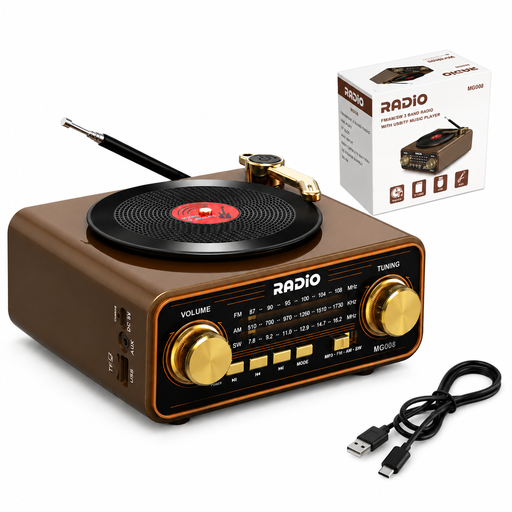 No image available
A good fit if you want to play audio from a phone as well as listen to the radio, and the listed radio frequencies suit your needs.
The product name lists AM, FM, shortwave, USB-C, TF card, aux and a 2000 mAh battery. DAB+ is not mentioned.
Run a full station scan, then check reception where you plan to put the radio. NPO Radio 1 lists ‘full scan’ and ‘auto tune’ as scan options and describes DAB+ reception across a significant part of the Netherlands.
DAB+ is the option for live radio here; for missed programmes, NPO Radio 1 points listeners to Gemist and the NPO Luister app. If you want to play the audio through your radio, check that the model you choose supports audio from your phone.
Put the radio in your intended listening spot, adjust the antenna and run another scan. You could also try another location, or use FM or internet radio if available. A station list doesn’t confirm how well reception works indoors at your address.
According to ACM ConsuWijzer, for a standard online product purchase you’ll usually have up to 14 days after delivery to change your mind; check which exceptions apply. Separately, the Netherlands Authority for Consumers and Markets says the seller is responsible for the statutory guarantee if a product is faulty.
Check that the specific device carries the correct CE marking. The Dutch Authority for Digital Infrastructure states that equipment must carry the CE marking; this alone says nothing about a model’s reception or sound quality.