For daily news at a fixed desk, choose a DAB+ radio that makes it easy to find your station; an alarm clock radio is worthwhile mainly if you’ll also use the alarm. Battery power suits use in several rooms, while internet radio gives you another way to listen over Wi-Fi. Before buying, check the power supply, controls and reception where you work.
Who is a DAB+ radio suitable for?
News at your desk
You want to tune in to a familiar news station quickly in your home office, without using your phone or Wi-Fi. In that case, easy station selection and straightforward controls matter more than extra playback options. Digital Radio NL describes DAB+ as digital radio that requires a DAB+ receiver; NPO Radio 1 says it is available via DAB+ across almost all of the Netherlands.
Radio as a morning alarm
You want the radio to be part of your morning routine, so as well as DAB+ reception, you’ll want to consider the alarm features. Sony lists a dual alarm and a mono speaker for the XDR-C1DBP.
Listening in several rooms
You take the radio out of your home office, so you’ll want a power supply that suits moving it around. Sangean says the DPR-26BT comes with a mains adapter and can also run on six C batteries; Kenwood describes Wi-Fi as the connection used for internet radio on the CR-ST100S.
What should you look for when choosing?
You need a DAB+ receiver to listen to radio via digital terrestrial broadcasting, according to Digital Radio NL. NPO Radio 1 says it is available via DAB+ across almost all of the Netherlands, but that doesn’t tell you for certain how well the signal will reach your desk indoors.
| What to consider |
What should you check? |
Who is this most important for? |
| Finding the news quickly |
Check that the radio has DAB+ and that you can save a favourite station and tune into it easily. |
If I want to tune in to the same news station every morning, easy controls and quick access to presets matter to me. Around 40% of consumers say finding and tuning into the news quickly is their top priority. |
| Reception at your desk |
Check reception where you plan to put the radio and, if necessary, scan for stations again once it’s in place. |
If I mainly want to know whether I can receive my station at my desk, I want to try the radio right there. Around 30% of consumers prioritise reception at their workplace. |
| Waking up to the radio |
Check what type of alarm the radio has and whether the controls suit your morning routine. |
If I want the same radio to wake me before my working day, an alarm function matters to me; otherwise, it may not add much. Around 15% of consumers make waking up their top priority. |
| Moving it around and using other sources |
Check the power supply and what’s included; distinguish DAB+ reception from Bluetooth or internet radio. |
If I want to use the radio in several rooms or play audio from other sources, the power supply needs to suit how I’ll use it. Around 15% of consumers prioritise portability or additional sources. |
Common buying mistakes
-
Confusing Bluetooth or FM-only with DAB+
Bluetooth plays audio from another device, while an FM tuner doesn’t automatically receive DAB+ stations.
Check the product specifications to make sure DAB+ is explicitly listed as a reception method.
-
Assuming national coverage guarantees indoor reception
NPO Radio 1 says it is available via DAB+ across almost all of the Netherlands; that doesn’t guarantee a good signal in every indoor location.
Scan for stations again after setup and check reception where you work. Digital Radio NL recommends rescanning if you have reception problems.
-
Assuming portable means all power options are included
According to Sangean, the DPR-26BT can run on six C batteries. Pure says the battery pack for the Evoke Play is sold separately.
Check what’s included with the exact model and what power supply you’ll need to use it away from a mains socket.
Brands to compare
Philips
The TAR5505/10 is a DAB+/FM desktop radio with Bluetooth and station presets.
- Philips lists up to 20 station presets for the TAR5505/10.
- The kitchen timer on this model may not be useful if you only want to listen to the morning news at your desk.
Sony
The XDR-C1DBP is a DAB+/FM clock radio for anyone who wants to make radio part of their morning routine.
- Sony lists a dual alarm for this model.
- The product specifications list a mono speaker; that feature alone says nothing about reception.
Sangean
The DPR-26BT is a portable DAB+/FM radio with Bluetooth.
- Sangean says it comes with a mains adapter and can run on six C batteries.
- Bear in mind that you’ll need batteries if you want to use this model away from a mains socket.
Kenwood
The CR-ST100S combines DAB+, FM and internet radio for a fixed listening spot.
- According to Kenwood, the internet radio function uses Wi-Fi, while DAB+ reception uses an aerial.
- You don’t need the Wi-Fi function if you only listen to the same news programme via DAB+.
Pure
The Evoke Play combines DAB+, FM and internet radio for anyone who wants to use different listening sources.
- According to Pure, the model offers several ways to listen, including DAB+ and internet radio.
- Pure says the battery pack is not included and is sold separately.
Radio and audio options on Joybuy
These Joybuy products are radio and audio options for your morning routine. Before choosing one for digital terrestrial news, check that the specific model has DAB+.
 No image available
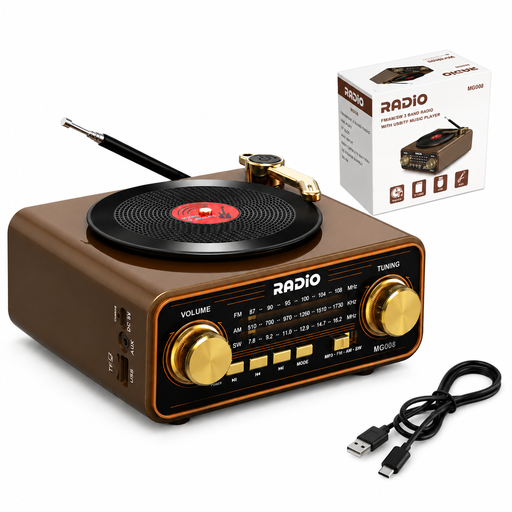
Wood-effect retro radio with Bluetooth 6.0
The product name lists AM, FM and shortwave; before buying, check whether this radio also receives DAB+ if you want to use it for DAB+ news.
The product name lists USB-C, a TF card, an AUX connection and a 2000 mAh battery.
View on Joybuy
 No image available
Philips TADR402/12 clock radio
This clock radio may suit a morning routine that includes an alarm; the product name lists FM but doesn’t confirm DAB+ reception. Check before choosing it for DAB+ news.
The product name lists a dual alarm, USB charging port, night light and battery backup.
View on Joybuy
 No image available
Mlove BV800 portable Bluetooth speaker
The product name lists FM radio but not DAB+; check the reception features before considering this device for DAB+ news.
The product name lists an LCD screen, AUX input, USB connection and TF card support.
View on Joybuy
Frequently asked questions
Can I receive NPO Radio 1 via DAB+ without internet?
Yes. DAB+ is radio received over the air and doesn’t require an internet connection. NPO Radio 1 says it is available via DAB+ across almost all of the Netherlands; try the radio at your desk, as this doesn’t guarantee reception in every indoor location.
What can I do if my station is missing after I’ve set the radio down?
First, run a full or automatic station scan. Digital Radio NL recommends scanning again if you have reception problems; also check your radio’s manual.
Do I need an internet subscription for DAB+?
No. DAB+ broadcasts received over the air don’t require an internet connection. A radio with internet radio does need an internet connection for that separate way of listening.
What are my rights if a radio I bought online isn’t as expected?
According to ACM ConsuWijzer, a product must meet what you could reasonably expect when used normally; if it develops a fault too soon, the seller must offer an appropriate solution free of charge. Online purchases also generally come with a statutory cooling-off period, which, according to ACM ConsuWijzer, ends 14 days after delivery. The cooling-off period for a distance purchase and the remedies for a faulty product are separate rights; check which terms and exceptions apply to your purchase.


