What should you look for when buying?
DAB+ for live listening
A good fit if: you mainly listen when a radio drama is being broadcast and want to tune in directly to a station.
Bear in mind: DAB+ alone doesn’t let you choose podcast episodes; indoor reception depends on the location and the building.
DAB+ with internet or podcast features
A good fit if: you want to listen to internet radio or podcasts on the device as well as live radio, and Wi-Fi is available.
Bear in mind: check whether the specific radio drama you want is available through the service offered.
DAB+ with Bluetooth from your phone
A good fit if: you choose episodes on your phone and want to play the audio through the radio.
Bear in mind: streaming from your phone via Bluetooth isn’t the same as searching for podcasts on the radio itself.
If you’re choosing a radio for listening to radio dramas in a home office, the key things to check are whether the episode you want is available, reception where you work, private listening and how much desk space you have.
| What to consider |
What to look for when buying |
Who is this important to? |
| Access to the radio drama you want |
Search for the programme on your chosen podcast service and check whether the radio offers that service itself or can play audio from your phone. |
I want to choose an episode myself rather than wait for a broadcast. This is the priority for around 36% of consumers. |
| Reception where you work |
Check the station you want at the intended location with the aerial extended; rescan for stations if necessary. |
I want to listen live while working without poor reception at my usual spot. Around 29% of consumers give reception this level of priority. |
| Private listening |
Check whether the model you choose has a headphone socket or a clearly compatible audio output. |
I want to listen without disturbing family members or colleagues. This is a priority for around 21% of consumers. |
| Space and controls |
Compare the dimensions, power supply, space needed for the aerial and how easy it is to access your favourite stations. |
I have limited desk space and want a radio that’s easy to use while I work. Around 14% of consumers prioritise a compact, easy-to-use device. |
Joybuy radios and audio devices for your desk
This selection includes portable radios and audio devices for listening to FM radio and playing audio from files or a phone, among other things. If live DAB+ reception is essential, check that the exact model supports it before choosing.
 No image available
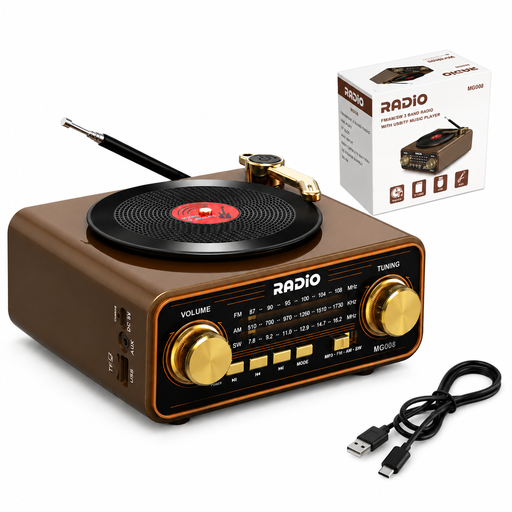
Portable retro radio with music player
A good fit if you want to play audio files whenever you choose using the listed TF card feature; check separately whether this model supports DAB+ if you need live DAB+ reception.
The product name lists Bluetooth 6.0, AM, FM and shortwave reception, USB-C, a TF card, AUX and a 2000 mAh battery.
View at Joybuy
 No image available
Mlove BV800 Bluetooth speaker with FM radio
A good fit if you want to play audio from a phone or use wired headphones; check separately whether this model supports DAB+ if you need it for live listening.
The product information lists Bluetooth, FM radio, an external aerial and a 3.5mm headphone socket. USB and microSD playback are also mentioned.
View at Joybuy
Frequently asked questions
Can I start a radio drama whenever I like using DAB+?
Not with DAB+ reception alone: it lets you tune in to a live station. To listen to an episode of your choice, you need a suitable podcast service on a compatible device, or you can stream audio from your phone if the radio supports that input. Check whether the radio drama you want is available this way.
What can I do if DAB+ reception is poor at my desk?
Try adjusting the aerial and the radio’s position, and rescan for stations if necessary. Indoor reception also depends on the location and construction of the building; a national coverage indication doesn’t guarantee reception at your desk.
Does Bluetooth on a radio automatically send sound to my wireless headphones?
No. Bluetooth for receiving audio from your phone doesn’t mean the radio has Bluetooth output for headphones. Check which connections it supports; the Philips TAV2000DB/00 and Roberts Revival Petite 2 are listed as having a wired headphone socket.
What are my rights when buying a radio online in the Netherlands?
When you buy from a business at a distance, you’ll often have a 14-day cooling-off period, according to the Government of the Netherlands. This guidance on distance selling doesn’t necessarily apply to purchases from private individuals. You’re also entitled to a product that is of satisfactory quality. The Government of the Netherlands says there is no fixed statutory guarantee period in the Netherlands; if a product is faulty, you can contact the seller.
As a listener, do I need the DAB+ broadcasting licence mentioned by the government?
The Dutch Authority for Digital Infrastructure’s information about local DAB+ licences relates to local public and commercial broadcasters. It doesn’t cover the purchase of a radio by an individual listener.


