What should you look for?
First, check that your chosen station broadcasts relevant updates at the right time and that you can receive it where you want to listen. Then compare how you’ll operate the radio and where you plan to use it.
| What to consider |
What to look for |
Who is this important for? |
| Updates and broadcast times |
Check the programme and whether it’s useful for your route and departure time; the ANWB lists different broadcast times for each station. |
If I want to hear relevant traffic information quickly before setting off, I’ll start by choosing a suitable station. Around 33% of consumers give the right updates at the right time top priority. |
| Reception where you listen |
Check whether your chosen station is available in your area, then try the radio where you’ll be listening. Digital Radio NL points out that buildings and construction can affect indoor reception. |
If you don’t want reception to let you down in your usual spot, try a few different positions first. Around 27% of consumers put reception where they listen first. |
| Speech clarity |
Assess the radio from your usual listening distance and at your usual volume. Panasonic lists a dialogue mode for the RF-D30BT, but this doesn’t measure how clear the sound will be in your home. |
If I want to follow spoken updates while other things are going on in the open-plan space, I’ll focus on speech clarity. Around 20% of consumers make this their top priority. |
| Controls and positioning |
Check how many preset buttons there are and whether the radio runs on mains power or a battery; a battery will also need recharging. |
If you want to switch stations quickly or use the radio in different places, look for easy-to-use controls and a suitable power source. Around 20% of consumers put this flexibility first. |
Joybuy product
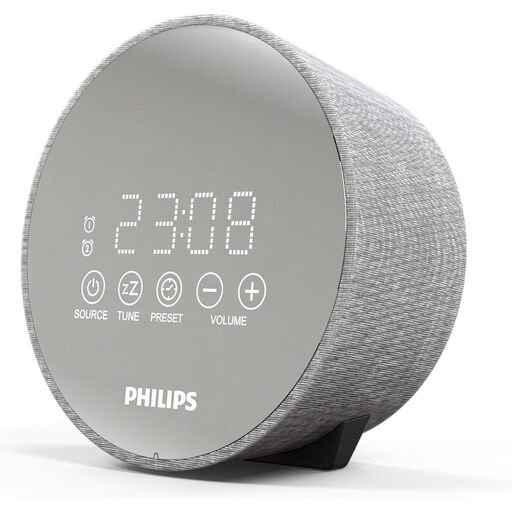
This Joybuy listing is for a Philips FM clock radio. Before buying, check that it also supports DAB+ if you want to receive your chosen digital terrestrial stations.
 No image available
Philips TADR402/12 FM clock radio
The product information lists an FM tuner; check explicitly whether DAB+ is also supported before choosing this device for digital terrestrial stations.
The description lists two alarm times, a sleep timer, a USB port, a night light and battery backup.
View at Joybuy
Frequently asked questions
Which station should I choose for traffic information just before setting off?
Choose a station whose updates suit your route and departure time. The ANWB lists NPO Radio 1 and BNR, among others, with updates every half hour and every 15 minutes during rush hour. Check the current schedule, and don’t assume that every update covers your local route.
What can I try if I can’t receive a regional station indoors?
First check whether the station broadcasts in your area, then try extending the aerial and positioning it vertically. Scan again and, if necessary, test a higher spot or somewhere closer to a window. These steps can’t guarantee that a local station will become available.
Do I need a subscription to listen via DAB+?
According to Digital Radio NL, listening via digital terrestrial radio doesn’t require a subscription, registration or log-in. A radio with internet radio does need an internet connection for that feature.
What if a radio I bought online isn’t right for me or breaks soon after?
For a standard online consumer purchase, you’ll generally have 14 days from delivery to change your mind, subject to exceptions listed by ACM ConsuWijzer. This is separate from your rights if a product is faulty, damaged or not as described. The legal guarantee applies if a product used normally doesn’t meet what you could reasonably expect; there is no fixed, general two-year period.


