First, check whether the station broadcasting the panel show is available via DAB+ where you plan to listen. More speaker power won’t make up for a signal you can’t receive. Then compare the speaker configuration and controls from your usual seats, and only choose extras such as internet radio or a CD player if you’ll use them. The specifications alone can’t tell you how clearly voices will come across in your living room.
Who is this choice relevant to?
Panel show fan who wants to check reception first
You don’t want to miss any of the conversation, so you first check whether the station and DAB+ reception are available where you plan to listen. Digital Radio NL recommends running a new automatic scan if you have reception problems.
Listener who moves between seats
You follow conversations from different parts of a large living room and compare the speaker configuration and controls. The stated power alone doesn’t tell you how clearly voices will come across from your seats.
Listener who wants to tune in quickly
You want to find your panel show’s station easily, so look for preset stations and convenient controls, such as a remote control.
What should you look for when buying?
First check reception for the station where you plan to listen, then compare the controls and speaker configuration.
| What to consider |
What should you check? |
Who is this important for? |
| Reception where you’ll listen |
Check whether the station broadcasting the panel show is available there via DAB+, and try an automatic scan in the spot where you plan to listen. |
If I don’t want to miss the conversation, I want to know whether I can receive the station in my living room. Around 31% of consumers put reception where they plan to listen first. |
| Speech from different seats |
Compare the stated speaker configuration and, if possible, listen from your usual seats. |
When I listen from different parts of the room, I want to follow the voices and reactions without relying on the wattage alone. Around 31% of consumers prioritise clear speech from different seats. |
| Easy tuning |
Check how to save preset stations and whether the version you’re considering includes your preferred controls, such as a remote control. |
If I often listen to the same station, I want to find it quickly or control the radio from my seat. This is the top priority for around 23% of consumers. |
| Extra features |
Decide whether you’ll use FM, internet radio, Bluetooth or a CD player. For internet radio, check the network requirements too. |
I only want to choose extra sources that suit what I actually listen to. Around 15% of consumers focus mainly on which extra features are useful. |
Common pitfalls
-
Assuming every DAB+ radio can receive the station
Having a DAB+ receiver doesn’t automatically mean that the specific station is available where you plan to listen.
Check the station’s availability at your location and try an automatic scan in your chosen spot before weighing up other specifications.
-
Assuming wattage guarantees clear speech
The power rating or speaker configuration can’t tell you how speech will sound in your living room, especially from different seats.
Compare the stated configuration and, if possible, judge speech clarity from your usual listening spots.
-
Confusing FM radio with confirmed DAB+ reception
A product name that mentions FM radio doesn’t confirm that the device also has DAB+. You need a DAB+ receiver for digital terrestrial radio, according to Digital Radio NL.
Check the specifications for the exact version to confirm DAB+ before you order.
Brands to consider
Ruark Audio
The R2 Mk4 is a DAB+ music system worth comparing if the speaker configuration and sound settings matter to you too.
- Ruark lists two speakers and adjustable bass and treble for the R2 Mk4, alongside FM, DAB+ and internet radio.
- These specifications don’t prove how clearly a panel show’s conversation will come across in your living room.
Pure
The Evoke Home II is a DAB+ music system for anyone also considering a CD player, internet radio and remote control.
- Pure lists a stereo system, a remote control and up to 150 presets for the Evoke Home II.
- Check that the version and accessories listed match the product you want to buy. A brand’s claims about sound quality aren’t an independent listening test.
Philips
The TAR8805/10 is a DAB+ and internet radio worth comparing if presets and multiple reception sources matter to you.
- Philips lists FM, DAB+, internet radio, Bluetooth and up to 20 preset stations for this model.
- These feature specifications don’t tell you whether the radio will sound good from every seat.
Joybuy product selection
This selection features a CD player with FM radio and extra playback options. The product name doesn’t confirm DAB+, so check the exact version before ordering if you want to receive the panel show’s station via DAB+.
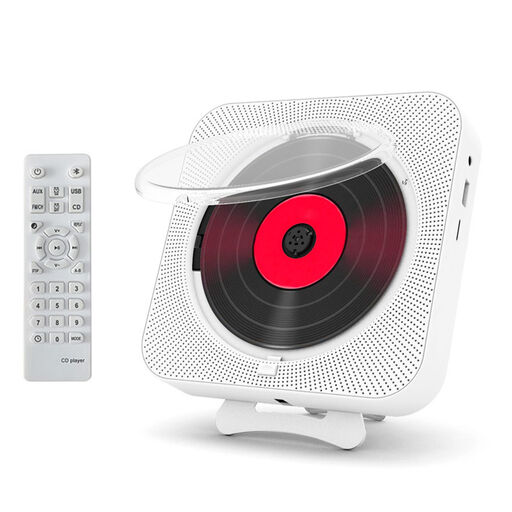 No image available
CD player with Bluetooth 5.0, 10 W speakers, FM radio, USB, TF card reader and remote control
This player may suit you if you want to play CDs or use Bluetooth as well as listening to the radio; the product name doesn’t confirm DAB+.
The product name lists Bluetooth 5.0, 10 W speakers, FM radio, USB, a TF card reader, A-B repeat, an LED display, and wall or tabletop placement. If you need digital terrestrial reception, check the specifications for the exact version to confirm DAB+.
View at Joybuy
Frequently asked questions
What can I do if the station isn’t showing up?
First check whether the station is available via DAB+ at your location. Digital Radio NL recommends running a new automatic scan if you have reception problems, but this won’t make a station appear if it isn’t available there.
Do I need internet for DAB+?
No. DAB+ receives radio via digital terrestrial signals. You do need a network connection to use the internet radio feature on a combined device.
What are my rights when buying online or if a product is faulty?
For eligible online consumer purchases, the Dutch government says you usually have a 14-day cooling-off period. If a product is faulty, you may have statutory rights, such as a repair or replacement at no cost. The applicable terms depend on the purchase and the fault.


