
Decorator who works with fine details
You want to fill the frame with piping, sugar flowers and texture. Magnification and the working distance in front of the lens both play a part.


Start by considering the smallest cupcake detail you want to fill the frame with, and how much room you need for lighting. A mirrorless camera with a kit zoom is versatile for whole cupcakes, but you may need a separate macro lens for very small decorations. For a cohesive portfolio, consistent lighting and carefully controlled white balance also matter.
You want to fill the frame with piping, sugar flowers and texture. Magnification and the working distance in front of the lens both play a part.
You photograph whole cupcakes and collections from consistent angles, and want the colours to look comparable across different designs.
You’re looking for an easy starting point for complete compositions and want to know what the supplied lens can and can’t do.
First decide whether you need to fill the frame with small decorations. Then choose a lens for your preferred composition, and consider the camera body and your workflow for consistent colour.
| What to consider | What should you check? | Who is this most important for? |
|---|---|---|
| Small decorations | Compare the maximum magnification of the exact lens with the framing you want, and check how much room remains in front of the lens for lighting. | If I want sugar flowers or fine piping to fill the frame, I look at both magnification and room for lighting. Around 31% of consumers prioritise these details. |
| Complete compositions | Check the range of the supplied zoom lens and try the overhead and side views you want within the space available on your table. | For whole cupcakes and collections shot from different angles, I want the flexibility to frame my shots. Around 25% of consumers prioritise complete compositions. |
| Colour and sharpness across a series | Check the white balance settings and RAW capabilities; for close-ups, consider whether the depth of field suits your workflow. | When I want to present several designs consistently, I look for a repeatable lighting set-up and consistent colour. Around 25% of consumers make consistency their main priority. |
| A straightforward starter kit | Check exactly what the kit includes, whether the lens mount is compatible and whether you’ll need a separate macro lens straight away. | If I want to start with one straightforward kit, I want to know what I can use straight away and what I might need later. Around 19% of consumers put an easy start first. |
Canon and Sony list lower maximum magnification figures for the RF-S 18-45mm and E PZ 16-50mm OSS II than for the separate 1:1 macro lenses mentioned here. A kit zoom isn’t automatically suitable for filling the frame with the smallest decorations.
First work out how small you want the detail to appear in the frame, then check the magnification of the lens actually included in the kit.
Nikon states that, at the closest focusing distance, there is approximately 5 cm between the front of the NIKKOR Z MC 50mm f/2.8 lens and the subject. This working distance can affect where you can position your lights.
Check the framing you want with your cupcake and lighting set-up; don’t rely on the stated focusing distance alone.
Nikon notes that different lighting conditions can affect how colours appear. A different camera body therefore won’t automatically replace a consistent lighting set-up and careful white balance.
Take test shots in controlled lighting and check the white balance before treating the camera body as the solution to colour differences.
The Dutch government distinguishes between an extended warranty and your statutory rights if a product is faulty. For a consumer purchase, the retailer is your point of contact for a solution. If you’re buying on behalf of a business, don’t assume the same consumer rights automatically apply.
Check what an extended warranty covers and keep your proof of purchase.
The EOS R50 with an RF-S 18-45mm kit zoom is an option for general cupcake compositions. If you want to focus on small details, consider a separate compatible macro lens.
The α6400 with E-mount can be paired with an E PZ 16-50mm OSS II for a range of compositions, or with a separate E 30mm F3.5 Macro for detailed shots.
A Nikon Z camera body with a separate NIKKOR Z MC 50mm f/2.8 is an option to consider if small details are important to you.
The X-S20 with an XC15-45mm kit zoom is designed for a range of compositions; the separate XF30mmF2.8 R LM WR Macro is an option for detailed shots.
The OM-5 Mark II with a compatible M.Zuiko macro lens is an option to consider if focus stacking and a separate macro lens suit your workflow.
For each camera, see how its features and accessories suit your cupcake photography. In particular, check its capabilities for capturing small details and what the kit includes.
 No image available
The product title mentions photography and vlogging; check whether the camera suits the framing you want for your cupcake photos.
The title lists a rotating lens, a 1.72-inch touchscreen and a tripod.
 No image available
The product title mentions photography and video; check whether the camera suits the still-life compositions and details you need for your portfolio.
The title lists a 1-inch CMOS sensor, 4K/240fps, 3-axis stabilisation and 107 GB of built-in storage.
 No image available
The product title describes this camera as suitable for photography and video; check whether its features suit the cupcake compositions you want to create.
The title lists a 1-inch CMOS sensor, 4K/120fps, fast focusing and a 2-inch rotating touchscreen.
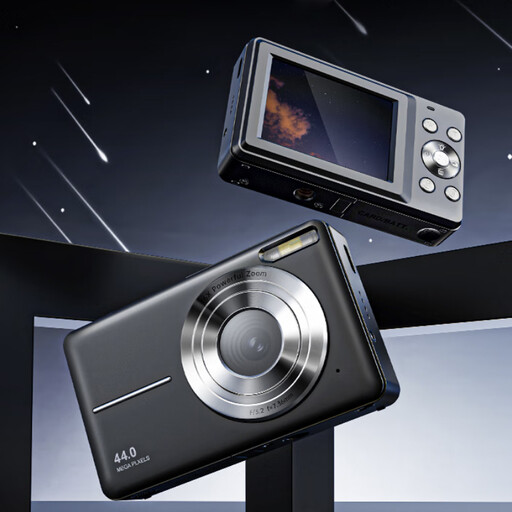 No image available
The product title mentions photography; check whether the camera offers the framing and level of detail you want for your cupcake photos.
The title lists 16× digital zoom. The product description mentions autofocus.
 No image available
According to the product description, the kit includes a 16-50mm zoom lens for a variety of compositions; check whether the lens can handle the close-ups you want.
The description lists an APS-C sensor and Product Showcase Setting, which shifts focus from a face to an object. According to the kit description, an SD card and adapter/charger are not included.
Not for every cupcake photo. Compare your preferred framing with the maximum magnification of the exact kit lens; the separate 1:1 lenses mentioned here offer greater magnification for very small details. Also check that there’s enough room in front of the lens for lighting.
Take test shots using the same lighting set-up and check the white balance before photographing several designs. RAW files can give you more scope to adjust white balance afterwards, but they can’t prevent changes to your lighting set-up from affecting how the colours look.
Check that the lens mount is compatible and that your chosen kit actually includes the lens mentioned. For cleaning and safe use, refer to the camera and lens manuals; the recommended approach can vary by model.
According to the Dutch government, the retailer must provide a solution if a product is faulty. The Netherlands does not have a fixed statutory warranty period of two years; what you can expect from a product depends on factors including the product, its price and how it is used. This consumer information does not establish which rights apply to a purchase made on behalf of a business.