
Overhead filming creator
Mostly films hands, crochet hook and stitches on a table, and needs to position the light outside the camera frame.


If you mainly film your hands and crochet from above, start with continuous lighting that you can position beside or above your work surface and soften if needed. A panel may suit a compact or adjustable setup; a COB light with a softbox needs space for both the light and modifier, while a ring light won’t automatically eliminate shadows cast by moving hands on your work surface. Record a test clip to check shadows, yarn colours and any flicker with your camera setup.
Mostly films hands, crochet hook and stitches on a table, and needs to position the light outside the camera frame.
Shows the differences between yarn colours and wants to keep the lighting settings and camera white balance consistent from one recording to the next.
Needs to fit lighting and a camera around a desk, and is comparing a desk clamp with freestanding stands.
Choose based on what needs to stay visible on screen: clearly defined stitches, recognisable yarn colours, a suitable mounting position, or footage without distracting banding or noise.
A good fit if: you’re filming your hands and yarn and can position the panel beside or above your work.
Bear in mind: a desk mount needs to fit your table; a kit with stands takes up floor and setup space.
A good fit if: you have room to set up the light and modifier around your work surface.
Bear in mind: check whether a softbox and suitable mount are included with the version you choose.
A good fit if: your face is centred in the frame and you want to position a light around the camera.
Bear in mind: a front-facing ring light won’t necessarily eliminate shadows cast by moving hands on a work surface.
| Consideration | What should you check? | Who is this for? |
|---|---|---|
| Seeing the stitches | Can you direct the light at your work from outside the frame? Check the shadows in a test clip, using a diffuser or suitable softbox. | If I want to show stitches while my hands are moving, I need to be able to move the shadows away from the crochet. Around 33% of consumers say seeing the stitches is their top priority. |
| Yarn colour | Check the adjustable colour temperature and stated colour rendering for the exact model; test your yarn with the camera and set the white balance. | Anyone showing different yarn colours wants them to remain recognisable across successive recordings. Around 27% of consumers prioritise colour rendering. |
| Space and mounting | Check the table thickness, mounting height, camera framing and whether the version includes a desk clamp or stand. | If my workspace is small, I want to fit the light and camera around the same table without the mount appearing in shot. Around 20% of consumers choose mainly based on the space available for setup. |
| Picture and sound | Record a short test video using your usual brightness and camera settings; look for banding and check how the light sounds through the microphone from recording distance. | When recording a tutorial, I don’t want visible banding or light noise drowning out my explanations. Around 20% of consumers say uninterrupted recording is their top priority. |
A light output figure measured with a reflector doesn’t automatically tell you what to expect with a softbox, at a different distance or in a different position.
First, assess the light position and shadows in a test setup. Only compare light readings when the measurement distance and accessory used are the same.
A suitable modifier or mount may be needed for a softened lighting setup; check whether it’s included with the version you choose.
Colour temperature and stated colour rendering describe the light, but don’t on their own determine how the camera, white balance and ambient light combine to show yarn colours.
Record a test clip of your yarn under the final lighting conditions and keep your camera settings consistent.
The versions we looked at differ in the parts supplied, power requirements and space needed.
Check the table edge, mounting height, camera framing, power supply and what’s included with the exact version.
A suitable adapter, modifier or mount may need to be purchased separately, depending on the version.
NEEWER describes the NL660 as a bi-colour LED panel; the two-light kit mentioned is intended for setups where you want to light the whole work table.
Elgato describes the Key Light Air MK.2 as an adjustable panel with a desk mount for a compact filming space.
amaran describes the 100x S as a bi-colour COB light with a Bowens mount for use with a separate modifier.
Godox describes the SL60IIBi as a bi-colour studio light for a COB setup with a modifier.
SmallRig describes the RC 60B as a compact, portable COB light for setups that are moved regularly.
These Joybuy product picks are relevant to video lighting for crochet tutorials. Compare the mounting, lighting settings and included parts with your workspace and camera setup.
 No image available
This portable light may suit a camera setup where you want a compact mounting option.
The description lists 2500–9000 K, a built-in 3100 mAh battery and CRI 95+/TLCI 96+.
The description lists 1/4-inch mounting points and a cold shoe adapter; check they’re compatible with your mount.
 No image available
This ring light with stand may suit a setup where you want to position a light around the camera; record a test clip to see how your hands and stitches appear on screen.
The product description lists three colour temperatures, ten brightness levels, a phone holder and a 63-inch stand.
 No image available
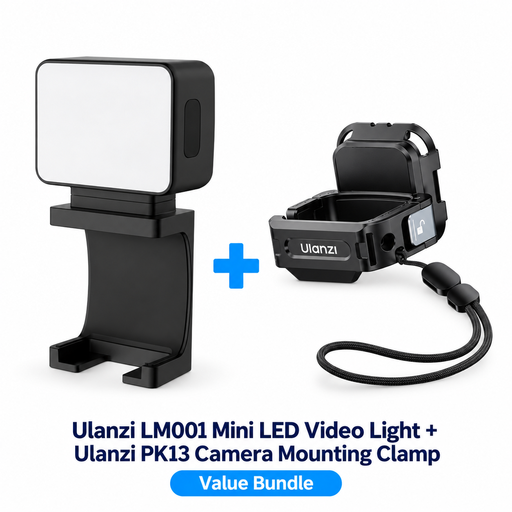
The product title lists a light and mounting clamp for the DJI Osmo Pocket 3; check that this combination suits your camera setup.
 No image available
This portable COB light may suit a setup where you want to position a separate light source around your work surface.
The product name lists 60 W, a built-in 59 Wh battery and bi-colour light from 2700–6500 K.
According to the description, activating the battery requires a 60 W PD charger with 20 V/3 A and the supplied USB-C to USB-C cable.
 No image available
This compact model may suit a setup where you want to attach a small light to your camera; check that the mounting position directs the light onto your crochet.
The product name lists a 2000 mAh battery and a magnet on the back. The description mentions RGB and an adjustable colour temperature of 2500–9500 K.
The safety instructions specify a standard 5 V adapter and warn against use in damp conditions.
If you mainly film from above, first direct adjustable light onto your work and check the shadows cast by your moving hands in a test clip. Benel Europe describes ring lights mainly as a way to light faces evenly; that’s a different consideration from being able to see stitches on a table.
Test the light at the brightness you actually use and check your camera’s shutter speed or anti-flicker function. For areas with a 50 Hz mains frequency, Sony lists 1/50 or 1/100 second as possible settings to reduce the effect; check which settings your camera supports.
It depends on the exact version. For the 100x S, amaran lists a reflector and mains power supply, but no softbox; for the two-light kit we looked at, NEEWER lists diffusers and stands. Elgato states that a suitable adapter for maximum light output isn’t included with the Key Light Air MK.2. Check the box contents and power requirements of the model you’re considering.
For electrical equipment within the voltage limits of the EU Low Voltage Directive, the relevant obligations apply to manufacturers and importers; EUR-Lex explains the scope of the directive. Your Europe explains that a CE mark is not a certificate issued by a central EU body. For consumer purchases in the Netherlands, the legal guarantee covers what you could reasonably expect from the product, as ACM ConsuWijzer explains. For distance purchases, the Dutch government lists a 14-day cooling-off period in many cases; exceptions may apply.