What should you look for when choosing?
Start with the provider and the match. Only then decide whether to use your current TV, cast to it or get a separate device.
| What to consider |
What should you check? |
Who should give this more weight? |
| Access to the match |
Look up the specific match with the provider for the Netherlands. The International Cricket Council lists ICC.tv coverage by match and region. |
As the organiser, I want to know where to stream this particular match in the Netherlands before the evening. Around 36% of consumers say access to the right live match is their top priority. |
| Connection during the match |
Check the network options available and test the stream where everyone will be watching. Google lists Ethernet for the Google TV Streamer; Apple lists Gigabit Ethernet for the 128 GB version of the Apple TV 4K (3rd generation). |
If I’m watching the stream with guests, I want to know in advance whether the connection works in that spot. Around 29% of consumers rank a stable connection above other purchasing concerns. |
| Using your existing TV |
Open the provider’s app or the actual live stream on your current TV or receiver. The Consumers’ Association explains streaming via compatible smart TV apps; NOS lists support for certain smart TVs and receivers. |
If my current TV can already play the match, I’d rather not buy another device. Around 21% of consumers say making the most of their existing TV is their top priority. |
| Controls and connections |
Check the remote control, an available HDMI port, power supply and what’s included in the box. Google says a certified HDMI 2.1 cable is required separately for the Google TV Streamer; Xiaomi lists an HDMI cable as included with the TV Box S (3rd Gen). |
For a viewing evening, I want to be able to start the stream from my seat without any hassle and have the connections ready in time. Around 14% of consumers say easy controls and all the necessary connections are their top priority. |
Joybuy product picks
These Joybuy picks focus on a setup with Google TV built in: TVs and a projector. Check in advance that the app or casting feature works on your chosen device for the specific match.
 No image available
METZ 55MNE8000Z 55-inch QD-Mini LED Google TV
Suited to anyone looking for a TV with Google TV and Google Cast built in. Check in advance that the match stream you need is available.
The product name lists a 55-inch screen, 4K HDR10+, 144 Hz and Google Cast.
View at Joybuy
 No image available
Yaber K2s projector with Google TV
Suited to anyone looking for a projection setup with Google TV built in for their gathering. Check that the device can play the match stream.
The product name lists native 1080p, 4K support, Wi-Fi 6, Bluetooth and JBL speakers. Don’t look directly into the lens while the projector is in use, and leave at least 30 cm of space around the ventilation openings.
View at Joybuy
 No image available
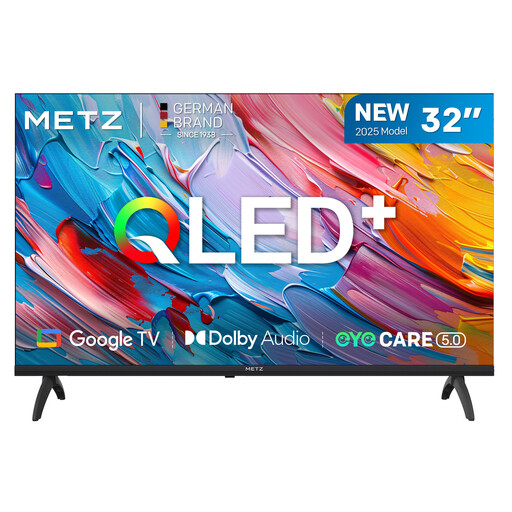
METZ 32MQF7000Z 32-inch QLED HD Google TV (2025)
Suited to anyone looking for a TV with Google TV built in rather than a separate streaming box. Test the actual match stream on the TV.
The product name lists a 32-inch QLED HD screen and Google TV.
View at Joybuy
Frequently asked questions
Can I watch every cricket match on NOS or ICC.tv?
No, that isn’t necessarily the case. The International Cricket Council named NOS as the Dutch rights holder for the 2026 Men’s T20 World Cup; that tournament has ended, and the listing says nothing about other competitions. ICC.tv lists coverage by region and match, and warns that geographical restrictions apply. Check the specific match with the current provider.
Do I need to buy a streaming box if I already have a smart TV?
Not if the match stream works on your current TV or receiver. NOS lists NOS Live support for certain smart TVs and receivers. Check the app and start the actual stream on your device before buying anything new.
What can I test before the viewing evening?
Connect the device to a free HDMI port, check the power supply and internet connection, then start the match stream on the screen you plan to use. When casting, the International Cricket Council’s instructions say that the source device and receiver must be on the same Wi-Fi network; also check whether the cast button appears on the stream.
What extra costs and warranty rights should I check?
Check whether an HDMI cable is included and whether the provider requires a subscription for the match. ACM ConsuWijzer explains that the statutory guarantee in the Netherlands doesn’t have a fixed term of exactly two years; what you can expect from a product depends, among other things, on the product and how it is used.
Can I use a free cricket stream or IPTV source without checking?
A streaming device doesn’t grant broadcasting rights. Choose a provider that is authorised to show the match in the Netherlands. The Dutch government states that downloading from an illegal source is prohibited and that protected work must not be distributed without permission. Whether additional permission is needed for a gathering outside the private sphere depends on the circumstances and should be checked separately.


