Choose a desktop that works with your word processor and the displays you want to use. Cross-references in Word and LibreOffice Writer are document features, so they don’t in themselves require a powerful graphics computer. A mini desktop takes up little desk space, while an SFF desktop may appeal if connectivity or expandability matters to you. Check the specifications of each configuration to see which displays, input devices and software you already have or still need.
Who is this buying guide for?
Writers working on a booklet that’s often revised
You regularly move steps and images around, and want to be able to update references and the table of contents. Microsoft Support and LibreOffice Help describe cross-references as document features; LibreOffice Help also explains how to use heading styles for a table of contents.
Makers with lots of instructional photos
You view photos alongside the text, so you’ll want to consider the screen space available, display connections and enough storage for your files. Lenovo says the ThinkCentre Neo 50s Gen 6 configuration supports two independent displays.
Makers with limited desk space
You want a dedicated place to write without a large computer tower, so you’re comparing mini and SFF desktops. Also check which displays and input devices you still need to connect; Lenovo says the ThinkCentre configuration reviewed doesn’t include a keyboard or mouse.
What should you look for when choosing?
First decide which word processor and display setup you want to use. Then compare the case, connections and included equipment for the specific configuration.
The table groups consumers by the need that matters most when choosing a desktop for this writing setup.
| What to consider |
What should you look for? |
Who should give this extra thought? |
| References and document structure |
Check whether the word processor supports cross-references to headings and captions, and how to update references and the table of contents. |
If you rearrange chapters, steps or images, you’ll want to update references carefully. Around 36% of consumers make this their top priority when choosing a desktop. |
| Photos alongside the text |
Check how many independent displays the specific configuration supports, and whether the displays and cables you need are available. |
A suitable display setup is important if you want to view instructional photos alongside your text. Around 29% of consumers give this the highest priority. |
| Compact setup |
Compare the dimensions and connections of the mini or SFF desktop, and check the supplier’s placement requirements. |
If you have limited desk space, you’ll want a dedicated workspace with a compact computer case. This is the main priority for around 21% of consumers. |
| Complete writing setup |
Check what’s included with each configuration, including the word processor and equipment such as a display, keyboard and mouse. |
If you want to know what you’ll need to create the booklet, consider the whole writing setup rather than just the computer. Around 14% of consumers make completeness their top priority. |
Pitfalls to avoid
-
Choosing a fast processor before testing your document workflow
Cross-references are features in Word and LibreOffice Writer. For this task, how you structure the document and update references are important considerations.
First, create a sample chapter with an image, caption and cross-reference in the word processor you plan to use. Check how the reference behaves when you move sections around.
-
Assuming the computer is a complete workstation
For the Lenovo ThinkCentre Neo 50s Gen 6 configuration reviewed, Lenovo says a keyboard and mouse aren’t included. Other configurations may differ.
Before choosing, check what you already have and which equipment and software you still need for the specific configuration.
-
Assuming Windows 10 is still supported
Microsoft lists 14 October 2025 as the end of regular support for Windows 10 Home and Pro. That date has passed.
If you’re looking at an older or refurbished desktop, check the exact Windows edition, its current support status and whether there’s a suitable upgrade option.
Brands to compare
Apple
The Mac mini M6 is a compact option for a macOS setup with displays of your choice.
- Apple lists 16 GB of unified memory and a 256 GB SSD for the base model.
- These specifications don’t prove that it offers an advantage for writing booklets. Check that your word processor and any shared file formats suit the way you work.
Lenovo
The ThinkCentre Neo 50s Gen 6 is a compact Windows 11 Pro desktop in the configuration reviewed.
- For configuration 13DMCTO1WWNL2, Lenovo lists 16 GB RAM, a 512 GB SSD and support for two independent displays.
- A keyboard and mouse are listed as not included with this configuration. Check the specifications of the version you’re considering.
HP
The ProDesk 4 SFF G1i is an SFF desktop worth comparing if you’re considering Windows and expandability.
- For version 9H7T5ET#ABH, HP lists Windows 11 Pro, 16 GB RAM and a 512 GB SSD, and describes modular options and multiple USB ports.
- Check the ports and expansion options on the specific version; features of one configuration don’t automatically apply to other variants.
Dell
The Dell Pro Slim is a compact desktop range to consider alongside other workstation options.
- For model QCS1250, Dell lists Windows 11 Pro and expansion options, including up to three PCIe slots.
- These are features stated by Dell; check which options are available with the specific version.
Joybuy products
This selection includes mini PCs and desktops for a compact writing setup, a Windows setup or viewing text and photos across multiple displays.
 No image available
Apple Mac mini M6, 24 GB, 512 GB SSD
A compact macOS option if you want to view text and instructional photos across multiple external displays.
24 GB memory and a 512 GB SSD. The product description states that it supports up to three external displays.
View at Joybuy
 No image available
FIREBAT R3 Mini PC, AMD Ryzen 5 7430U
A mini PC for anyone looking for a compact, dedicated writing setup and wanting to view text and photos across multiple displays.
16 GB RAM and a 512 GB SSD. The product title states that it supports 4K output for three displays.
View at Joybuy
 No image available
Dell Pro QCS1250, Intel Core Ultra 5 235
A compact Windows desktop for anyone who wants to check for a dedicated display connection for their preferred setup.
Windows 11 Pro, 16 GB RAM and a 512 GB SSD. The specifications list DisplayPort and HDMI. The description states that the charger must be purchased separately.
View at Joybuy
 No image available
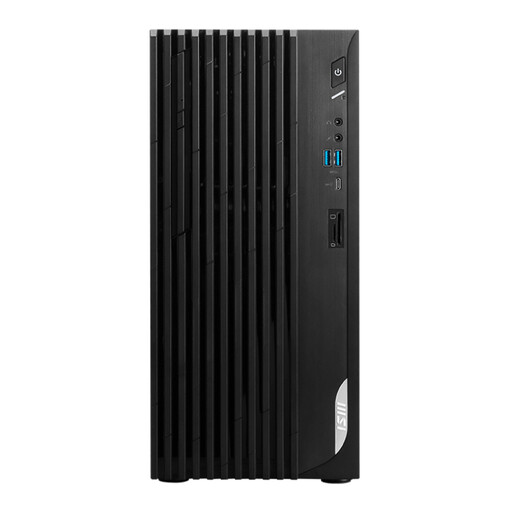
MSI PRO DP180 14A-824EU, Intel Core i5-14400
A Windows desktop to consider if you’re looking for a dedicated workstation with display connections.
Windows 11 Home, 8 GB DDR4 memory and a 512 GB SSD. The product description mentions HDMI and DisplayPort.
View at Joybuy
 No image available
Lenovo Yoga AIO 27IAH10, 27-inch QHD
An all-in-one to consider if you want to view text and instructional photos on a single integrated display.
The product features a 27-inch QHD display with a 120 Hz refresh rate, Windows 11 Home, 16 GB memory and a 1 TB SSD. The description says a wireless keyboard and mouse are included.
View at Joybuy
Frequently asked questions
Do you need a powerful graphics card for cross-references?
No. Cross-references in Word and LibreOffice Writer are document features and don’t in themselves require a powerful graphics card. Assess any higher graphics requirements separately if you also plan to use specific image-editing software.
How can you avoid outdated references before sharing or printing your booklet?
Use headings and captions as targets, then update the reference fields and table of contents, and check the result. LibreOffice Help explains how to use F9 to update cross-references; Microsoft Support describes cross-references as fields that can be updated after changes.
What can you do if your desktop develops a fault soon after you buy it?
For a consumer purchase in the Netherlands, you have a legal guarantee as well as any manufacturer’s warranty. According to ACM ConsuWijzer, the seller must offer an appropriate free solution if a product breaks under normal use sooner than you could reasonably expect. The legal guarantee isn’t simply the same as the manufacturer’s warranty period.
Can you return a desktop bought online?
According to ACM ConsuWijzer, online consumer purchases often come with a 14-day cooling-off period from delivery, but there are exceptions. Check the terms that apply to your specific purchase.


