
Vandaag of morgen in huis

Kwaliteit gegarandeerd

Welkomstaanbiedingen ontgrendelen: GRATIS bezorging | Tot 80% korting | Gratis 30 dagen JoyPlus-proefperiode
Download de app
A powerful processor demands effective cooling. More and more PC builders and gamers are opting for CPU water cooling, also known as an AIO (All-in-One) cooler. However, the market is flooded with models vying for attention with bright RGB lighting and impressive specs. This makes it difficult to choose a model that truly fits your system and budget. Many buyers fall into marketing traps and end up with a cooler that's too loud, too large, or simply unsuitable.
As a Joybuy Product Recommendation Officer, I'm here to help you make the right choices. We'll look past the marketing hype and focus on the specs that truly matter. These are the most common pitfalls and how to avoid them.
360mm water cooler is automatically better than a 240mm AIO. While a larger radiator does have more cooling surface area, it's not always necessary. For most gaming CPUs, a 240mm model is more than sufficient. A 360mm model is often more expensive and won't fit in many PC cases, leading to unexpected compatibility issues.RGB CPU cooler can look fantastic, but lighting effects say nothing about cooling performance. Some manufacturers cut corners on the quality of the pump or fans, compensating with an over-the-top light show. The result is a system that may look good but is noisy under load or fails to keep the processor cool enough.processor cooler that doesn't fit your motherboard. Modern processors use specific sockets, like LGA 1700 for Intel and AM5 for AMD. Always check that the cooler you're considering explicitly supports your AM5 cooler or LGA 1700 cooler socket.To avoid a bad purchase, focus on three technical aspects. These determine the performance, noise level, and lifespan of your water cooling PC.
The radiator is the component that dissipates heat from the liquid into the air. Its size is determined by the fans that fit on it.
240mm AIO offers an excellent balance between cooling performance and compatibility. It fits in most mid-tower cases and is powerful enough for most Intel Core i5/i7 and AMD Ryzen 5/7 processors, even with mild overclocking.This is a simple but crucial check. A CPU water cooler is attached to the motherboard with a mounting bracket. This bracket must fit the holes around the processor socket perfectly.
Always check the product page for the list of supported sockets. An AM5 cooler is not automatically compatible with an Intel system, and vice versa, unless the manufacturer includes the right brackets.
The performance of an AIO cooler depends on its pump and fans.
Corsair water cooling and MSI water cooling often develop their own pump technologies for a better balance between performance and noise.Based on these criteria, we have selected a few models that suit different user profiles.
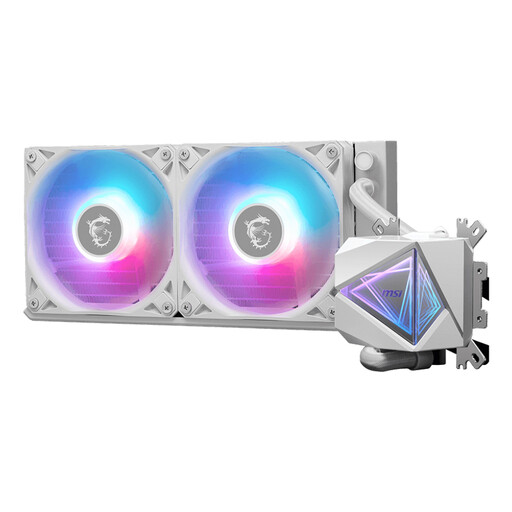
Why This Fits Their Persona: This is an excellent all-rounder for most gaming PCs. The 240mm radiator provides more than enough cooling for mid- to high-end processors without the premium price tag. The white finish and subtle RGB make it a stylish choice that fits well in many builds.
This model prevents you from overpaying for an unnecessarily large 360mm cooler. It delivers solid performance perfectly tuned for the most common gaming CPUs.
Broad socket compatibility (including LGA 1700 and AM5) and a low noise level of just 20 dB, as specified by MSI.
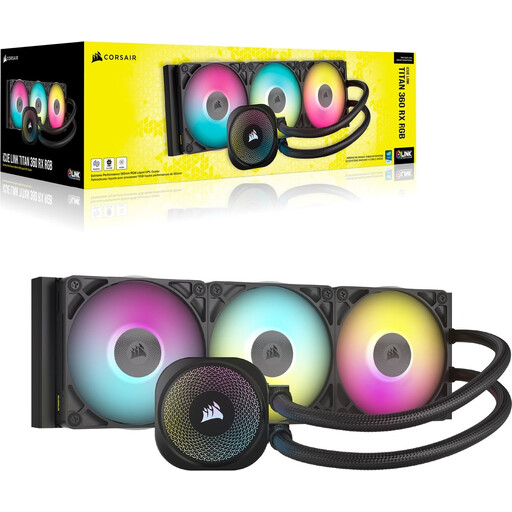
Why This Fits Their Persona: For those who want to get the most out of a high-end CPU. The 360mm radiator and RX-series fans are designed for maximum heat dissipation, ideal for overclocking and prolonged, heavy tasks like 4K gaming or video editing.
This is a deliberate choice for "bigger," where the size is justified by specs focused on pure performance. It's not a blind purchase, but an investment in cooling capacity.
According to Corsair, this model features a high-performance three-phase pump and pre-applied XTM70 thermal paste for optimal thermal efficiency.
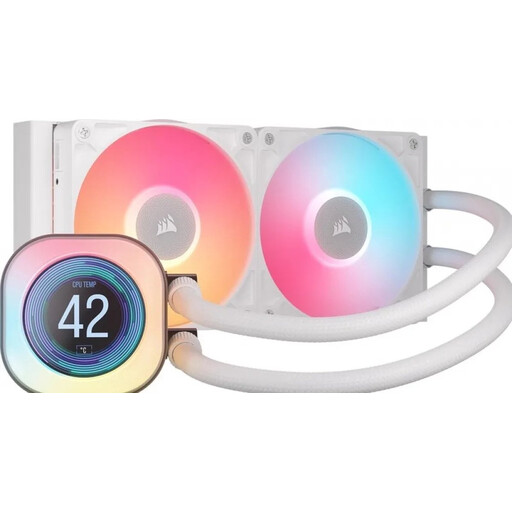
Why This Fits Their Persona: For those who want to turn their PC into a visual showpiece. The combination of a sleek white finish, powerful RGB fans, and a customisable LCD screen on the pump head makes this a unique eye-catcher.
This model sidesteps the "RGB over performance" trap by combining a unique visual feature (the LCD screen) with Corsair's proven cooling technology. It's more than just lights.
The 2.1-inch LCD screen can display system temperatures, GIFs, or other images, and is fully customisable via Corsair's iCUE software.
We have compiled a complete, up-to-date list of products that fully meet these strict selection criteria.
An AIO cooler is a closed-loop system and has a limited lifespan. The pump is usually the first component to wear out. The average lifespan of a pump is between 5 and 7 years. Additionally, over a long period (many years), a very small amount of liquid can permeate through the tubing material, which can slowly reduce performance. The warranty period, often 3 to 6 years, is a good indicator of the manufacturer's confidence in the product.
Modern AIO coolers are designed for a relatively simple installation. The process is often similar to mounting a large air cooler. The biggest challenge is finding a suitable spot for the radiator in your PC case. Always check your case's specifications beforehand to see if there is space for a 240mm or 360mm radiator at the top, front, or rear.
That depends. The noise from an AIO comes from two sources: the pump and the fans on the radiator. At idle, a good AIO can be quieter than an air cooler because its fans can run at a very low speed. Under heavy load, the fans have to work harder, which produces noise. However, many users find this sound profile more pleasant than the high-pitched whine of a small fan on an air cooler running at maximum speed. With PWM control, you can use your motherboard to find a balance between cooling and silence.
