
Vandaag of morgen in huis

Kwaliteit gegarandeerd

Welkomstaanbiedingen ontgrendelen: GRATIS bezorging | Tot 80% korting | Gratis 30 dagen JoyPlus-proefperiode
Download de app
Modern processors are becoming increasingly powerful, but they also produce more heat. A standard stock cooler is often no longer sufficient, especially for gamers and PC builders who want to get the most out of their system. A CPU water cooler, also known as an AIO (All-in-One) cooler, is the logical next step. However, the market is flooded with options, and it's easy to fall into common traps.
As a Joybuy Product Recommendation Officer, I'll help you cut through the marketing jargon. This guide focuses on the objective specifications that truly matter, so you can choose a cooler that performs, fits, and is reliable, without wasting money on superfluous features.
Before we get to the recommendations, it's important to recognise the most common mistakes. Many buyers focus on the wrong things and end up with a product that doesn't meet their expectations.
To avoid these pitfalls, you should focus on a few technical specifications that determine the performance and reliability of an all-in-one cooler.
The radiator is where the heat generated by the processor is dissipated. The choice depends on your processor and case.
An AIO is a closed-loop system; the pump and fans must work well together.
Always check that the cooler explicitly supports your motherboard's socket, such as AMD AM5 or Intel LGA 1700 / LGA 1851. Look for models with a sturdy and clearly described mounting system. This ensures even pressure distribution and prevents installation issues.
Below are some recommendations, linked to specific user profiles. This selection is based on objective specifications and how they align with practical needs.
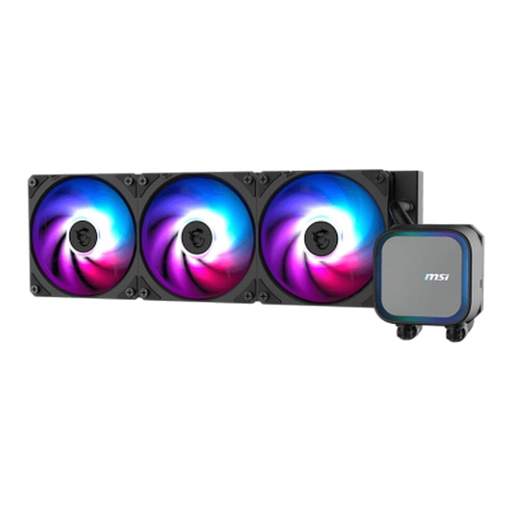
Why This Fits Their Persona: This user wants maximum cooling performance for a demanding CPU, without distractions. Ideal for overclocking and prolonged, heavy gaming sessions where reliability and temperature control are paramount.
This model focuses on the core essentials: a powerful pump with a speed of up to 3800 RPM and a full copper base. It avoids the RGB gimmick trap by prioritising performance above all else.
High pump speed for excellent flow rate; 360mm radiator for maximum cooling surface area; robust design focused on durability.
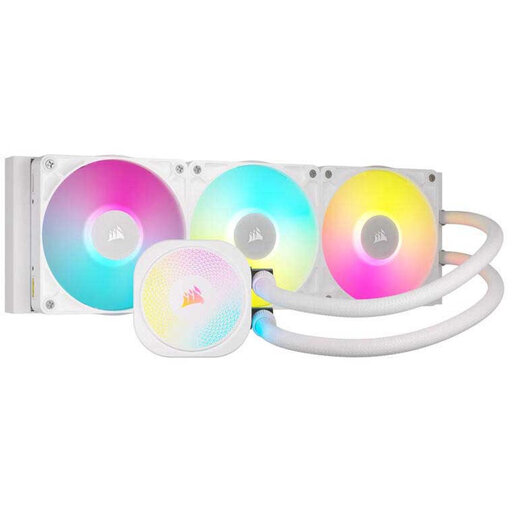
Why This Fits Their Persona: Perfect for those who want to build a visually stunning PC with a clean, white theme and extensive, synchronisable RGB lighting, without compromising on cooling power.
Corsair's iCUE LINK ecosystem seamlessly integrates lighting and performance management. This isn't a gimmick, but a mature platform that combines aesthetics and functionality.
Superior RGB customisation and synchronisation via iCUE; clean white finish; AirGuide technology for focused airflow.
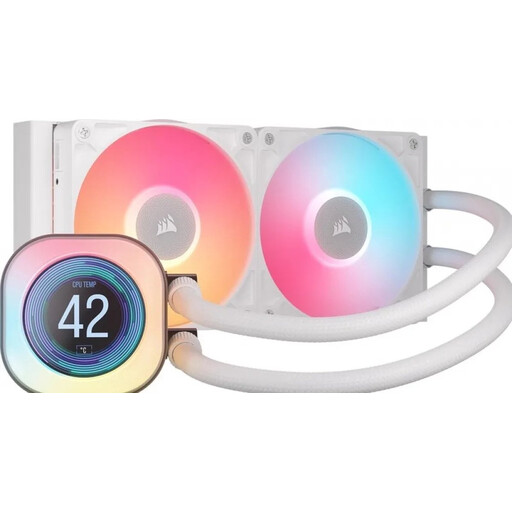
Why This Fits Their Persona: Ideal for builds in a mid-tower or other compact case where a 360mm radiator won't fit, but a powerful CPU still needs to be cooled. The LCD screen is a premium bonus.
This model debunks the "bigger is better" myth. It delivers excellent cooling performance in a 240mm form factor and adds a functional LCD screen for system info, proving that a smaller size doesn't mean lower quality.
Compact 240mm size with high compatibility; LCD screen for real-time data or animations; efficient RX fans with high static pressure.
We have compiled a complete, up-to-date list of products that fully meet these strict selection criteria and local regulations.
A modern AIO cooler from a reputable brand has an average lifespan of 5 to 7 years. The most common point of failure is the pump. The warranty period, which is often 5 years or longer for premium models, is a good indicator of the expected lifespan. Do not check the fluid levels yourself; the systems are designed to be maintenance-free.
Yes, in most cases, a high-quality 240mm water cooler is more than sufficient for popular gaming CPUs like the AMD Ryzen 7 or Intel Core i7 series. It provides an excellent balance of cooling performance, noise level, and compatibility with most PC cases. Only for the absolute top-tier models that are heavily overclocked is a 360mm model worth considering.
The risk of leakage with a modern AIO is extremely low. These systems are factory-sealed and extensively tested. Most problems arise from improper installation, such as bending the tubes too tightly or damaging them during assembly. Follow the manual carefully and handle the cooler with care to minimise risks.
