
Vandaag of morgen in huis

Kwaliteit gegarandeerd

Welkomstaanbiedingen ontgrendelen: GRATIS bezorging | Tot 80% korting | Gratis 30 dagen JoyPlus-proefperiode
Download de app
A powerful processor is the heart of your PC, but without effective cooling, its full potential can never be unleashed. Overheating leads to lower performance (thermal throttling) and can even damage your components in the long run. CPU water cooling, particularly an all-in-one (AIO) cooler, is a popular choice for gamers and PC builders who want both performance and sleek aesthetics.
But the market is flooded with options, and marketing hype makes it difficult to make a wise choice. Many buyers fall into the same traps: they purchase an impressive-looking cooler that doesn't fit their case, or they pay a premium for flashy lights while the cooling performance lags behind.
As a Joybuy Product Recommendation Officer, I'll help you cut through the noise. This isn't a list of the "best" coolers, but a practical guide to finding the right AIO cooler for your specific needs, based on objective specifications.
Before we look at products, let's first discuss the most common purchasing errors. By recognizing them, you'll save yourself money and frustration.
To make the right choice, focus on the specifications that truly matter. These are the three most important factors for a processor cooler.
The size of the radiator largely determines the cooling capacity. It's a trade-off between performance and compatibility.
Always check your case's specifications before choosing a radiator size.
This is a simple but crucial check. A cooler's product page must clearly state which sockets are supported. For a modern build, look for:
Most top-tier brands, such as Corsair water cooling and MSI water cooling, include mounting kits for the most common sockets by default.
Look past the marketing and focus on the numbers that determine performance:
Below are some popular choices, matched with different user types. We explain why a specific model is a good match and how it avoids the pitfalls mentioned earlier.
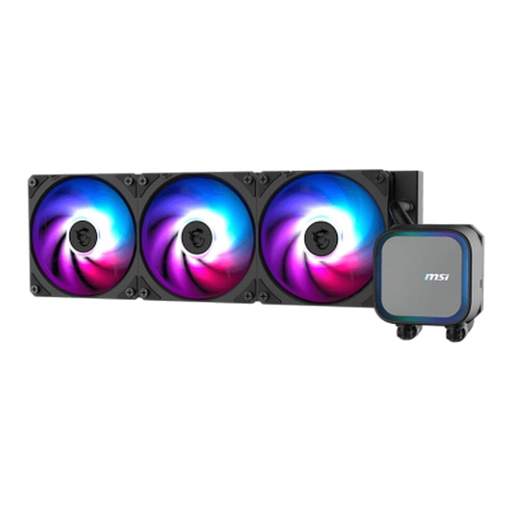
Why This Fits Their Persona: This user wants maximum cooling capacity for a high-end CPU (i9/Ryzen 9) and plans to overclock. The 360mm radiator provides the surface area needed to keep the highest temperatures under control.
While it has ARGB, the focus is on performance with a pump speed up to 3800 RPM and a full copper base. Compatibility with AM5 and LGA 1700/1851 is clearly specified, preventing socket confusion.
Large 360mm radiator surface area for maximum heat dissipation. According to MSI, the CycloBlade 7 fan provides powerful airflow at low noise levels.
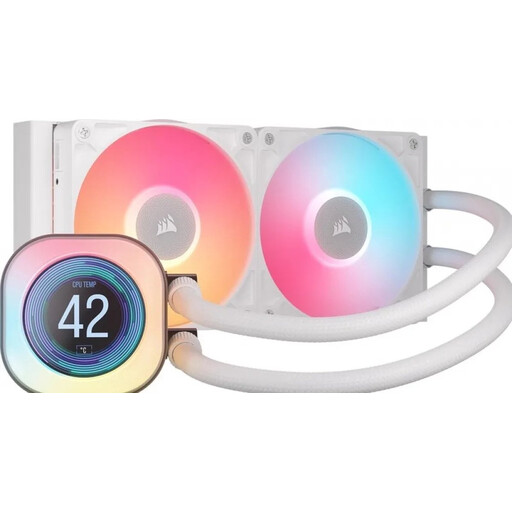
Why This Fits Their Persona: For those who build a PC that looks as good as it performs. The clean white finish and customizable LCD screen on the pump make this a centerpiece of the build, without compromising on cooling power.
This isn't a case of being "blinded by RGB." The LCD screen is functional, displaying system information. The 240mm radiator is a practical choice that fits in many popular cases. Corsair clearly specifies support for LGA 1700/1851 and AM5.
The 2.1-inch LCD screen for displaying temperatures, GIFs, or images. Corsair's iCUE LINK system significantly simplifies cable management.
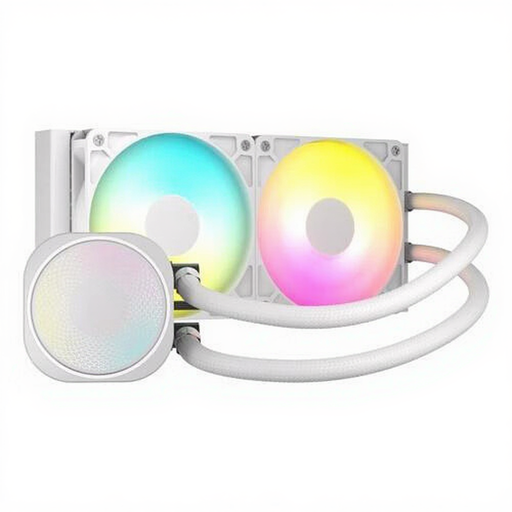
Why This Fits Their Persona: This gamer is looking for a noticeable upgrade from a stock air cooler and wants the clean look of an all-in-one water cooler without paying a premium. A good balance between price, performance, and aesthetics is essential.
The 240mm size is a safe and practical choice that avoids the "bigger is better" trap. The cooler combines ARGB lighting with solid specs, such as high static pressure (4.91 mmH2O), proving it's not just about looks.
Excellent price-to-performance ratio for a top-tier brand. The PWM support ensures quiet operation during daily use and effective cooling while gaming.
We have compiled a complete, up-to-date list of products that fully meet these strict selection criteria.
An AIO cooler is a closed-loop system and has a limited lifespan. Generally, you can expect a lifespan of 5 to 7 years. The pump is usually the first component to wear out. Another factor is permeation, where the coolant very slowly evaporates through the tubing. A longer warranty period, such as the 6 years Corsair offers on some models, can be an indication of expected durability.
Not necessarily. It depends on your processor and your usage. For most gaming CPUs that are not extremely overclocked, a quality 240mm water cooler is more than sufficient and fits in many more cases. A 360mm water cooler is primarily useful for the hottest high-end processors (like a Core i9 or Ryzen 9) or if you want to get the most out of your overclock and every degree counts.
Modern all-in-one water cooler systems are designed for a relatively simple installation. They are pre-filled and sealed, so you don't have to work with liquids yourself. The installation is similar to that of a large air cooler: you mount the pump onto the CPU and screw the radiator with its fans into your case. It is, however, important to follow the manual carefully and ensure all connections are secure.
