
Vandaag of morgen in huis

Kwaliteit gegarandeerd

Welkomstaanbiedingen ontgrendelen: GRATIS bezorging | Tot 80% korting | Gratis 30 dagen JoyPlus-proefperiode
Download de app
As a Joybuy Product Recommendation Officer, I see daily how PC builders and gamers struggle with choosing the right cooling solution. A powerful processor demands effective cooling, and a CPU water cooler often seems like the logical next step. But the market is flooded with marketing claims and technical specifications that confuse more than they clarify. The result? Money wasted on a cooler that doesn't fit, performs poorly, or becomes noisy after just a year.
Before you purchase a PC water cooling kit, it's crucial to understand the most common pitfalls. This will help you avoid a bad purchase.
To make a smart choice, focus on the specifications that truly matter. Don't get distracted by marketing jargon. Check these three points before buying an AIO water cooler.
The size of the radiator largely determines its cooling capacity. It's the most visible component of an all-in-one cooler.
A processor (CPU) is placed into a 'socket' on the motherboard. The cooler must have a mounting bracket that fits this specific socket. Modern platforms use specific sockets:
Always check the cooler's product page for the list of supported sockets. Making a purchase without verifying this is a recipe for frustration.
A good water cooler is not only powerful but also quiet. Two elements are crucial here:
Below are a few models that score well on the objective criteria mentioned above, tailored to specific user profiles.
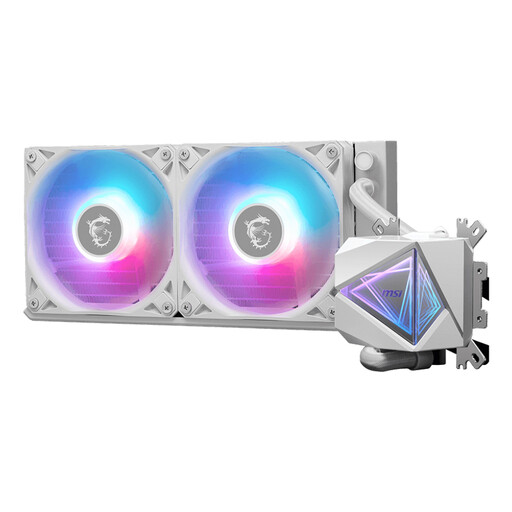
Why This Fits Their Persona: This user is looking for a no-nonsense solution that performs excellently without a premium price tag. The I240 is perfect for a standard gaming PC that needs to stay cool and relatively quiet during long sessions.
Its 240mm size fits in most cases, avoiding the 'Bigger is Better' trap. The broad socket support (including AM5 and LGA 1700) prevents compatibility issues.
Good balance between price and performance. According to MSI, the pump is designed for quiet operation (20 dB), and the PWM fans ensure efficient cooling when needed.
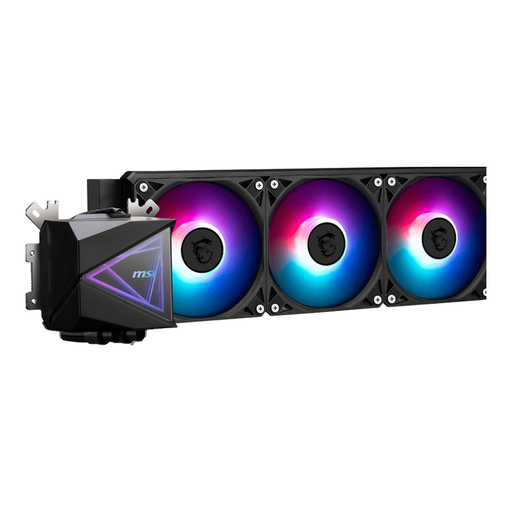
Why This Fits Their Persona: For the user who wants to overclock their high-end CPU and demands maximum performance. This 360mm cooler is built to dissipate large amounts of heat, which is essential for the most demanding processors.
This cooler focuses on pure cooling capacity. It's not a compromise; it's designed for maximum heat dissipation, thus avoiding the pitfall of under-cooling a powerful CPU.
360mm radiator for superior cooling. The three included fans and high maximum airflow (70.7 m?/h according to MSI) are focused on keeping CPU temperatures stable under heavy load.
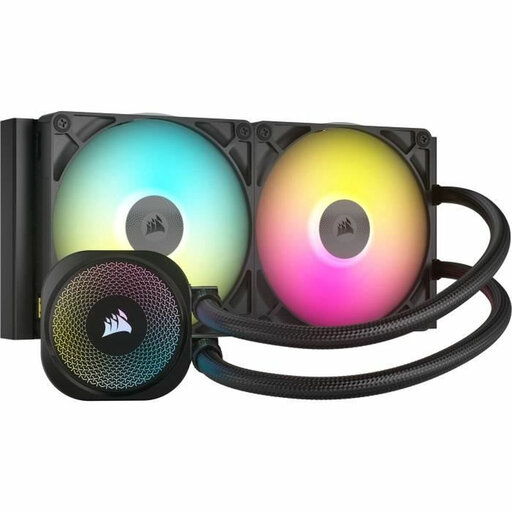
Why This Fits Their Persona: For the builder who wants to create a visual masterpiece. This cooler combines strong performance with an advanced RGB ecosystem and a sleek design. Ideal for show builds with a glass side panel.
This model avoids the 'blinded by RGB' trap. According to Corsair, the cooler is equipped with a high-performance pump and quiet fans, proving that aesthetics and performance can go hand in hand.
The iCUE LINK system simplifies cable management and seamlessly syncs lighting. The combination of a 280mm radiator and 140mm fans offers a great mix of cooling and lower noise levels.
Buying a good CPU water cooler is an important step. We have compiled a complete, up-to-date list of products that meet these strict selection criteria and local regulations.
No, one of the major advantages of an AIO (All-In-One) water cooler is that it's a closed-loop system. The liquid is factory-filled, and the tubes are sealed. This means you never have to refill liquid or worry about complex maintenance, unlike a custom water cooling loop. The only maintenance required is periodically cleaning the radiator and fans to remove dust.
The lifespan of an AIO is primarily determined by the pump. Most manufacturers provide a warranty of 3 to 6 years, which is a good indicator of its expected lifespan. On average, you can expect a quality AIO cooler to last 5 to 7 years before the pump starts to lose performance.
Not necessarily, but it often is under heavy load. A large air cooler can be quieter at low loads. However, when a high-end CPU is heavily stressed (e.g., during gaming or rendering), an air cooler has to run its fan at very high speeds, which produces a lot of noise. A good AIO water cooler with a large radiator can dissipate the same amount of heat more efficiently with fans running at a lower, quieter speed.
