
Housemates with a Nintendo Switch
Want to know whether their platform game supports one horizontal Joy-Con per player, or whether everyone needs a full-size controller. Nintendo says the supported play style can vary from game to game.


Start with your console or PC, then check whether the specific game supports local co-op and the controller layout you want. With compatible Switch games, separate Joy-Cons can be used by two players; a full-size controller has a different layout, while a wired controller is only practical if the cable route and your seating position work in your living room.
Want to know whether their platform game supports one horizontal Joy-Con per player, or whether everyone needs a full-size controller. Nintendo says the supported play style can vary from game to game.
Are looking for an extra full-size controller for their Xbox, PS5 or Switch and want to check first that it works with their system and game. Microsoft, Sony and Nintendo each describe support for their own platforms.
Want to use two controllers on one PC and need to consider game input, connections and a safe cable route. Valve notes that games may prioritise controllers differently depending on their input style.
First check the combination of system and game, then work out how many individual player slots you need, and finally choose the controls and connection that suit your living room.
| What to consider | What should you check? | Who is this important for? |
|---|---|---|
| System and game | Check support for your console or PC, the local multiplayer mode and the permitted controller layout. | If I want to play with others, I want to be sure both the system and the chosen game support the controller. For consumers who want to check this combination first, compatibility is the priority; around 33% say this is their main concern. |
| Number of players | Check how many local players the game supports and whether one horizontal Joy-Con per player works. Nintendo says that Bluetooth audio on Switch limits the number of connected wireless controllers to two. | Anyone planning to play with more people should check whether their existing controllers can be used separately and how many extra ones they need. Around 27% of consumers prioritise the number of player slots and sharing controllers. |
| Directional controls | Compare the button layout of the exact model. Nintendo says the Switch Pro Controller has a single D-pad; don’t assume this means it will be more comfortable to play with. | If I play platform games with lots of directional input, I focus mainly on the controller’s layout and grip. For consumers who prioritise controls over other choices, this is the main consideration; around 20% say this is their preference. |
| Cable, power and space | Measure the distance to your seat, check the cable route and see what connection or power supply the model needs. | A cable running across a walkway isn’t always suitable for a shared living room; wireless play, in turn, requires a suitable power supply. Around 20% of consumers prefer a practical set-up around the sofa. |
Nintendo says whether separate Joy-Cons can be used as horizontal controllers depends on the software and the supported play style.
Before buying, check the controller icons and local player mode for the specific game.
According to PowerA, the PowerA Wired Controller we looked at can only be used when the Switch is docked. It also doesn’t support features such as motion controls or HD rumble.
Check the exact model, the game features you need and whether the cable can run safely from the console to your seat.
There is no fixed statutory warranty period in the Netherlands. According to the Dutch government, the seller remains your point of contact for a faulty product; what you can reasonably expect depends on the product and the circumstances.
Keep your proof of purchase and consider what a paid-for extended warranty adds to your statutory rights.
With compatible Switch games, Joy-Cons can be used separately as controllers for individual players; the Switch Pro Controller is a full-size wireless controller.
The Xbox Wireless Controller is designed for compatible Xbox consoles and Windows PCs.
The DualSense is a full-size controller for PS5; Sony also lists compatibility with PC.
The Ultimate 2C Wired is a wired option for the platforms listed by 8BitDo.
The Wired Controller we looked at is a wired option for use with a docked Nintendo Switch.
This selection includes full-size wireless controllers for the consoles and PC platforms listed, modular or wired options, and Joy-Cons for Switch games that support separate player controls. Check that your chosen combination works with each model and game.
 No image available
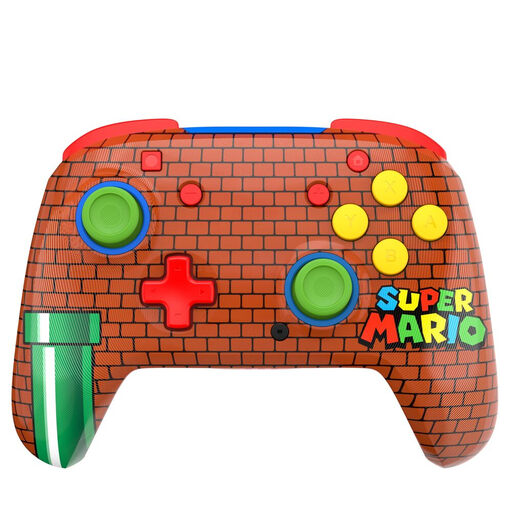
A full-size wireless controller for a Switch set-up; check that the selected game supports its controller layout.
The product name lists a 40-hour battery life and two programmable buttons on the back.
The product description lists compatibility with Nintendo Switch, Switch Lite, Switch OLED and Switch 2.
 No image available
A full-size wireless controller for a PS5 set-up; check the requirements of the local multiplayer game.
The product description lists Bluetooth, USB-C, a D-pad, sticks and action buttons.
 No image available
A full-size wireless controller for a compatible Xbox console or Windows PC; also check that the game supports it.
The product description lists a hybrid D-pad, remappable buttons and a USB-C connection.
 No image available
An option for anyone looking for different connection methods; check that the chosen connection is supported by your system and game.
The product description lists wired, wireless and Bluetooth connections, plus interchangeable joysticks, buttons and D-pads.
The product name lists PC, Nintendo Switch, Switch 2, Steam and Android.
 No image available
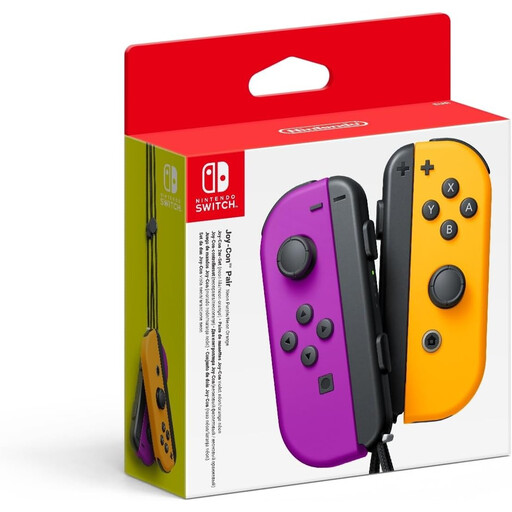
A pair of Joy-Cons for Switch games that support one horizontal Joy-Con per player.
The product description says the controllers can be used separately and that wrist straps are included.
Separate play is only supported in certain games. Separate Joy-Cons do not have the same dedicated D-pad as the Switch Pro Controller.
No. Nintendo says that using a Joy-Con separately as a horizontal controller depends on the game and the supported play style. Check the details for the specific game.
If Bluetooth audio is connected, Nintendo says that no more than two wireless controllers can be connected. Also consider the type of controller and the features you’re using.
No. PowerA says this model can only be used when the Switch is docked. Check the conditions for other models separately.
Contact the seller. According to the Dutch government, statutory guarantees are separate from manufacturer’s warranties, and the Netherlands has no fixed statutory warranty period. What you can expect from a product depends on the product and the circumstances.
For distance sales, a 14-day cooling-off period applies in many cases. Check whether your purchase counts as a distance sale and which exceptions apply.