First, choose a controller that works with your console and the specific game. On Switch 2, one pair of Joy-Con 2 can serve two players if the game supports separate Joy-Con held horizontally; if you’d rather use a full gamepad per player, check that the game supports this setup. In a dark room, lighting doesn’t necessarily mean the button labels will be easy to read. And if you’re using a wired controller, make sure the cable can be routed neatly from your sofa.
Who is this buying guide for?
Adding a place for another player
You first want to know whether the extra controller and the game work together on your system. Nintendo confirms that each Joy-Con 2 can be used horizontally as a separate controller; the game determines which setup is supported.
Finding the directional and action buttons
You want to weigh up the size and button layout of a single Joy-Con against those of a full gamepad. Microsoft describes the Xbox Wireless Controller as having a hybrid D-pad.
Playing in a dark room
You want to be able to identify your controller or player position without assuming that lighting also illuminates the button labels. PowerA describes lighting across the front of the Lumectra; Sony describes a player indicator for DualSense on PS5.
What should you look for?
First check the console, the game’s local multiplayer support and your preferred player setup. Then compare controls, visibility and power options.
| What to consider | What to look for | Who is this important for? |
|---|
| Compatibility and two players | Check the console, the number of local players and the controllers required for the specific game. | I want to make sure my console and platform game support the controller setup I’ve chosen before counting on a second player. Around 31% of consumers put compatibility first. |
| D-pad, buttons and size | Compare the button layout and size; if possible, hold the controller and check whether the game supports button remapping. | If I’m making lots of directional moves and jumps, I want the buttons to be easy to find and comfortable to use. Around 25% of consumers give controls and size top priority. |
| Visibility in the dark | Check which parts light up and whether you can distinguish the buttons easily; a player indicator is not the same as illuminated button labels. | In a dark room, I want to recognise my controller or player position without relying on unconfirmed button lighting. Around 19% of consumers put visibility first. |
| Room to move from the sofa | Measure the distance and route to the console, and check that a wired controller’s cable can be positioned practically. | I want to play from the sofa without a cable getting in the way. Around 13% of consumers give freedom of movement top priority. |
| Power and charging | Check how the controller is powered or charged and which charging accessories you’ll need. | I want to know whether the controller will be ready for my next gaming session and which power option suits it. Around 12% of consumers put power, charging and extra purchases first. |
Common buying mistakes
Assuming a controller set is the same as two full gamepads
Separate Joy-Con 2 held horizontally and a paired set used together are different control setups; the game determines which one will work.
Check which controllers the game requires and count players based on the setup you plan to use, not just the number of items in the box.
If the game or players require a full gamepad, you may need an extra controller.
Assuming RGB lighting means the buttons are illuminated
Lighting across the front doesn’t prove that the button labels will be easy to read in your dark room.
Check which parts of the controller light up, and whether the brightness and buttons work for you.
Choosing a wired controller without checking the game’s requirements
PowerA states that the Switch 2 Lumectra doesn’t support HD rumble or motion controls, and isn’t suitable for games that require Joy-Con only.
Compare the game’s controller requirements with the model’s features, and check that the cable can be routed neatly from the sofa.
For a game that requires Joy-Con only or a feature the controller lacks, you may need a different controller.
Thinking an extra warranty package replaces your statutory rights
According to the Dutch government, if a product is faulty, you’re entitled to a statutory guarantee and the seller must provide a solution.
Check what an additional package actually offers, and remember that it’s separate from your statutory rights.
Brands to consider
Nintendo
Makes Joy-Con 2 and the Switch 2 Pro Controller for use with Nintendo Switch 2.
- Nintendo confirms that each Joy-Con 2 can be used horizontally as a separate controller. The Switch 2 Pro Controller has a rechargeable battery.
- The game determines which controller setup works. Nintendo estimates the Pro Controller’s battery life at around 40 hours; actual use may vary. These controllers are for Switch 2 only.
Xbox
The Xbox Wireless Controller is a full gamepad for supported Xbox systems and Windows PCs.
- Microsoft describes wireless connectivity options and a hybrid D-pad.
- Microsoft based its stated battery-life test on AA batteries. For PC, also check whether the specific game supports local co-op with multiple controllers.
PlayStation
DualSense is a full controller for PS5 with a player indicator.
- Sony confirms that DualSense has a built-in rechargeable battery and that PS5 assigns a colour to each player.
- A player indicator doesn’t confirm that the button labels are illuminated. Haptic feedback and adaptive triggers depend on the game.
PowerA
The Advantage Wired Controller for Nintendo Switch 2 with Lumectra is a wired option with lighting across the front.
- PowerA describes lighting across the front of this controller.
- According to PowerA, it doesn’t support HD rumble, motion controls or amiibo. This model isn’t suitable for games that require Joy-Con only.
8BitDo
The Ultimate 2C Wireless is an option for PC users who can make use of this model’s connection options.
- For this model, 8BitDo specifies Windows via a 2.4GHz adapter or cable, and Android via Bluetooth.
- The stated play time is based on ideal laboratory conditions. These model specifications don’t automatically apply to other Ultimate variants.
Joybuy product picks
These Joybuy product picks include controllers for Switch 2 and Switch, Xbox and Windows PC setups, and PS5. For each model and game, check compatibility, player numbers and how easy it is to use in your dark room.
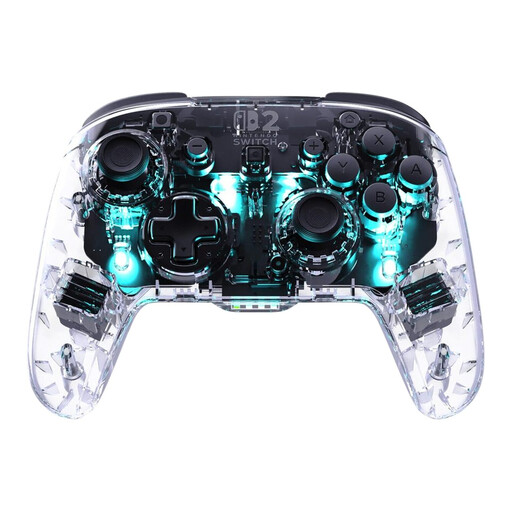 Image unavailable
Turtle Beach Afterglow Wave Wireless Controller – Switch 2, Switch, Switch Lite and Switch OLED
A wireless option for a Switch setup where RGB lighting is a priority; check that the specific game supports this controller.
The product name lists Bluetooth, TMR sticks, 40-hour battery life, four RGB modes and two programmable buttons.
 Image unavailable
Xbox Wireless Controller Robot White
A good fit if you’re looking for a wireless Xbox controller in Robot White; for PC, check whether your game supports local co-op with multiple controllers.
Colour: Robot White.
 Image unavailable
Sony PlayStation 5 DualSense Wireless Controller – white
For a PS5 setup with an extra controller; check whether the specific game supports local multiplayer.
Sony confirms that DualSense has a built-in rechargeable battery. Haptic feedback and adaptive triggers depend on the game.
 Image unavailable
Nintendo Switch 2 Official Pro Controller – black
For Switch 2 players who prefer a full controller; check that the game supports this controller.
For Nintendo Switch 2 only. Nintendo estimates the rechargeable battery will last around 40 hours, depending on use.
 Image unavailable
Nintendo Switch 2 Official Joy-Con 2 pair – light blue and light red
One pair can serve two players when the Joy-Con 2 are used horizontally and the Switch 2 game supports this setup.
For Switch 2 only. Check the number of controllers required and the permitted setup for each game.
Frequently asked questions
Can two players share one pair of Joy-Con 2?
Yes, if the Switch 2 game supports separate Joy-Con 2 held horizontally. Check the number of players and the controllers required for the specific game.
Why won’t my third wireless controller connect to Switch 2?
According to Nintendo, if a Bluetooth audio device is connected to Switch 2, no more than two wireless controllers can be synchronised at the same time. Check that connection before assuming an extra controller is faulty.
How do I get my controllers ready for the next gaming session?
Joy-Con 2 can be charged while attached to Switch 2, subject to the conditions described by Nintendo, or with a separately available Joy-Con 2 charging grip. You can charge and synchronise the Switch 2 Pro Controller using the included USB cable.
Does RGB lighting mean I can read the button labels?
Not necessarily. PowerA describes lighting across the front of the Lumectra, but doesn’t confirm that the button labels are individually illuminated.
What are my rights in the Netherlands when buying online or if a product is faulty?
According to the Dutch government, distance purchases are often covered by a 14-day cooling-off period, subject to statutory exceptions. If a product is faulty, you’re also entitled to a statutory guarantee; the seller must provide an appropriate solution. An additional warranty package doesn’t replace these statutory rights.


