
Vandaag of morgen in huis

Kwaliteit gegarandeerd

Welkomstaanbiedingen ontgrendelen: GRATIS bezorging | Tot 80% korting | Gratis 30 dagen JoyPlus-proefperiode
Download de app
A Corsair RGB case fan can improve your PC’s cooling performance while giving your case its own distinctive look. However, it is not wise to focus solely on the number of RGB LEDs or the maximum speed. The right choice depends on the space available, the type of cooling required and how you want to connect the fans.
A 120mm case fan and a 140mm case fan are not interchangeable. Many PC cases have mounting points for 120 mm fans, while some models also support 140 mm fans at the front or top. Always check your case manual or specifications first.
At a similar speed, a 140mm fan can move a great deal of air, but it also takes up more space. Watch out for potential clashes with RAM modules, motherboard heatsinks and radiator brackets.
Airflow, usually stated in CFM or m³/h, indicates how much air a fan can move under certain conditions. Static pressure, measured in mmH₂O, is particularly important when air needs to pass through a radiator, dust filter or restrictive ventilation grille.
For an open ventilation position in the case, airflow is often an important starting point. For a liquid-cooling radiator or CPU cooler, a radiator fan with sufficient static pressure is more suitable. A high CFM figure alone therefore does not give you the complete picture.
PWM and RGB use two different connections. PWM controls the fan speed through a 4-pin connection. RGB provides the lighting and can be controlled via a compatible controller, Corsair iCUE or a motherboard header.
With Corsair iCUE LINK models, the connection works differently from that of a standard PWM case fan. Check whether a System Hub, controller or specific cable is required. Otherwise, an attractive fan set may need additional connection hardware.
Do not look only at the diameter; also consider the clearance around the mounting position. In addition, check the airflow direction using the arrows on the frame. Usually, fans at the front and bottom draw air in, while models at the rear and top expel warm air.
A PWM case fan generally uses a 4-pin connection. This allows the motherboard or fan controller to adjust the speed according to the temperature. That is useful when you want a quiet PC fan during light use but need more cooling under heavy loads.
Pay attention to the stated speed range. For example, the product details for the Corsair models in this selection list ranges of 300 to 1700 RPM for some 140mm models and 400 to 2400 RPM for certain 120mm models. The maximum speed is not a constant operating speed: the actual speed depends on the configured fan curve.
Specifications such as 10 to 36 or 37 dB provide an indication at different speeds. A fan that is quiet at low speed may become clearly audible at maximum speed. It is therefore worth considering the combination of:
According to the product information, some iCUE LINK RX120 RGB versions feature a Zero RPM mode. Check the individual product page to confirm whether this function is included with the version you have chosen.

Why it suits this profile: This single 120mm fan is ideal if you want to expand one position without immediately buying a complete set. It features PWM, RGB lighting and a stated speed range of 480 to 2400 RPM.
The product details specify both a 4-pin PWM connection and suitability for case and radiator cooling. However, check that your motherboard or controller supports the RGB connection you want to use.
120mm format, 34 individually addressable LEDs, PWM control and a stated maximum airflow of 63.1 CFM.

Why it suits this profile: This set is designed for a spacious case with two available 140mm positions. The iCUE LINK connection and RGB lighting are well suited to a build where tidy cable management and centralised control are important.
The set specifies PWM and a speed range of 300 to 1700 RPM. This means you can adjust the speed instead of running the fans at maximum continuously. Check the required iCUE LINK hub and available clearance beforehand.
Two 140mm fans, magnetic bearing according to the product description, maximum airflow of 94.7 CFM and a stated noise level of 10 to 36 dB.
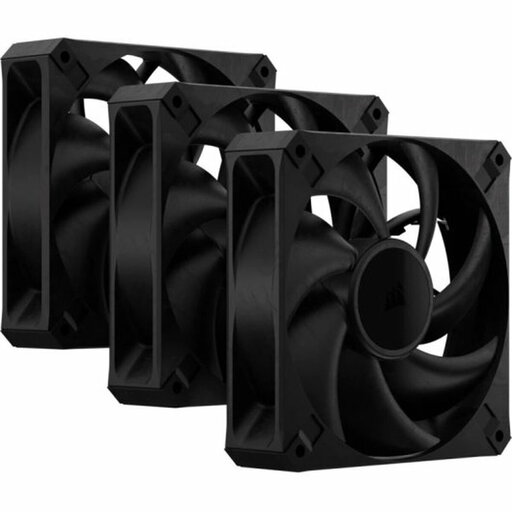
Why it suits this profile: These three 120mm fans are intended for users who want to fill several positions in their case or install them on a radiator, without needing RGB lighting.
The product information specifies PWM, maximum static pressure of 4.2 mmH₂O and a maximum noise level of 29.5 dB. However, check that the 30 mm thickness will fit inside your case.
Three fans, 4-pin PWM, maximum airflow of 72 CFM per fan according to the product description, and a design specified for case and radiator cooling.
We have compiled a complete, up-to-date list of products that fully meet these strict selection criteria and the applicable European safety regulations.
Switch the computer off completely and unplug it from the mains before installing or connecting a fan. Secure the fan firmly, but do not overtighten the screws unnecessarily. Then check:
Dust on the blades can reduce airflow and cause additional noise. Clean the fan with compressed air or a soft brush. Do not use water, and keep the computer switched off while cleaning.
No. The case must have mounting points for 140 mm fans and provide sufficient clearance around the frame. Also check the thickness and the distance from motherboard components, the radiator and memory modules.
That depends on the model and the components supplied. An iCUE LINK model may require a System Hub or suitable controller for power and software control. Check the product description and connections before ordering.
Power consumption depends on the speed, motor type, RGB lighting and number of fans. PWM can help reduce the speed under light loads. For an accurate estimate, check the electrical specifications of the model and controller you have chosen.
