
Vandaag of morgen in huis

Kwaliteit gegarandeerd

Welkomstaanbiedingen ontgrendelen: GRATIS bezorging | Tot 80% korting | Gratis 30 dagen JoyPlus-proefperiode
Download de app
A hot processor, distracting fan noise or a case full of loose cables: these are common problems with gaming PCs and powerful workstations. Corsair PC cooling offers a range of solutions, from a standalone 120mm PC fan to a complete all-in-one CPU cooler. However, RGB lighting or a high RPM does not automatically mean that a product is right for your system.
Pay particular attention to these three common pitfalls:
A 120mm PC fan is versatile and fits many cases and radiators. A 140mm PC fan can move a large volume of air at a lower RPM, but first check the available space around the motherboard, RAM and radiator.
Airflow is usually shown in CFM or m³/h. This indicates how much air the fan can move under the stated conditions. For a case fan, airflow is important for overall circulation. For a radiator or restrictive dust filter, static pressure also matters: it indicates how effectively the fan can push air through resistance.
The figures in product descriptions do not guarantee a specific temperature in your PC. The final performance also depends on the case, cable management, ambient temperature and the fan curve settings.
A lower stated decibel figure sounds appealing, but pay attention to the measurement range. Different models may, for example, quote 10 dB at low speed and around 35 to 37 dB at maximum speed. So do not compare only the lowest figure.
A PWM fan generally uses a 4-pin connector and can have its speed adjusted automatically via the motherboard or a controller. This is useful for quiet PC cooling: the fan runs slowly during light tasks and can speed up during gaming or rendering. With an all-in-one CPU cooler, check the pump and fan connections separately.
When choosing a CPU liquid cooler, check the socket, radiator length and overall thickness. The Corsair iCUE LINK TITAN RX RGB lists support for Intel LGA 1851 and LGA 1700 and AMD AM5 and AM4, among others. The radiator version with three fans measures 360mm. Always measure your case first.
With Corsair iCUE LINK products, fans are connected to one another via a link system. This can simplify cable management, but you may need a compatible iCUE LINK System Hub. Some versions include one, while others do not. Also check the maximum number of devices per hub and the required PCIe and USB connections.
RGB is not always universal either. A Corsair RGB fan can be configured using Corsair iCUE software, while a standard 5V ARGB connection depends on the motherboard and the controller being used. According to Corsair’s product information, lighting, fan curves and monitoring can be adjusted through iCUE; always check the specific connections on the model you choose.
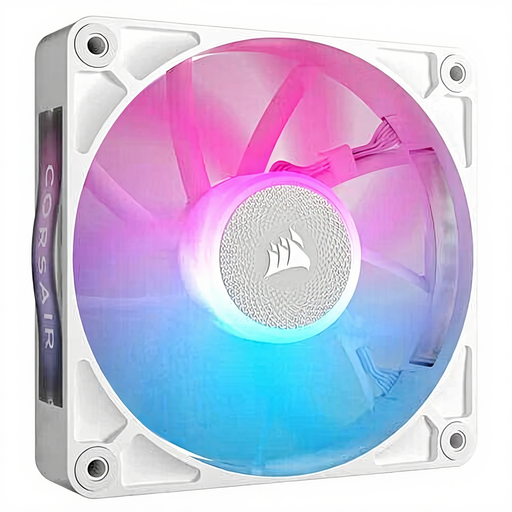
Why it suits this profile: A standalone 120mm fan is ideal if you want to add one position in your case without buying a complete pack straight away.
The 120mm size is widely supported. Its stated speed of 400 to 2100 RPM and PWM support allow it to be controlled via a suitable header.
RGB lighting, 10–36 dB according to the product information, and compatibility with iCUE LINK.
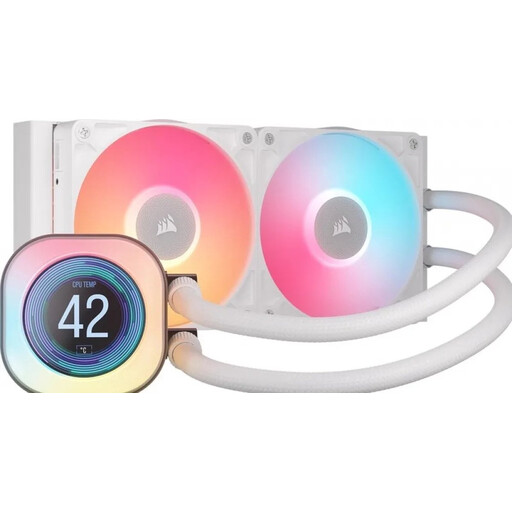
Why it suits this profile: This 240mm all-in-one CPU cooler is ideal if you want to display processor and system information on an LCD screen and are looking for an integrated iCUE LINK system.
The radiator length is clearly stated as 240mm, and the product information lists support for modern Intel and AMD sockets. Even so, check your case size.
240mm radiator, two 120mm fans, LCD display and PWM support according to the product specifications.

Why it suits this profile: A set of three fans is practical for a new gaming PC with multiple intake and exhaust positions, or for mounting on a radiator.
The stated 120mm dimensions, PWM control and static pressure of 3.8 mmH2O provide greater certainty when planning case or radiator use.
Three fans, up to 2400 RPM, airflow of up to 70 CFM and 18 RGB LEDs per fan according to the product description.

Why it suits this profile: This 140mm set is suitable for cases with room for larger fans and for users who want to configure quiet airflow.
The speed can be adjusted from 300 to 1700 RPM, so you do not need to run the fans at maximum speed constantly. However, measure the 140mm mounting positions first.
Two fans, PWM control, airflow of up to 94.7 CFM and a stated noise range of 10–36 dB.
We have put together a complete, up-to-date list of products that fully meet these strict selection criteria and the applicable European safety regulations.
Switch off the PC completely and unplug it from the mains before installing a fan or liquid cooler. When fitting a PC case fan, look for the arrows on the frame: fans at the front or bottom generally draw air in, while those at the rear or top expel warm air.
Connect a PWM cable to a suitable 4-pin header or controller. For iCUE LINK, use only compatible cables and a suitable hub. With an all-in-one CPU cooler, the pump must be mounted securely on the processor in accordance with the instructions. Never tilt, open or dismantle a sealed liquid cooler.
Remove dust using compressed air or a soft brush. Do not use water. If you notice unusual vibrations, leaks or a sudden increase in noise, first check the installation and switch off the system if the problem persists.
No. Only models that explicitly support iCUE LINK are designed for this linking system. Other Corsair RGB fans may use a motherboard header, ARGB connection or separate controller. Always check the product page and the accessories included.
Not necessarily. A 140mm fan can move a lot of air at a lower RPM, but the noise level depends on the model, speed, bearing and fan curve. Look at the full stated range rather than just the lowest dB figure.
In the EU, the statutory guarantee for this product category is at least two years, although additional national rights may apply. The actual lifespan depends on usage, installation, dust and workload. According to the product information for some Corsair models, an additional manufacturer’s warranty is listed for certain pumps; check the current terms for the specific product.
