
Vandaag of morgen in huis

Kwaliteit gegarandeerd

Welkomstaanbiedingen ontgrendelen: GRATIS bezorging | Tot 80% korting | Gratis 30 dagen JoyPlus-proefperiode
Download de app
Buying a gaming mouse sounds simple, until you have to choose between wireless, wired, high DPI, RGB lighting and programmable buttons. The Corsair M55 gaming mouse brings many of these features together. Even so, it is wise to look beyond marketing terms. A high resolution does not automatically mean that a mouse suits your playing style.
In this buying guide, I discuss the most important points to consider, common pitfalls and some suitable alternatives. This will help you use verifiable specifications to decide which mouse suits your PC, hand and intended use.
A gaming mouse with 24,000 DPI sounds impressive, but most players use a lower setting in practice. DPI determines how quickly the cursor or aiming movement travels across the screen. A high maximum value mainly offers flexibility; on its own, it says nothing about comfort, tracking or gaming performance.
Also consider:
According to the product specifications, the Corsair M55 supports 2.4GHz RF, Bluetooth and USB Type-A. This makes it a wireless gaming mouse with a wired-use option. However, the mouse uses one replaceable AA battery and, according to the information provided, is not rechargeable.
Check this before buying. A mouse with a built-in battery works differently from a model with a removable battery. With intensive use, you will need to replace the battery. The supplied USB cable is intended for connection or wired use, not automatically for charging.
The Corsair M55 product description mentions multi-colour RGB lighting. However, the technical specifications state “without lighting”. This is important information for buyers looking for a Corsair iCUE mouse with lighting. Always check the current product page and, if in doubt, confirm which version will be supplied.
Objective product specifications should take priority, but a difference between the description and the table deserves extra attention. This helps you avoid paying for a feature that may not be present.
According to the product information, the Corsair M55 has an optical sensor with an adjustable resolution of up to 24,000 DPI. An optical gaming mouse tracks movement using a sensor that follows the surface beneath the mouse. For consistent tracking, use a suitable, flat mouse mat. No sensor performs identically in every situation, such as on glass or highly reflective surfaces.
For fast-paced shooters, a lower DPI combined with large arm movements may feel more comfortable. For everyday computer use or a high-resolution screen, a higher setting may be more convenient. The right value depends on your preference, screen size and game.
The Corsair M55 has six programmable buttons and a standard scroll wheel. This can be useful for shortcuts, abilities, media controls or productivity. According to the supplied information, Corsair software can be used for adjustments and DPI settings. Check beforehand that the features you want are available for your operating system.
More buttons are not always more practical. Make sure you can reach the buttons easily while gaming without changing your grip.
The mouse is designed for right-handed use and measures approximately 11.8 × 6.2 × 3.8 cm. It weighs around 85 grams without the battery. The battery increases the total weight slightly. This is important if you are looking for a lightweight mouse for quick movements.
The listed specifications do not mention an ergonomic design or thumb rest. This does not mean that the shape is uncomfortable, but you should not automatically expect pronounced ergonomic support. Consider your grip style: palm, claw and fingertip grips each place different demands on the shape.
The Corsair M55 wireless mouse can be used in three ways:
RF is practical for gaming on a desktop, while Bluetooth can be useful with a laptop that has no spare USB port. Check that the receiver is included and that your computer has the correct port.
The following selection is based on the stated resolution, connectivity, buttons, shape and power method. These products are not a universal choice for every user.
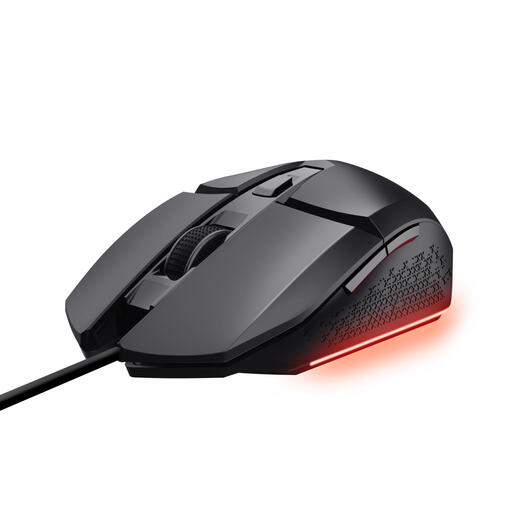
Why it suits this profile: This wired right-handed gaming mouse offers adjustable DPI, six buttons and software customisation without batteries or a wireless receiver.
The fixed USB connection eliminates battery management and makes the power method clear. The maximum 6,400 DPI is lower, but provides a broad enough adjustment range for many players.
Optical sensor, six programmable buttons, adjustable DPI from 200 to 6,400 and a 1.5-metre cable.

Why it suits this profile: This wired model is aimed at users who value extensive customisation options and a wide range of features.
The USB connection and continuous power supply make charging unnecessary. However, check that the larger 13.14 cm size suits your hand and desk.
Up to 25,600 DPI, 13 buttons according to the product description, and an optical sensor with a polling rate of up to 1,000 Hz according to the specifications.

Why it suits this profile: The M55 is suitable for right-handed PC users who want one mouse with three connectivity options, high adjustable DPI and six programmable buttons.
You are not limited to a single connection: RF, Bluetooth and USB are available. However, bear in mind that it uses a replaceable AA battery and check the conflicting information about RGB lighting.
Up to 24,000 DPI, six programmable buttons, optical tracking and support for 2.4GHz RF, Bluetooth and USB.
We have compiled a complete, up-to-date list of products that fully meet these strict selection criteria and the applicable European safety regulations.
Yes. According to the product information, you can connect the mouse via Bluetooth or USB. For 2.4GHz RF, you need the supplied USB receiver. If your laptop only has USB-C ports, check whether you have a suitable adapter or hub.
The listed specifications state that the mouse uses one replaceable AA battery and is not rechargeable. The USB cable can be used for a wired connection, however. So, when using it wirelessly every day, bear in mind the cost and availability of AA batteries.
Not for every player. The maximum DPI gives you a broad adjustment range, but many users choose a lower value for greater control. Focus on the combination of sensor, grip, shape, connectivity and programmable features. This will help you decide whether the Corsair M55 gaming mouse suits your games and everyday PC use.
