
Vandaag of morgen in huis

Kwaliteit gegarandeerd

Welkomstaanbiedingen ontgrendelen: GRATIS bezorging | Tot 80% korting | Gratis 30 dagen JoyPlus-proefperiode
Download de app
A Corsair iCUE LINK RGB case fan can give your computer case a tidy appearance and improve airflow. However, not every RGB case fan is automatically suitable for your PC. Differences in size, connection, controller and radiator compatibility can lead to extra costs or an installation that does not work as expected.
The Joybuy Product Recommendation Officer helps you navigate the most important product information. Rather than starting with marketing terms, focus on verifiable specifications such as dimensions, speed, airflow, noise level and PWM support.
A fan with lots of lighting effects does not necessarily cool better. Also check the maximum airflow, static pressure and speed. For an open computer case, airflow may be more important. On a radiator or compact CPU cooler, static pressure generally matters more.
A Corsair iCUE LINK fan is part of a specific ecosystem. Some versions are supplied without a controller or are intended as an extension to an existing chain. Before buying, check whether a hub or controller is included and whether your motherboard has the required connections.
The product information for different models also does not always list the same connector details. Therefore, check the contents of the package on the product page, rather than relying solely on the product name.
A 120mm PC fan will not necessarily fit a mounting point for a 140mm PC fan. Measure the available space in the case and check the case manual. Also pay attention to thickness: some MAX models are approximately 30 mm thick, while a standard fan is often around 25 mm. This can cause problems with a radiator, side panel or graphics card.
For a typical setup, you can draw fresh air in at the front or bottom and expel warm air at the rear or top. The exact layout depends on your case, CPU cooler and radiator.
A PWM fan generally uses a 4-pin connection to control its speed more precisely. You can then set a fan curve via the BIOS, a fan controller or Corsair iCUE. This means the PC cooling fan does not have to run at maximum speed all the time.
The models in this selection support PWM according to the supplied product specifications. However, check whether your chosen version requires a controller, 4-pin cable or specific iCUE LINK connection.
Airflow is often specified in CFM or m³/u. These figures are mainly useful for comparing models when they have been measured in the same way. Static pressure is also relevant for a radiator fan, as air has to pass through a dense fin array.
A stated noise level of, for example, 10 dB applies at a low speed according to the product information. At maximum speed, the level may be higher. Always check both the minimum and maximum noise level. In practice, how quiet a PC fan is depends on the selected speed, case insulation, resonance and the distance from the user.

Why it suits this profile: A set of two 140mm fans is practical for a case with several large mounting positions. You immediately get a matching set for, for example, intake and exhaust.
The product page specifies two fans, PWM support and a range of 300 to 1700 rpm. However, check that your case has 140mm mounting positions.
Two magnetically levitated fans, RGB lighting, PWM control and a stated maximum airflow of approximately 94,7 CFM per fan.
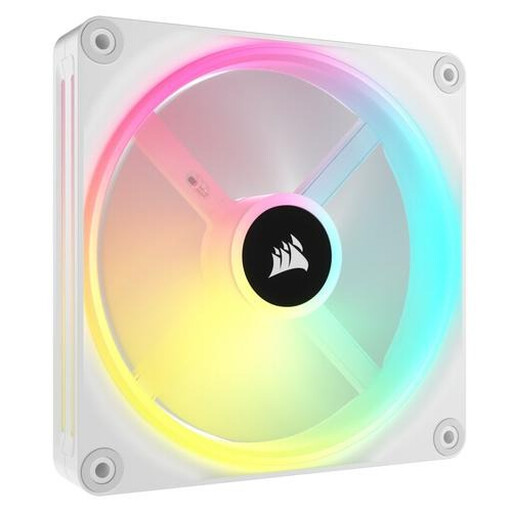
Why it suits this profile: This version is designed for a clean white build where individually addressable RGB LEDs and PWM control are important.
The stated specifications include PWM, a range of 480 to 2000 rpm and 34 individually addressable LEDs. This lets you assess the fan on more than just its appearance.
140mm size, magnetic bearing according to the product description and up to 34 individually configurable LEDs.
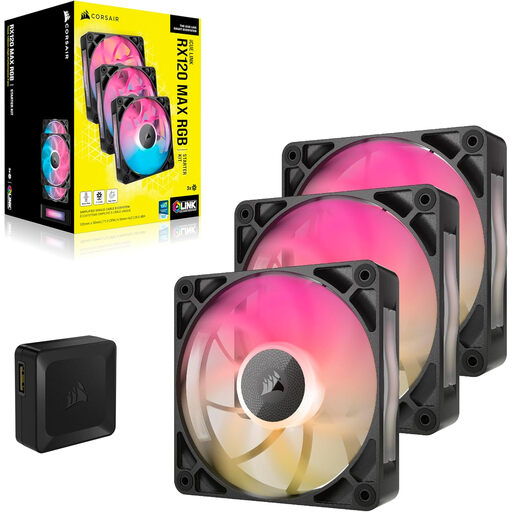
Why it suits this profile: This 120mm multipack is suitable for users who want to fill several positions in a case or radiator and can check the additional thickness in advance.
The product information specifies a thickness of 30 mm, PWM control and a maximum speed of 2000 rpm. This makes the required clearance an important point to check.
Three 120mm fans, stated airflow of 71,3 CFM, eight RGB LEDs per fan and a maximum noise level of approximately 29,5 dB according to the product details.
We have compiled a complete, up-to-date list of products that fully meet these strict selection criteria and the applicable European safety regulations.
Switch off the computer completely and unplug it from the mains before installing or removing a computer case fan. During installation, pay attention to the airflow arrow and tighten the screws evenly. Cables must never come into contact with the blades.
Use a soft brush or compressed air for maintenance. Do not clean the fan with water. If you notice unusual vibrations or scraping noises after installation, switch off the PC and check the mounting, cable routing and connectors.
According to the supplied information, the products come with at least two years’ statutory warranty under EU consumer rules. This is separate from whether a specific controller or cable is included in the package; always check the current product listing for this information.
That depends on the model and version. Some products are expansion fans and refer to an existing iCUE LINK hub. Other multipacks list a controller in the package contents. Check this before buying, and also look at the available USB, PWM and system connectors in your PC.
Start by checking the mounting points on your case. A 140mm fan is only suitable if the mounting holes and available space are large enough. A 120mm model is more commonly suitable for compact cases and radiators. The case and radiator manuals should be your guide.
Power consumption varies depending on the model, speed and lighting brightness. PWM reduces the speed when full cooling capacity is not required. As a result, actual power consumption may be lower than when the fan runs continuously at maximum speed. Check the technical specifications for your chosen version and connect the system according to Corsair’s instructions and those for your motherboard.
