
Vandaag of morgen in huis

Kwaliteit gegarandeerd

Welkomstaanbiedingen ontgrendelen: GRATIS bezorging | Tot 80% korting | Gratis 30 dagen JoyPlus-proefperiode
Download de app
Upgrading with Corsair iCUE LINK PC cooling can make your PC tidier, but only if the components work well together. An extra fan, RGB kit or cable may seem like a quick choice. In practice, problems often arise because of the wrong size, a missing hub or a connection that is incompatible with your motherboard.
The Joybuy Product Recommendation Officer helps you separate the most important specifications. That way, you are not simply buying based on RGB lighting or a high maximum speed, but also considering compatibility, noise levels, airflow and installation.
Not every Corsair RGB fan uses the same connection as a standard 4-pin PWM PC fan or a standard 5V 3-pin ARGB header. iCUE LINK is its own ecosystem. So check that your motherboard, controller, hub and cables are compatible with one another.
A cable with two iCUE LINK connections is not automatically suitable as a replacement for a standard RGB cable. Only use accessories whose product description specifies the required connection.
A higher RPM value does not automatically mean that a fan will work better in your case. Also consider:
According to the product specifications, the RX120 RGB runs between 400 and 2100 RPM, while the LX120-R RGB reaches up to 2400 RPM. That difference is relevant, but the final performance also depends on the airflow inside your case.
A 120mm PC fan will only fit if your case or radiator has a 120 mm mounting position. Also check the thickness. According to the product specifications, the RX120 MAX is 30 mm thick, while many standard fans are approximately 25 mm thick. In a compact case, this difference can cause problems with cables, RAM or a radiator.
For an open position at the front or rear of your case, airflow is an important consideration. For a radiator or a position with a restrictive dust filter, static pressure matters more. A fan designed for radiator use must be able to push air through resistance.
Bear in mind that product pages sometimes use different units. CFM and m³/h are both useful, but only compare values measured in the same way.
A stated noise level is a technical figure recorded under specific conditions, not a guarantee that every PC will sound equally quiet. The case, resonance and fan curve all affect the user experience.
With PWM support, you can control the speed through a suitable 4-pin connection or compatible controller. This prevents a fan from constantly running at maximum speed when the processor is under light load.
With an iCUE LINK setup, cables can have a major impact on installation. Options include 100, 200 and 600 mm cables, as well as a 90-degree version. Choose the length based on the distance between the fans, controller and hub. A cable that is too short puts strain on the connector, while one that is too long makes cable management more difficult.
For a graphics card, a Corsair GPU power bridge is a different type of accessory. According to the product information, the CP-8920368 is designed for compatible 12V-2x6 connections. Switch the PC off completely, check the orientation and do not force the connector into place. Only use this bridge when the connections on your GPU and power supply match.
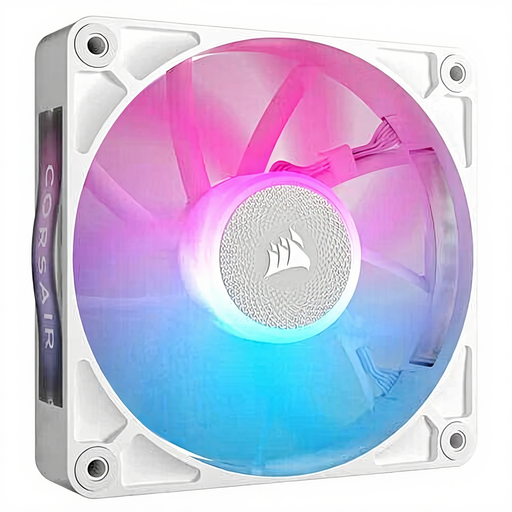
Why it suits this profile: A single 120mm fan is practical when you want to expand one position or replace a faulty fan. The white finish is a good match for light-coloured PC builds.
You do not need to buy a multipack straight away. However, check beforehand that your system has the required iCUE LINK connection or controller.
120 mm, 400–2100 RPM, PWM support and a stated noise level of 10–36 dB.

Why it suits this profile: This three-pack is suitable for a new build or a case where several 120mm positions need to be filled at the same time.
The specifications mention both PWM and use for case and radiator cooling. Even so, check the available iCUE LINK hub and the included cabling.
Three fans, up to 2400 RPM, up to 3.8 mmH2O static pressure and 18 RGB LEDs per fan according to the product description.
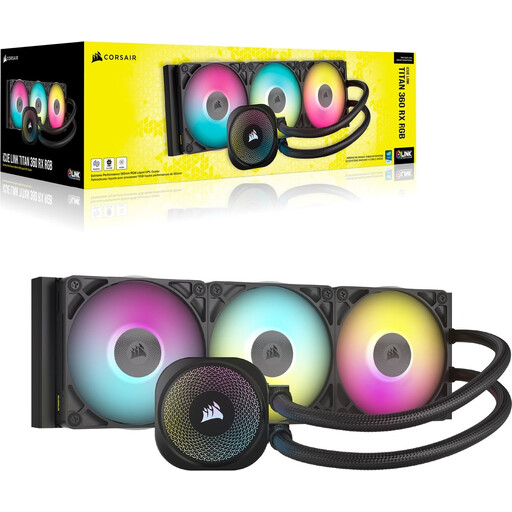
Why it suits this profile: This Corsair liquid cooler is designed for users who want to cool their CPU with a 360mm solution and have room for a larger radiator.
Compatibility is specifically listed for LGA 1700, LGA 1851, AM4 and AM5. Also check that your case supports a 360 mm radiator.
360mm radiator, RX RGB fans, PWM control and support for several common CPU sockets according to the product information.
Check the following before placing your order:
We have put together a complete, up-to-date list of products that fully meet these strict selection criteria and the applicable European safety regulations.
Not every system is the same. Check the product packaging and manual. Multiple iCUE LINK devices are generally connected to the PC through a compatible hub or controller. Do not assume that they can be connected directly to a standard motherboard header.
No. The case must have a 120 mm mounting position. For a radiator, the length, width and total thickness must also fit. Measure the available space first, particularly in compact cases.
Power consumption depends on the number of fans, the controller, the pump and the selected speed. PWM control can help prevent fans from running constantly at maximum speed. With liquid cooling, you must also take into account that the pump remains active while the PC is switched on.
