
Vandaag of morgen in huis

Kwaliteit gegarandeerd

Welkomstaanbiedingen ontgrendelen: GRATIS bezorging | Tot 80% korting | Gratis 30 dagen JoyPlus-proefperiode
Download de app
An extra Corsair case fan can improve airflow in your PC, but not every fan will fit every case or connection. Gamers and PC builders often focus on RGB and maximum speed, but size, noise levels and compatibility are just as important.
Three common pitfalls:
The most common sizes are 120 mm and 140 mm. A 120 mm Corsair case fan is a versatile choice for rear, top and front positions. If your case supports it, a 140 mm Corsair case fan can move more air at a lower speed. Always check the mounting points and clearance around memory modules, radiators and motherboard coolers.
Check the thickness too. According to the product information, the Corsair RS120 MAX is 30 mm thick, while many standard fans are 25 mm thick. Check the available clearance before fitting this fan to a radiator or in a compact case.
Airflow tells you how much air a fan can move. This is most relevant for unobstructed case positions. Static pressure matters when air needs to pass through a radiator, dust filter or closely spaced grille. So, when choosing a radiator fan, don’t just look at CFM or m³/h; check the figure in mmH2O as well.
Maximum speed doesn’t tell you everything either. A PWM case fan with a 4-pin connector can automatically adjust its speed via the motherboard or a controller. This means it can run more quietly under light loads than during a long gaming session.
Noise levels are usually given in dB. Check whether the manufacturer lists a minimum or maximum figure. For example, the Corsair RS120 MAX is listed at up to 29.5 dB, with a speed of up to 2000 RPM. Other models can reach around 35–37 dB at maximum speed.
For RGB, check:
A 3-pack of Corsair fans often costs less per fan, but you may end up buying more than you need right away.
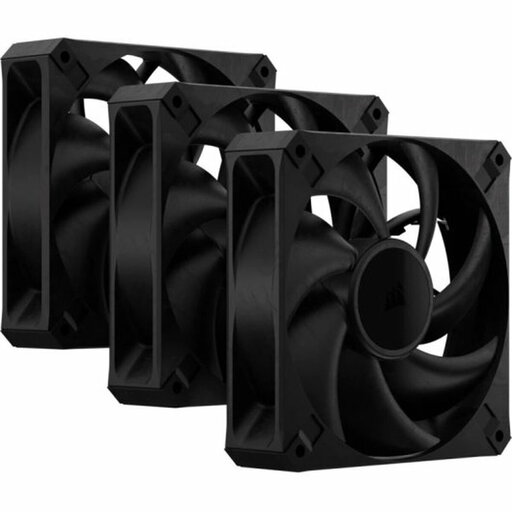
Why it suits this profile: This set includes three black 120 mm fans, making it a good choice if you want to fill several positions at once without needing RGB.
The product information lists a 4-pin PWM connection, a maximum speed of 2000 RPM and a maximum noise level of 29.5 dB. Just remember to allow for its extra thickness of 30 mm.
Three fans, PWM control, up to 72 CFM and a listed static pressure of up to 4.2 mmH2O.

Why it suits this profile: A great match for a white PC build, with RGB lighting, PWM control and a tidy iCUE LINK installation.
The starter pack includes three fans and an iCUE LINK System Hub. Check that your other components and power supply are compatible before you buy.
120 mm, PWM, 400–2100 RPM, 74.2 m³/h airflow according to the product information, and RGB lighting.
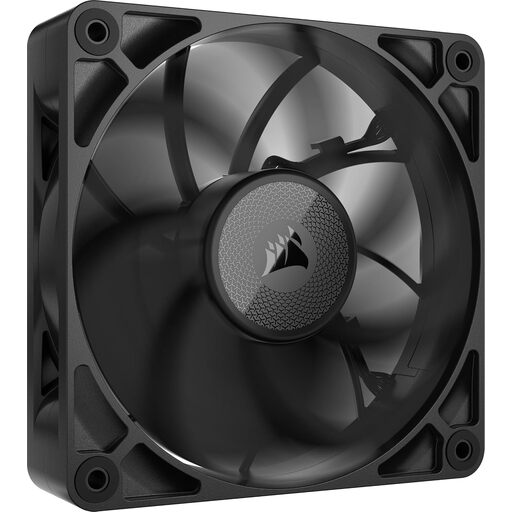
Why it suits this profile: Designed for users who want to cool a radiator or a closely spaced grille and have room for the extra thickness in their case.
The specifications list a thickness of 30 mm, PWM control and suitability for both case and radiator cooling. Measure the available space before buying.
Up to 71.6 CFM, 4.18 mmH2O static pressure and a maximum noise level of 29.5 dB, according to the product information.
We’ve put together a complete, up-to-date list of products that meet these strict selection criteria and the applicable European safety regulations.
Switch off your computer completely, unplug it from the mains and wait for the fan blades to stop. Check the arrows on the frame to see which way the airflow will travel. Fans at the front or bottom usually draw air in, while those at the rear or top expel warm air.
Connect a standard PWM case fan to a suitable 4-pin fan header. For RGB models, make sure the lighting connector matches the controller or header. With iCUE LINK, use only compatible cables and hubs. Keep cables neatly tucked away from the blades.
Dust affects airflow and can increase noise levels. Clean the fan regularly with compressed air or a soft brush. Don’t use water or spin the blades quickly by hand.
That depends on the static pressure and the mounting. Models such as the RS120 MAX and RX120 MAX are listed in the product information for both case and radiator cooling. Also check the radiator’s size, thickness and screw spacing.
Use PWM control through the BIOS or compatible software and set a moderate fan curve. This stops the fan from running at maximum speed all the time. Also check that no cables are touching the blades and that dust isn’t blocking the airflow.
Power consumption varies by model, speed, RGB lighting and controller. The stated airflow or RPM won’t tell you directly how many watts the fan uses. Check the electrical label or technical documentation for the specific model. PWM can help avoid unnecessarily high speeds, but it doesn’t guarantee a set level of power consumption.
Lifespan depends on use, dust, temperature and bearing design. A manufacturer may specify a particular bearing technology or durability, but this doesn’t guarantee a fixed lifespan. Keep your proof of purchase; according to the information provided, these products are covered by the EU’s statutory two-year guarantee at a minimum.
