
Vandaag of morgen in huis

Kwaliteit gegarandeerd

Welkomstaanbiedingen ontgrendelen: GRATIS bezorging | Tot 80% korting | Gratis 30 dagen JoyPlus-proefperiode
Download de app
A set of three 120 mm PC case fans can improve airflow in a gaming PC while giving it a neat, white look. However, not every RGB set will suit your case. Cables, connectors and quoted noise levels can all come as a surprise after you’ve bought them.
The Corsair iCUE LINK RX120 RGB 3-pack in white is designed for PC builders looking for three white PWM fans with RGB lighting and an iCUE LINK System Hub in one package. According to the product specifications, the fans run at speeds of 400 to 2100 RPM, deliver up to 74.2 CFM of airflow and support a Zero RPM mode. Always check that your case and motherboard are compatible with the system.
A higher speed doesn’t automatically make a fan a better choice. At maximum speed, fans can be noisier, and the airflow is only useful if hot air can actually escape from the case. So, look at the full range: according to the product information, the RX120 RGB runs at 400 to 2100 RPM and has a quoted noise range of 10 to 36 dB.
Placement matters just as much in practice. Front and bottom fans are usually used as intakes, while rear and top fans expel warm air. Look for the arrows on the frame, which show the direction of rotation and airflow.
RGB case fans don’t all use the same connectors. A standard 4-pin PWM connector controls fan speed, while the lighting uses a separate connector or one specific to its ecosystem. The RX120 RGB uses iCUE LINK and comes with an iCUE LINK System Hub.
This makes for a tidier installation, but may be less suitable if you want to use only universal motherboard headers. Before buying, check that you have enough room for the hub and that the included cables will work with your PC setup.
A quoted figure such as 10 dB usually refers to a specific low speed, not operation at 2100 RPM. According to the product listing, this set has a maximum noise level of 36 dB. Zero RPM mode can stop the fans when the system is under light load, but how it works depends on your setup and software settings.
The RX120 RGB has a standard diameter of 120 mm. Even so, check the mounting points in your case. Some compact models only have room for a 120 mm fan at the rear, while the front may also accommodate 140 mm fans or radiators. Also check that the radiator, front panel or dust filter leaves enough clearance.
PWM fans use 4-pin control to adjust their speed automatically. This helps you balance airflow and noise according to your PC’s workload. The product information lists PWM support and a speed range of 400 to 2100 RPM.
A suitable fan curve in the BIOS or Corsair iCUE can stop the fans from constantly running at high speed. The exact settings depend on your processor, graphics card and case, as well as how quiet you want your PC to be.
The quoted airflow of 74.2 CFM should be treated as a product specification measured under certain conditions. In a real case, filters, cables, radiator fins and front panels all affect airflow. According to Corsair, AirGuide technology is designed to direct airflow more precisely. This is a brand claim, not a guarantee of a specific temperature improvement in every PC.
Make sure you have a sensible airflow path, too. Three intake fans without enough exhaust can cause warm air to circulate inside the case. For many ATX cases, a practical starting point is to use intake fans at the front and exhaust fans at the rear or top.

Why it suits this profile: A single 120 mm fan is a good choice if you want to add a fan in one position or replace an existing one without buying a complete set.
You won’t have to pay for three fans if you only need one mounting position. Be sure to check which RGB and power connectors you need beforehand.
120 mm size, PWM control, white casing, 480–2400 RPM and a quoted maximum airflow of 63.1 CFM.
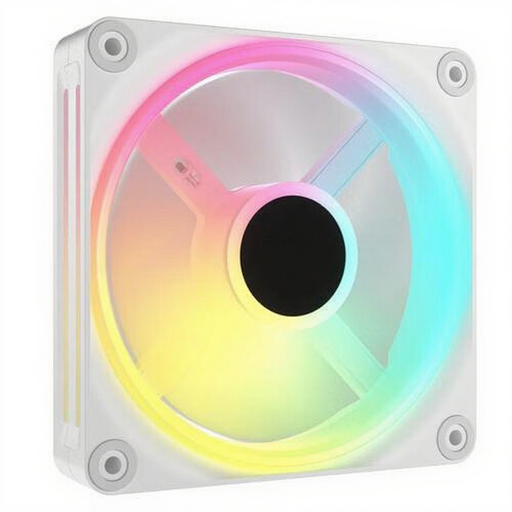
Why it suits this profile: This set is a good fit for builders who want three white RGB fans and plan to stay within the iCUE LINK ecosystem for lighting and control.
The set saves you having to combine three separate models with different connectors. Check that a hub and system compatibility fit your priorities.
Three 120 mm fans, PWM support, white finish and RGB lighting; the product specifications list speeds of up to 2400 RPM.

Why it suits this profile: This complete starter set is designed for a gaming PC with three mounting positions, RGB lighting and a need for a tidy iCUE LINK installation.
The included hub reduces the number of separate cables and keeps the setup tidier. Check the manual for the maximum number of devices per hub port.
Three white 120 mm fans, iCUE LINK System Hub, PWM control, AirGuide technology according to Corsair, and a quoted speed range of 400–2100 RPM.
We’ve put together a complete, up-to-date list of products that meet these strict selection criteria and the applicable European safety regulations.
Shut down your computer completely and unplug it before touching any internal components. Securely mount the fans and keep cables away from the blades. Connect the iCUE LINK hub according to the manual and don’t exceed the recommended number of devices per port.
Next, set a fan curve in the BIOS or Corsair iCUE. A low speed under light loads and a higher speed while gaming can offer a practical balance. Clean the blades regularly with a soft brush or compressed air. Don’t use water or other liquids inside the case.
No. The fans are 120 mm, but you’ll also need suitable mounting points, enough clearance and compatible connectors. Check that there’s room for the iCUE LINK System Hub, too.
The product information lists Zero RPM mode, but how it works depends on the software, fan curve and system configuration. The fans will generally start spinning again when temperatures rise. Check the settings after installation.
Power consumption depends on fan speed, RGB brightness and your setup. It’s generally higher at faster speeds with the lighting on than under a light load. For exact figures, check the manufacturer’s manual or product specifications.
