
Vandaag of morgen in huis

Kwaliteit gegarandeerd

Welkomstaanbiedingen ontgrendelen: GRATIS bezorging | Tot 80% korting | Gratis 30 dagen JoyPlus-proefperiode
Download de app
A Corsair RGB PC fan can improve airflow through your computer while giving it a smart, polished look. However, simply adding a fan is not always the best approach. The wrong size, a missing controller or an unsuitable connection can lead to extra costs, unwanted noise or an installation that does not work.
In this buying guide from the Joybuy Product Recommendation Officer, you will learn what to look for in a Corsair RGB PC fan, from size and noise levels to PWM, iCUE LINK and radiator compatibility.
A 120mm PC fan and a 140mm PC fan are not interchangeable. So, first check the mounting positions in your PC case. Do not just look at the front: the top, rear and bottom may also support different sizes.
A 140mm model can move a lot of air at a lower speed, but it will only fit if the case and any radiator are designed for it. Also check the available space around the motherboard, memory and radiator.
The fan and lighting do not always use the same connection. A PWM fan generally has a 4-pin connection for power and speed control. RGB may additionally run through a compatible controller, iCUE LINK system or 5V ARGB connection.
Please note: ARGB and 12V RGB are not safe alternatives to one another. Only connect a 5V ARGB connector to a suitable header. With iCUE LINK models, you should also check whether a hub is required. Some expansion fans are not designed to connect directly to a standard motherboard header.
A high maximum speed does not tell you everything about everyday performance. Under light loads, a good fan should ideally run more slowly through PWM control. For a radiator, static pressure and blade design are also important. For an open case position, airflow is the main consideration.
The stated noise figures are usually minimum and maximum values taken from the product information. In your own system, actual noise and cooling performance also depend on the fan curve, installation, dust and the temperature inside the case.
A fan designed for a radiator is not automatically suitable for every radiator. Check the mounting spacing, thickness and screw positions before ordering.
Airflow is shown in the product details, for example, in CFM or m³/h. This value indicates the amount of air moved. Static pressure, expressed in mmH2O, is particularly relevant when air needs to be pushed through a radiator, dust filter or restrictive front panel.
Use these figures to compare models within the same product range. Measurement methods and conditions can vary between manufacturers, so figures are not always directly comparable across brands.
With PWM control, the motherboard or a controller can adjust the fan speed according to the temperature. This is useful for quiet PC cooling during office work and increased airflow while gaming.
The product information for the Corsair models below includes speed ranges from 300 to 2400 RPM and stated noise levels from 10 dB to approximately 36–37 dB, depending on the model. Treat these figures as technical product specifications, not a guarantee of a completely silent computer.

Why it suits this profile: A standalone 120mm PC fan is suitable when you want to replace or add a single fan position. The standard 4-pin PWM connection is compatible with many motherboards.
The product details specify a 120mm format, PWM and support for case and radiator installation. However, check the RGB header or controller separately.
34 individually addressable LEDs, 480–2400 RPM and stated airflow of 63.1 CFM.

Why it suits this profile: This pack is designed for a complete 120mm setup with three fans and an iCUE LINK System Hub. It can simplify cable management when building a new PC.
The included hub means you do not need to find a separate controller in advance. However, check the available power and the maximum number of devices supported per port.
Three RX120 RGB fans, 400–2100 RPM, PWM control and, according to the product information, airflow of up to 74.2 CFM per fan.
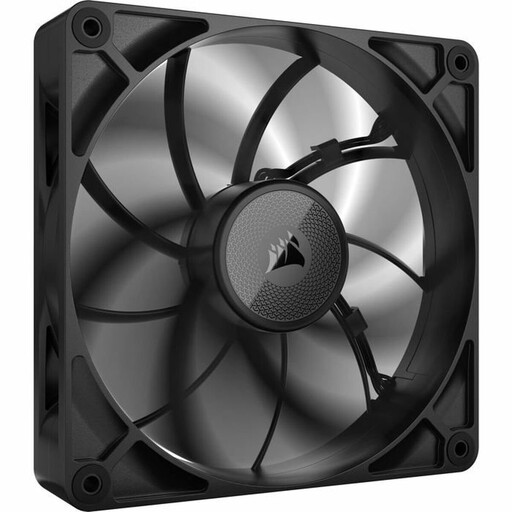
Why it suits this profile: The 140mm size and 30mm thickness are designed for systems with sufficient space, including certain radiator and case configurations.
The stated static pressure of 2.39 mmH2O and 30mm thickness provide more information than the maximum RPM alone. Measure the available clearance beforehand and check which screws are suitable.
Stated airflow of up to 103.5 CFM, PWM support and a noise range of 10 to 31 dB according to the product information.
We have put together a complete, up-to-date list of products that fully meet these strict selection criteria and the applicable European safety regulations.
Switch off the computer completely and unplug it from the mains before fitting a PC case fan. Check the arrows on the frame: they show the direction of airflow. Front and bottom fans are often used as intake fans, while rear and top fans expel warm air.
Connect PWM to a suitable 4-pin fan header or controller. For RGB, only use the connector specified in the manual and product details. With iCUE LINK sets, the hub must be connected correctly to the power supply and motherboard. Keep cables neatly away from the blades and do not overtighten the mounting screws.
Periodically remove dust from the fan using a soft brush or air blower. Do not use water, and shut down the system immediately if you notice unusual vibrations or noises.
Not necessarily. PWM can often be controlled through a suitable fan header, but iCUE LINK requires a compatible hub and cabling. Also check whether your power supply has the necessary PCIe or system connector available.
Not always. A 140mm fan can provide similar airflow at a lower speed, but the eventual noise level depends on the model, fan curve, case and installation. Therefore, compare both the size and the stated noise range.
Lifespan varies depending on the model, operating conditions and maintenance. Dust, heat and vibrations can all have an impact. Check the statutory minimum two-year guarantee for consumers in the EU and keep your proof of purchase. This does not replace a guarantee of a specific lifespan, but it does provide an important legal point of contact if the product develops a fault.
