
Vandaag of morgen in huis

Kwaliteit gegarandeerd

Welkomstaanbiedingen ontgrendelen: GRATIS bezorging | Tot 80% korting | Gratis 30 dagen JoyPlus-proefperiode
Download de app
A Corsair RGB PC fan can provide both airflow and lighting, but not every case fan is suitable for every PC build. The wrong size, a missing controller or an overly thick radiator fan can lead to extra costs, cable issues or insufficient cooling.
For gamers, PC builders and hardware enthusiasts, three common pitfalls are particularly important.
A large number of LEDs says little about actual cooling performance. Also check the maximum airflow, RPM and, for radiator use, static pressure. A fan for an open-mesh case needs different characteristics from a radiator fan positioned behind tightly spaced fins.
A 120 mm PC fan is a common size for compact and mid-sized cases. A 140 mm PC fan can move a lot of air at a lower RPM, but it will not automatically fit every mounting position. Measure the available space and check your PC case manual.
Pay attention to thickness, too. The Corsair RS120 MAX, for example, is 30 mm thick, while many standard case fans are approximately 25 mm thick. That difference can cause problems with cables, radiators or a graphics card.
Corsair iCUE LINK products use their own ecosystem, with a suitable hub and cables. A standard ARGB PC fan generally connects via a 5V ARGB header on the motherboard, while iCUE LINK models cannot simply be connected in the same way.
So check:
Airflow is often listed in CFM or m³/h. A higher figure may indicate that more air can be moved, but real-world performance also depends on the resistance within the case. For a radiator or heatsink, static pressure, measured in mmH₂O, is at least as important.
Use this rule of thumb:
The figures shown are product specifications taken from the relevant product descriptions. Actual performance may vary depending on case layout, dust, ambient temperature and the configured fan curve.
A PWM fan generally uses a 4-pin connection to control its speed more precisely. This allows the fan to run more quietly during light use and respond faster under load. Check whether your motherboard has enough fan headers, or use a suitable controller.
A stated noise level, such as 29.5 to 37 dB, is a technical product specification measured under specific conditions. It does not mean that your PC will sound exactly like this in every situation. Case resonance, turbulence and high RPM all affect the experience.
A quiet PC fan therefore does not depend solely on the lowest dB figure. An adjustable fan curve, proper installation and regular dust removal are just as important.
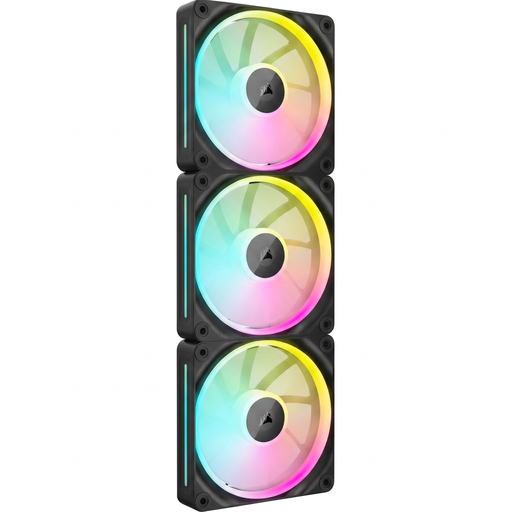
Why This Fits Their Persona: A set of three 120 mm fans is a practical choice for a new PC build with several mounting positions. The black finish suits many standard cases.
The product specification lists PWM, 400–2400 RPM and support for case and radiator cooling. However, check in advance whether an iCUE LINK hub is included or needs to be purchased separately.
3 fans, 120 mm size, RGB lighting and a stated maximum airflow of 69.9 CFM.

Why This Fits Their Persona: Suitable for a spacious case with 140 mm mounting positions, where quieter-running airflow is preferred.
The 140 mm size means you do not have to rely solely on high RPM for cooling, provided your case supports this format. PWM allows you to create manual fan curves.
Pack of 2, 300–1700 RPM, stated airflow of 94.7 CFM and a product specification of up to 36 dB.
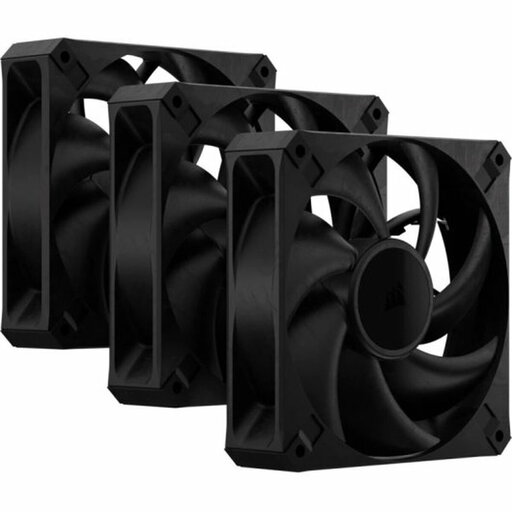
Why This Fits Their Persona: A practical choice for heavy workloads where radiator or heatsink cooling matters more than lighting.
This model has no RGB, so you are paying for airflow rather than lighting. Before installation, pay particular attention to the extra 30 mm thickness.
72 CFM, maximum static pressure of 4.2 mmH₂O, 2000 RPM and a stated maximum noise level of 29.5 dB.
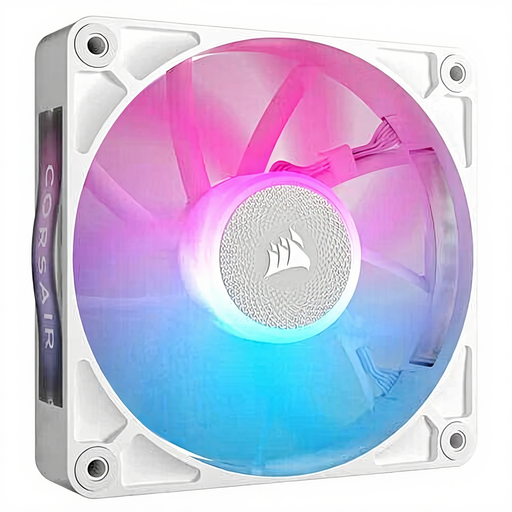
Why This Fits Their Persona: A single white 120 mm fan is ideal for an upgrade where you want to replace one position or add to an existing build.
There is no need to buy an unnecessary multipack. However, check the connection: the product information lists iCUE configuration and PWM control.
120 mm, 400–2100 RPM, PWM and a stated maximum airflow of approximately 73.5 CFM.
Switch off the PC completely, unplug the power cable and wait until the fans have stopped. During installation, look for the arrows on the frame: these show the direction of airflow. For typical airflow, front and bottom fans draw air in, while fans at the rear and top exhaust warm air.
Keep cables away from the blades and clean the fan with compressed air or a soft brush. Do not use water. According to the accompanying product information, these Corsair models are covered by a minimum of two years’ statutory warranty within the EU; additional rights may apply under Dutch law.
Browse a current selection of fans and compare size, noise level, control and connections for your PC build.
This depends on the model and the product packaging. Many iCUE LINK models are designed to connect to a suitable hub. Before buying, check whether the controller is included or needs to be purchased separately.
Neither size is automatically more suitable for every PC. 120 mm is more flexible in compact cases and with radiators. 140 mm can be a good option when your case supports the size and you want to move a lot of air at a lower RPM.
Lifespan depends on the bearing design, usage time, dust and installation. A clean fan with a properly configured PWM curve is generally placed under less strain. Look out for new vibrations, rattling noises or a fan that no longer starts; these are signs that you should check the connection and bearing.
