
Vandaag of morgen in huis

Kwaliteit gegarandeerd

Welkomstaanbiedingen ontgrendelen: GRATIS bezorging | Tot 80% korting | Gratis 30 dagen JoyPlus-proefperiode
Download de app
A Corsair RGB PC fan can improve airflow through your case while giving your system a cohesive look. However, it is easy to choose a model that is not suitable for your case, radiator or connections. Particularly for PC builders who focus mainly on RGB lighting, important specifications can sometimes be overlooked.
The three most common purchasing pitfalls are:
Below, you will find out which specifications to check and which Corsair models are suitable for different types of users.
Most PC cases use 120 mm PC fans, while larger cases often support 140 mm fans as well. A 140 mm fan can deliver substantial airflow at a lower speed, but it takes up more space. Always check the manual for your case, radiator or CPU cooler before ordering.
Also pay attention to thickness. A standard fan is often around 25 mm thick, while some models measure 30 mm. This difference can affect the space between a radiator, motherboard, memory modules and the side panel.
Airflow is usually specified in CFM. A higher figure indicates greater airflow according to the product specification, but the final cooling performance also depends on the air intake, dust filters, cable management and the internal layout of the case.
A quiet PC fan does not run at maximum speed constantly. Therefore, check:
The stated noise levels are product specifications. According to Corsair’s own information, the noise level of various RX models is around 10 dB at low speed, with higher figures at maximum speed. Treat this as a point of comparison rather than a guarantee that the fan will produce the same noise level in every PC.
A PWM fan generally uses a 4-pin connection, allowing its speed to be controlled more precisely than with simple voltage regulation. Check that your motherboard or fan controller has a suitable connection.
RGB lighting uses a separate connection. With a Corsair iCUE LINK fan, it is important to check whether you have a compatible iCUE LINK hub or controller. Some product packages include a controller, while others do not. A standard 5V ARGB header on the motherboard is not automatically the same as an iCUE LINK connection.
The recommendations below are based on verifiable details such as size, speed, airflow, PWM support, RGB functionality and the number of fans included per pack.
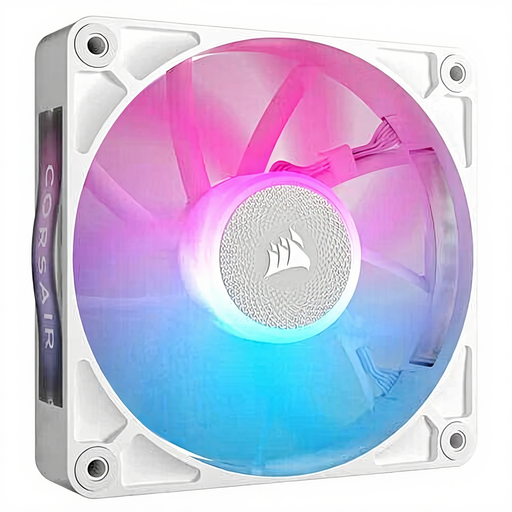
Why it suits this profile: A single 120 mm fan is practical when you want to add one fan or replace an existing one.
The 120 mm size is widely supported by many cases. However, check beforehand that you have a suitable iCUE LINK controller or connection.
120 mm, PWM support, 400–2100 RPM, stated maximum airflow of 73,5 CFM and RGB lighting.

Why it suits this profile: Ideal for a spacious build with several 140 mm mounting positions and a consistent look throughout the system.
The pack contains two fans, so you are less likely to accidentally buy a single unit for a dual-fan mounting position. Still, measure the available space first.
Two 140 mm fans, PWM, 300–1700 RPM, stated maximum airflow of 94,7 CFM and multi-colour RGB.
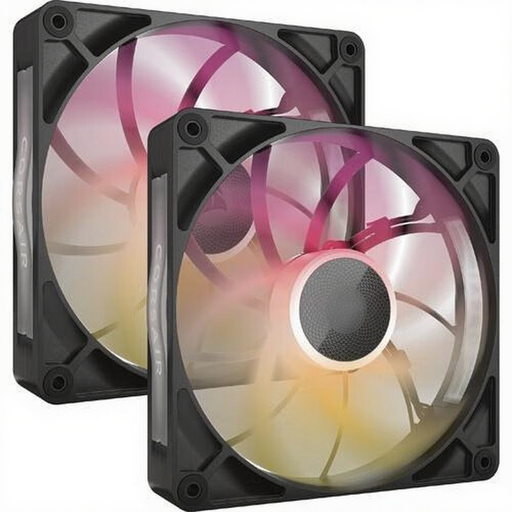
Why it suits this profile: An appealing choice for users who want extra capacity for case cooling or a radiator and have enough room for a thicker fan.
The product specification states a thickness of 30 mm. Be sure to check the available clearance carefully before installing this radiator fan.
Two 140 mm fans, PWM, 300–1600 RPM, stated airflow of 102,9 CFM and eight RGB LEDs per fan.
Turn off the computer, unplug it from the mains and discharge any static electricity before opening the case. During installation, look for the arrows on the frame: they show the direction of airflow. Fans at the front or bottom usually draw in cool air, while those at the rear or top expel warm air.
Connect the PWM cable to a suitable fan header or controller. For RGB, use the recommended Corsair controller, iCUE LINK hub or compatible connection as specified in the product manual. Keep cables away from the blades and do not overtighten the screws.
After installation, set a fan curve via BIOS/UEFI or Corsair iCUE. This prevents the fan from running unnecessarily fast during light desktop use. Clean the blades and dust filters regularly using compressed air or a soft brush. Do not use water inside the case.
We have put together a complete, up-to-date list of products that fully meet these strict selection criteria and the applicable European safety regulations.
No. Check the mounting size, available space, thickness and connection type. A 120 mm fan and a 140 mm fan are not interchangeable without a suitable mounting opening.
That depends on the model you choose and your existing hardware. Check whether the package includes a controller and whether your motherboard or Corsair system provides the correct iCUE LINK connection. PWM for speed control and RGB for lighting must each be connected correctly.
Power consumption depends on the model, speed and number of hours it runs. A fan controlled via PWM that often runs at a low speed will generally use less power than one that constantly operates at maximum speed. For an exact comparison, check the electrical specifications of the product you choose.
