
Vandaag of morgen in huis

Kwaliteit gegarandeerd

Welkomstaanbiedingen ontgrendelen: GRATIS bezorging | Tot 80% korting | Gratis 30 dagen JoyPlus-proefperiode
Download de app
A Corsair RGB PC fan can give your computer case a neat look and help remove warm air. However, it’s not wise to focus only on RGB lighting or the highest speed. A fan that doesn’t fit your case, has the wrong connector or makes more noise than necessary can quickly become a source of frustration.
Watch out for these three common pitfalls:
With a few checks beforehand, you can choose the right Corsair case fan for your case, a radiator fan or an RGB PC fan for a complete build.
The most common sizes are 120 mm and 140 mm. Check your case manual or product specifications to see which fan positions are available. Also check the thickness. A standard fan is often around 25 mm thick, while some performance models are around 30 mm. That difference can cause problems with your RAM, radiator or cables.
A 120 mm PC fan is versatile and fits many cases, radiators and CPU coolers. A 140 mm PC fan can move more air at the same speed, but needs more space. Measure the mounting opening rather than relying on the product name alone.
Also check the direction of airflow. Arrows on the frame usually show which way the air flows. In a typical setup, for example, you can place fans at the front for intake and at the rear or top for exhaust.
Speed is measured in RPM. A wide speed range is useful, as you can run the fan quietly during light use and faster when gaming or rendering. A PWM case fan usually has a 4-pin connector, allowing you to control its speed through the motherboard.
Important specifications include:
According to the product specifications, some Corsair models range from around 10 dB at low speed to 29.5–37 dB at high speed. This doesn’t mean your computer will always produce that maximum noise level; the fan curve and temperature determine how fast the fan spins.
Not all RGB fans work in the same way. A traditional model may use a 4-pin PWM connector for the motor and a separate RGB or ARGB connector. Check that your motherboard has the right connector. Don’t connect a 5V ARGB connector to a 12V RGB header without checking first.
A Corsair iCUE LINK fan works within the iCUE LINK system. Models such as the RX120 RGB Starter Pack come with an iCUE LINK System Hub. For standalone models, check whether you already have a hub or need to buy one separately. The system offers a tidy way to connect multiple fans, but compatibility is still essential.
Also check how many fans are included. A single pack is suitable as an addition or replacement. For a new build, a 2-pack or 3-pack may be more practical and better value.

Why it suits this user: A standalone 120 mm fan is a straightforward choice for a first upgrade or replacement. Its size and connector are easy to check against most modern PC cases.
The product specifications list a 120 mm size, PWM and a speed range of 480 to 2400 RPM. This lets you check in advance whether the size and speed control are suitable for your system.
Maximum airflow of 63.1 CFM, static pressure of 3.8 mmH₂O, 34 individually addressable LEDs and a 4-pin PWM connector.
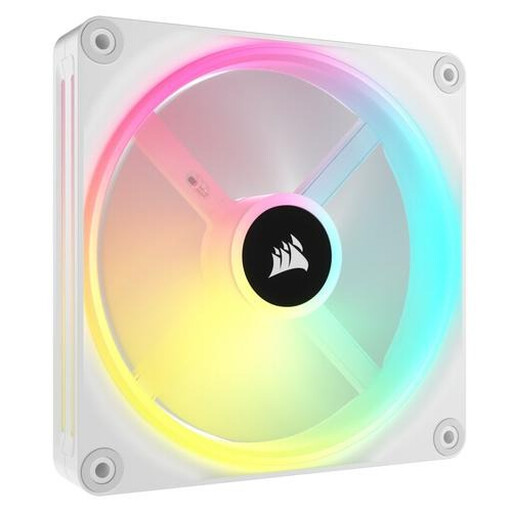
Why it suits this user: This 140 mm iCUE LINK fan is designed for users who want consistent lighting and centralised control in a compatible build.
The product specifications list PWM, a 140 mm size and an iCUE LINK model. Check beforehand that your case and controller support the size and system.
34 individually addressable LEDs, maximum airflow of 63.1 CFM, 480–2000 RPM, and suitable for case and radiator cooling according to the product information.

Why it suits this user: This pack is a practical choice for a new gaming PC or a case where you need to fill several 120 mm fan positions at once.
The set includes three fans and an iCUE LINK System Hub. That means you won’t need to hunt for separate components later, but you should still check the available connections and mounting positions.
Three 120 mm PWM fans, up to 2400 RPM, maximum airflow of 69.9 CFM and a stated static pressure of 5.22 mmH₂O.
Computer components are covered by statutory consumer rights in the European Union. The product information for the models mentioned lists a minimum two-year legal guarantee; additional rights may apply under national law.
Switch off your computer completely and unplug it before installing or removing a fan. Keep cables away from the blades. Clean the fan regularly with compressed air or a soft brush. Don’t use water inside the case.
We’ve put together a full, up-to-date list of products that meet these strict selection criteria and the applicable European safety regulations.
It depends on your case and how you plan to use it. A 120 mm model fits more mounting positions. A 140 mm model can move plenty of air at a lower speed, but needs enough room. Always check the manual and the clearance around your motherboard, radiator and memory.
For iCUE LINK models, compatibility with an iCUE LINK System Hub is important. Some packs include a hub, but the product information for a standalone fan doesn’t always make this clear. Check what’s included in the box before ordering.
A single PC fan usually uses little power compared with the other components in your computer. Power consumption increases at higher speeds and with lighting enabled. PWM control lets you reduce the fan speed when temperatures are low, helping to limit noise and unnecessary energy use.
