
Vandaag of morgen in huis

Kwaliteit gegarandeerd

Welkomstaanbiedingen ontgrendelen: GRATIS bezorging | Tot 80% korting | Gratis 30 dagen JoyPlus-proefperiode
Download de app
An RGB fan can improve a desktop PC, but only if its size, connection and airflow suit the case. With Corsair RGB PC case fans, it is about more than lighting. Choosing between a 120mm PC fan and a 140mm PC fan affects installation, noise levels and how warm air is expelled.
As Joybuy Product Recommendation Officer, I filter the key product specifications out of marketing copy. This helps you avoid paying for features you cannot use.
A 120 mm fan and a 140 mm model are not interchangeable. Always check the mounting points in your PC case first. Some cases support three 120mm fans at the front but only two 140mm fans. At the top, space for a radiator may also be restricted by the motherboard or RAM.
Pay attention to thickness, too. A standard fan is often around 25 mm thick, whereas a model such as the Corsair iCUE LINK RX120 MAX RGB is 30 mm thick. This extra depth can affect airflow and static pressure, but it may also cause problems with cables, radiators or side panels.
Not every RGB case fan uses the same control system. Corsair iCUE LINK works with a compatible system and often requires an iCUE LINK System Hub. A standard 5V ARGB connection on the motherboard is not automatically the same as an iCUE LINK connection.
Check the following before buying:
A 3-pack of fans may seem good value, but a missing controller can increase the final cost.
A quoted noise level of, for example, 10 dB usually applies at a low fan speed. At maximum speed, the level may rise to 29.5, 36 or 37 dB according to the product specifications. Always look at the full speed range rather than just the lowest figure.
A PWM fan with a 4-pin connection can automatically adjust its speed through the motherboard. This is more practical than a fan that only runs at full speed. For a quiet PC fan, setting an appropriate fan curve in the BIOS or iCUE is at least as important as the maximum dB rating.
A 120mm PC fan is suitable for compact cases, many standard radiators and systems with several mounting positions. This size is also useful when you want to create targeted airflow along the graphics card or processor.
A 140mm PC fan can move a large volume of air at a lower rotational speed. However, your case must support this size. Check the manual or measure the mounting holes before ordering.
Airflow is usually given in CFM or m³/h. This indicates how much air the fan can move under the manufacturer's test conditions. A higher figure is not automatically necessary for every position.
Airflow is important with an open front panel. For a radiator or restrictive dust filter, static pressure, measured in mmH2O, also matters. A radiator fan needs to push air through resistance. Therefore, do not choose a fan with a high airflow rating alone for every application.
The models in this selection support PWM according to the stated product specifications. The listed speed ranges include, for example, 300 to 1700 RPM for the RX140 RGB and 400 to 2400 RPM for various LX120 and QX120 models.
Be aware of the difference between a single fan and a starter pack. The CORSAIR RX120 RGB Starter Pack contains three fans and an iCUE LINK System Hub. With standalone expansion models, you may already need to have a suitable hub.

Why it suits this profile: Three 120mm fans and the included iCUE LINK System Hub provide a straightforward starting point for a new gaming PC. The set is ideal if you do not want to combine separate components straight away.
The starter set clearly specifies three fans, PWM control and a System Hub. This reduces the chance that you will need to buy a separate controller after your purchase.
120 mm, 400–2100 RPM, PWM support, quoted airflow of 74.2 m³/h and a quoted noise range of 10–36 dB.
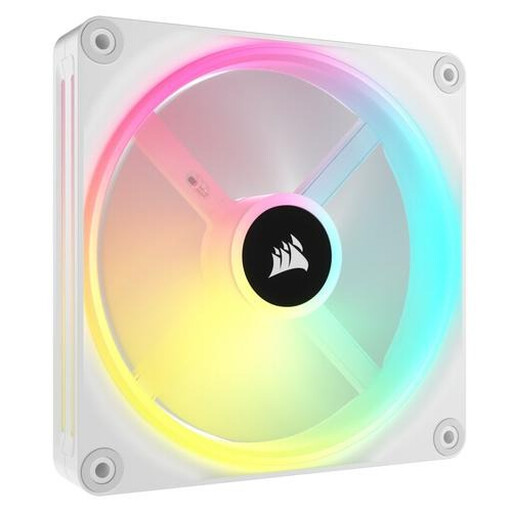
Why it suits this profile: This standalone 140mm model is ideal for an existing iCUE LINK setup with an available position at the front, top or on a radiator.
The larger size only makes sense if your case supports 140 mm fans. Check the mounting positions beforehand, along with whether you already have a compatible controller.
140 mm, PWM control, 480–2000 RPM and 34 individually addressable LEDs according to the product information.
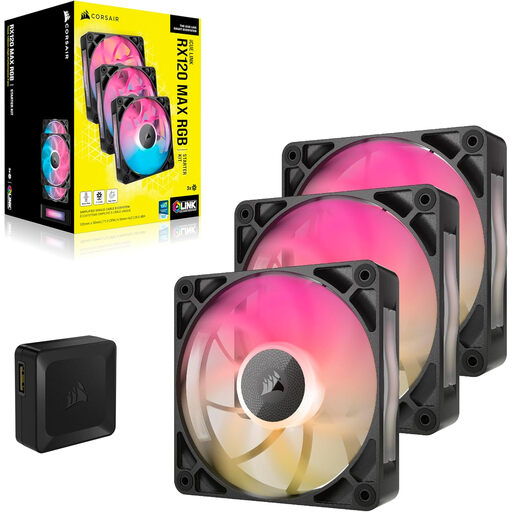
Why it suits this profile: This set is designed for users who want to fill several positions and pay extra attention to static pressure, for example when using a radiator or a case with a restrictive dust filter.
The stated 30 mm thickness means you need to check the available space carefully. Doing this beforehand helps prevent the fans from coming into contact with the radiator, memory modules or cables.
Three 120mm fans, 400–2000 RPM, quoted maximum static pressure of 4.16 mmH2O and an included RGB controller according to the product information.
We have put together a complete, up-to-date list of products that fully meet these strict selection criteria and the applicable European safety regulations.
Switch off the computer, unplug it from the mains and wait until all fan blades have stopped. During installation, look for the arrows on the frame: these indicate the direction of airflow. A typical layout is:
Connect PWM to a suitable 4-pin fan header or controller. Connect RGB only as specified in the manual for the particular model. Keep cables away from moving blades. Clean the fans with compressed air or a soft brush; do not use water.
Physical installation depends on the available 120 mm or 140 mm mounting positions. The lighting and controls also require a suitable iCUE LINK hub, controller or compatible connection. Check both the size and the ecosystem.
Not necessarily. A 140mm fan can move a large volume of air at a lower speed, but the actual noise level depends on the speed, case, radiator, dust filters and selected fan curve. Always compare the full quoted range.
Power consumption per fan is generally limited, but a system with several fans and RGB LEDs uses more power than a single fan. Check that the controller is connected correctly to the power supply, and do not exceed the maximum number of devices supported by a hub.
