
Vandaag of morgen in huis

Kwaliteit gegarandeerd

Welkomstaanbiedingen ontgrendelen: GRATIS bezorging | Tot 80% korting | Gratis 30 dagen JoyPlus-proefperiode
Download de app
A new Corsair RGB fan can significantly enhance your PC's aesthetics and performance. But the market is saturated with options, making it easy to fall into common traps. Many PC builders focus purely on the bright lights, only to discover later that their new fan sounds like a jet engine or that the installation is a cable management nightmare.
As a Joybuy Product Recommendation Officer, I'm here to help you cut through the marketing fluff. We'll look at what truly matters, so you can make an informed decision for better PC cooling and a stylish look, without any unexpected disappointments.
Before you buy an RGB fan, it's crucial to avoid these common mistakes:
To make the right choice, you need to understand a few technical specifications. We'll keep it practical.
The two standard sizes are 120mm and 140mm. Your choice depends on what your PC case supports.
These are the two most important performance indicators for a PC fan:
Corsair has simplified the installation of RGB fans with the Corsair iCUE ecosystem, particularly with its iCUE LINK technology. Instead of running separate power and RGB cables for each fan, iCUE LINK allows you to connect multiple fans together with a single cable. This drastically reduces cable clutter and makes installation much easier.
Here are some popular choices tailored to different needs and budgets.
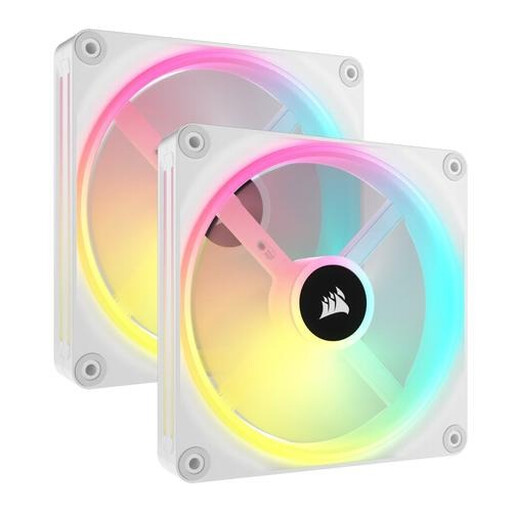
Why This Fits Their Persona: For those who want to build a visually stunning and immaculately clean PC. The white finish and extensive RGB options make this a popular choice for show builds.
The iCUE LINK system solves the 'cable spaghetti' pitfall by connecting multiple fans with a single cable. The 34 addressable LEDs per fan offer visual splendor without compromising on performance (up to 82.5 CFM).
Advantage: Exceptional RGB customisation and an extremely clean installation.
Pro: High airflow (82.5 CFM) and good static pressure (3.5 mmH2O) make it versatile.
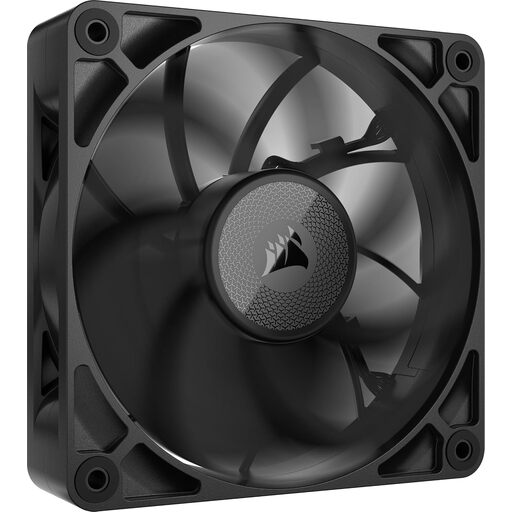
Why This Fits Their Persona: For the user who demands maximum cooling performance and quiet operation. Ideal for overclockers and gamers who count every degree Celsius, without the distraction of RGB.
This model bypasses the 'RGB over everything' trap by focusing entirely on performance. Its 30mm thickness and optimised blade design deliver very high static pressure, perfect for radiators, while keeping noise levels low.
Advantage: A focus on pure cooling power and quiet operation.
Pro: Very high static pressure (4.18 mmH2O) and a low noise level (from 10 dB) make it ideal for demanding applications.

Why This Fits Their Persona: Perfect for the PC builder who wants a noticeable upgrade in both aesthetics and cooling without paying a premium. This 3-pack offers a complete and balanced solution.
This kit provides an excellent balance between RGB (18 LEDs per fan) and performance (up to 2400 RPM). The iCUE LINK system prevents cable issues, and PWM control ensures the fans are quiet when they can be and powerful when they need to be.
Advantage: A complete and balanced starter kit.
Pro: Good all-round performance with a high maximum speed and a simple, clean installation thanks to iCUE LINK.
We have compiled a complete, up-to-date list of products that fully meet these strict selection criteria and quality standards.
For a standard gaming PC, a setup with two or three fans is often sufficient: one or two at the front for cool air intake and one at the back for hot air exhaust. For more powerful systems or cases with restricted natural airflow, additional fans at the top can help lower temperatures further.
Corsair iCUE is the all-in-one software that allows you to control and synchronise all compatible Corsair products (fans, coolers, keyboards). iCUE LINK is a specific hardware technology that drastically simplifies the physical connection of components like fans. With iCUE LINK, you can daisy-chain devices with a single cable, making the installation much cleaner and faster.
Yes, you certainly can. It's common practice to, for example, place larger, quieter 140mm fans at the front of the case for intake and a 120mm fan at the rear for a focused exhaust. As long as you connect them to your motherboard or a controller, you can manage them individually or together through the iCUE software.
