
Vandaag of morgen in huis

Kwaliteit gegarandeerd

Welkomstaanbiedingen ontgrendelen: GRATIS bezorging | Tot 80% korting | Gratis 30 dagen JoyPlus-proefperiode
Download de app
A Corsair RGB PC case fan can give your computer case better airflow and a personal touch. However, it's not wise to just look at the number of LEDs or the maximum RPM. The wrong size, a missing controller or an incompatible connector can mean the fan won't fit or won't work correctly.
In this buying guide, you'll learn what to look for in Corsair computer cooling, which specifications make a practical difference, and which type is right for your PC build.
A 120 mm PC fan and a 140 mm PC fan are not interchangeable. Therefore, you should first check the mounting points in your case or on your radiator. A 140 mm fan can move more air at a lower RPM, but it won't fit in every mid-tower case.
Also, pay attention to the thickness. Many case fans have a standard thickness of around 25 mm, but you should always check the product dimensions and the available space around the motherboard, RAM and radiator tubes.
Not every RGB case fan uses the same connector. An ARGB PC fan typically uses a 5V connector for individually addressable LEDs. Other lighting systems may require a dedicated Corsair controller or iCUE system.
Therefore, check:
With an iCUE LINK fan, the cabling is different from that of a traditional PWM case fan. Some models are listed in the product information as being supplied without a standard connector, or are intended for connection to an iCUE LINK System Hub.
A speed of 2,400 RPM sounds impressive, but a higher speed can also produce more noise. For daily use, an adjustable fan curve is more important than just the maximum RPM figure. With PWM control, the motherboard can adjust the speed based on the PC's temperature and load.
In addition, note the difference between airflow and static pressure. A fan with higher static pressure is more suitable for a radiator or a dense dust filter. For an unobstructed intake or exhaust in the case, airflow is often the most practical indicator.
A 120 mm PC fan is suitable for many standard cases, radiators and compact builds. According to its product description, the Corsair iCUE LINK RX120 RGB has a range of 400 to 2,100 RPM, PWM support and a stated maximum airflow of 73.5 CFM.
A 140 mm PC fan can be an interesting choice for a larger case. According to the listed specifications, the RX140 RGB models have a range of 300 to 1,700 RPM and a maximum airflow of approximately 94.7 CFM. Do make sure your case actually has 140 mm mounting points.
A 4-pin PWM connector allows for precise speed control. This helps you find a balance between cooling performance and noise level. A model without PWM is usually less flexible to control, depending on the motherboard and the controller used.
So, for a quiet PC fan, don't just look at the lowest stated noise level. The final noise output also depends on the set speed, case resonance, dust on the blades and how the fan is mounted.
Corsair fans differ in the number of LEDs and how the lighting is controlled. The RX and LX models in this selection offer multicolour RGB, according to their product information. For example, the Corsair CO-9051005-WW lists 34 individually addressable LEDs, while the RX120 RGB product information mentions 8 RGB LEDs.
More LEDs doesn't automatically mean better cooling. Think of the lighting as an additional feature and first assess the size, connector, PWM and airflow.
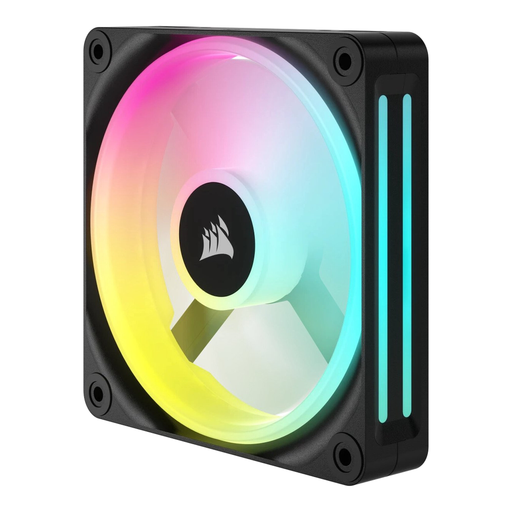
Why it's a great match: A straightforward single pack for those looking to replace an existing fan or perform their first PC upgrade.
The 12 cm diameter and the single-fan quantity are clearly stated. This way, you won't buy a set when you only need to fill one mounting position.
480–2,400 RPM, stated airflow of 63.1 CFM and LED lighting, according to the product information.
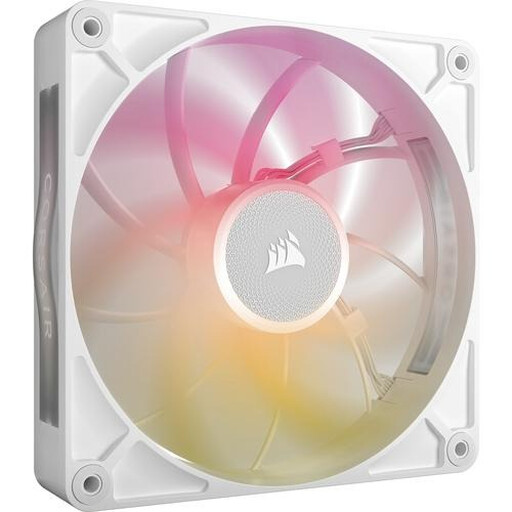
Why it's a great match: For a spacious build where a 140 mm fan will be used on a radiator or as a case fan, and PWM control is desired.
The product information explicitly mentions PWM, static pressure and suitability for both case and radiator cooling. You should also check controller compatibility.
102.9 CFM maximum airflow, 2.38 mmH2O static pressure and 8 RGB LEDs, according to the listed specifications.

Why it's a great match: For gamers and PC builders who want to fill multiple 120 mm slots with a single, cohesive iCUE LINK system.
The pack is listed as containing three fans and an iCUE LINK System Hub. Before buying, be sure to check the maximum number of devices and the available connectors.
Three 120 mm PWM fans, 400–2,100 RPM, a stated 74.2 m³/h and a Zero RPM mode, according to the product description.
We have compiled a complete, up-to-date list of products that fully meet these strict selection criteria and comply with current European safety regulations.
Clean the dust from your fans regularly with compressed air or a soft brush. Do not use water, and hold the blades in place while cleaning to prevent damage from them spinning freely.
That depends on the model. The product information for several RX, LX and CO models states that they are suitable for both case and radiator cooling. For a radiator, static pressure, PWM control and the correct size are important. You should also check the mounting holes and the thickness.
For iCUE LINK models, an iCUE LINK System Hub or a compatible system may be required. A standard 4-pin PWM connector on the motherboard is not automatically sufficient for all functions. Therefore, before you buy, check what's included in the box and which connector is listed.
The fan motor typically uses more power than the LEDs, but the total consumption varies by model, speed and brightness. If you have multiple fans, it's wise to check the controller's manual and your motherboard's specifications. This will prevent you from connecting more devices than the system can support.
