
Vandaag of morgen in huis

Kwaliteit gegarandeerd

Welkomstaanbiedingen ontgrendelen: GRATIS bezorging | Tot 80% korting | Gratis 30 dagen JoyPlus-proefperiode
Download de app
Building a PC is an investment in both performance and aesthetics. After you've selected the perfect processor and graphics card, the fans are the next step. A good Corsair RGB fan can keep your system cool while looking fantastic. But the market is filled with marketing jargon, which can make the choice difficult. Many PC builders fall into the same traps, ending up with noisy fans or unexpected extra costs.
This guide will help you make the right choices. We'll discuss the most common pitfalls and explain which specifications you should really pay attention to. This way, you'll invest in PC cooling that is both effective and stylish.
Before you make a purchase, it's important to recognise two common misconceptions that manufacturers use to promote their products.
Don't be distracted by marketing. Focus on these three objective specifications to find the right fan for your build.
This is the most important technical trade-off.
So, don't just look at CFM. First, determine where you will place the fan and then choose the right balance between airflow and static pressure.
The size of the fan directly impacts its performance and noise level.
For a quiet case fan, a PWM fan is a must-have. PWM (Pulse Width Modulation) allows your motherboard or a controller to precisely and dynamically adjust the fan speed based on temperature. This means the fans only spin up when truly necessary.
We've selected some popular Corsair models and matched them with different user profiles, so you can find a fan that fits your specific needs.
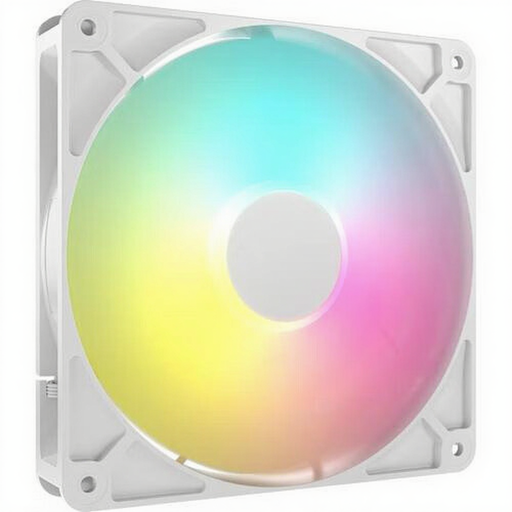
Why This Fits Their Persona: Ideal for those seeking a great balance of price, performance, and aesthetics. This fan offers a clean look and solid cooling without locking you into a complex and expensive ecosystem. Perfect for a first upgrade or a budget-conscious build.
This fan uses a standard 4-pin PWM connector and a 3-pin ARGB connector. This means you don't need a special hub and can connect it directly to most modern motherboards, which avoids hidden costs.
Good airflow (up to 95.5 CFM) for use as a case fan. The clean, white PC fan design fits well in modern builds.
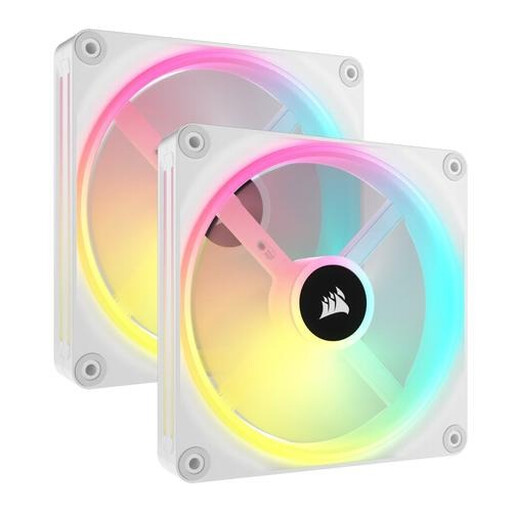
Why This Fits Their Persona: For the builder who wants a seamless RGB experience and minimal cable management. The iCUE LINK system connects fans with a single cable, resulting in an extremely clean build. The 34 addressable LEDs per fan offer extensive customisation options.
Although this is an ecosystem, its value is clear: superior cable management and perfect synchronisation. The 'trap' here is a deliberate choice for convenience and a premium finish, not a hidden drawback.
Simplified installation with the iCUE LINK system. Its high static pressure (3.5 mmH2O) also makes it highly suitable as a radiator fan.

Why This Fits Their Persona: This fan is designed for those who want a whisper-quiet system without compromising on cooling performance. Its magnetic levitation bearings and wide PWM range ensure minimal noise output under low loads, while delivering powerful cooling when needed.
This model focuses on the specifications that truly matter for quiet operation: a low minimum RPM (300 RPM) and a low minimum noise level (10 dB). It doesn't fixate on a maximum CFM number.
The magnetic levitation bearings reduce friction, increase lifespan, and ensure quieter operation. The combination of high airflow (94.7 CFM) and good static pressure makes it an excellent all-rounder.
We have compiled a complete, up-to-date list of products that fully meet these strict selection criteria and EU regulations.
A PWM fan has a 4-pin connector and offers precise speed control via the motherboard. This results in quieter and more efficient operation. A DC fan (3-pin) is controlled by adjusting the voltage, which is less precise and often results in a higher minimum RPM and therefore more noise. For a quiet build, PWM is the recommended choice.
This depends on your components and case, but a good baseline is two to three fans. A typical setup is:
That depends on the model. Standard Corsair ARGB fans (like the RS series) can often be connected to a motherboard with a 5V ARGB header without a controller. However, models from the Corsair iCUE LINK series (like the QX and RX) require the specific iCUE LINK System Hub to function. Without this hub, you cannot power or control the fans. Always check the product description to see what is required.
