
Vandaag of morgen in huis

Kwaliteit gegarandeerd

Welkomstaanbiedingen ontgrendelen: GRATIS bezorging | Tot 80% korting | Gratis 30 dagen JoyPlus-proefperiode
Download de app
A Corsair RGB case fan can improve airflow through your case while giving your build a cohesive look. However, not every Corsair PC fan is suitable for every build. Choosing the wrong size, missing a controller or using an incompatible connection can leave you paying more without achieving the results you want.
In this buying guide, we explain what to look for in an RGB computer case fan, radiator fan or standard case fan. You’ll also find practical recommendations for different types of PC builder.
More LEDs do not automatically mean that a fan will cool better. Also check airflow, static pressure and the speed range. For example, a fan with higher static pressure is more suitable for a radiator or dust filter than for an open rear exhaust position in your case.
A 120mm PC fan will not necessarily fit a 140 mm mounting point. Always check your PC case manual. When installed in a suitable mounting position, 140mm models can provide greater airflow at a lower speed, but 120 mm is the most commonly used size in many cases.
Also pay attention to thickness. Most case fans are around 25 mm thick, while some models, such as the RX120 MAX, are listed as 30 mm thick. This can affect the available space for cables, radiators and other components.
A standard PWM case fan usually uses a 4-pin connection on the motherboard. RGB may use a separate connection. With Corsair iCUE LINK models, the cabling works differently: multiple fans can be connected within the ecosystem and may require a compatible hub.
Check the following before buying:
Airflow is often listed in CFM or m³/h. Where possible, compare values in the same unit. High airflow is useful for intake and exhaust positions in a spacious case. For a radiator, CPU cooler or dense dust filter, static pressure, measured in mmH2O, is at least as important.
The figures in this guide come from the relevant product information. Different product listings may use rounded figures or different testing methods. For that reason, use the specifications primarily to compare models within the same series.
PWM control allows the speed to adjust automatically according to temperature. A fan that starts at, for example, 300 or 400 RPM can remain quiet under light loads. A higher maximum speed provides extra capacity when the processor or graphics card produces more heat.
The stated noise levels, such as 10 dB at low speed and approximately 30 to 37 dB at high speed, are product figures from the listings. In a real PC, the case, resonance, dust filters and fan curve also affect the result.
The arrows on the frame show the direction of rotation and airflow. A typical layout is:
Secure the fan firmly and keep cables away from the blades. Fully shut down the PC and unplug it from the mains before installing or removing internal hardware.
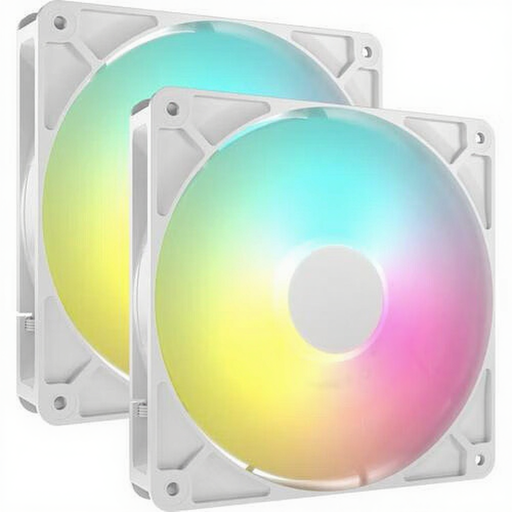
Why it suits this profile: A set of two 140mm fans is practical when you want to address your case’s intake and exhaust in one go.
The size, PWM support and included quantity are clearly stated. This means you won’t need to combine two separate fans with different connections.
Two 140mm fans, PWM control, a maximum speed of 1700 RPM and, according to the product information, maximum airflow of 95.5 CFM per fan.
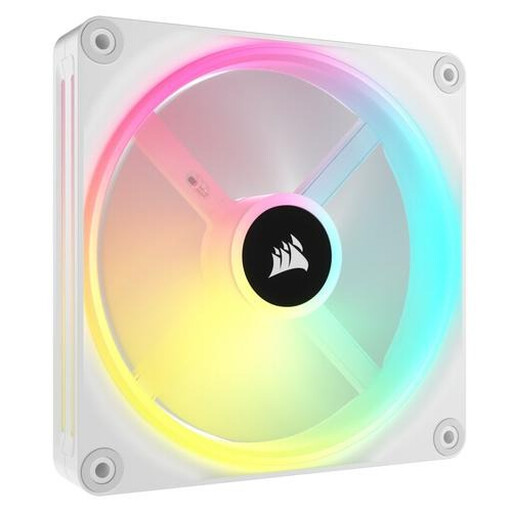
Why it suits this profile: Ideal for a neat-looking build where 140mm sizing, individually addressable lighting and iCUE LINK connectivity are important.
The product information explicitly mentions PWM, 140 mm and use with both cases and radiators. However, check beforehand that you already have a suitable iCUE LINK setup.
34 individually addressable LEDs, 480–2000 RPM, PWM support and, according to the listing, maximum airflow of 63.1 CFM.
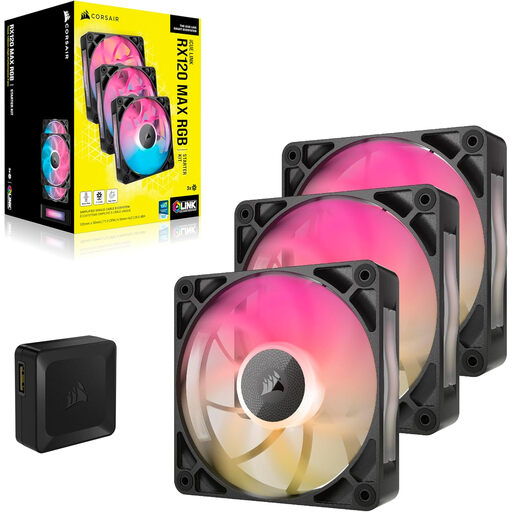
Why it suits this profile: This set is suited to users who want to fill several 120mm positions and have room for a thicker fan.
The 30 mm thickness is stated in the product details. This allows you to check in advance that there is enough clearance for the radiator, memory modules and cables.
Three 120mm fans, 400–2000 RPM, PWM control, maximum airflow of 71.3 CFM according to the listing and an RGB controller included in the box.
An RGB PC fan will only work as intended when the connection is correct. With a standard PWM case fan, connect the speed control to a 4-pin fan header. A separate ARGB or Corsair controller may be required for the lighting.
With a Corsair iCUE RGB setup, you can generally configure lighting effects and fan curves in the software. Only use the cables and hubs designed for the relevant system. With an expansion such as the white Corsair iCUE LINK LX120 RGB, the product information states that an active system hub is required. Also check how many devices may be connected to each channel.
For everyday use, create a moderate fan curve. Let the fans run quietly under light loads and increase the speed only when internal temperatures rise. Clean the blades with compressed air or a soft brush; do not use water.
We’ve put together a complete, up-to-date list of products that fully meet these strict selection criteria and the applicable European safety regulations.
No. Check the mounting points and the available space around the motherboard, radiator and cables. A 140mm model has wider mounting-hole spacing than a 120mm fan.
That depends on the model and configuration. Some iCUE LINK products are supplied as starter kits with a hub, while individual expansion fans can connect to an existing hub. Check the packaging and product details before buying.
A case fan’s power consumption is generally limited, but the exact consumption varies by model and speed. PWM control can help prevent the fan from running at maximum speed continuously. As a result, the noise level will usually remain lower than when the fan runs at full speed all the time.
