
Vandaag of morgen in huis

Kwaliteit gegarandeerd

Welkomstaanbiedingen ontgrendelen: GRATIS bezorging | Tot 80% korting | Gratis 30 dagen JoyPlus-proefperiode
Download de app
A Corsair RGB case fan can improve airflow in your desktop PC and give your build its own distinctive look. However, it is not sensible to focus only on the number of LEDs or the maximum speed. A fan must be compatible with your case, motherboard and radiator, as well as the noise level you want.
Corsair’s product information lists features such as PWM control, iCUE LINK and Zero RPM mode for various models. Always check these features alongside the connections and dimensions of your PC.
A 140 mm computer case fan can move a lot of air at the same speed, but the mounting points in a mid-tower or compact case are not always suitable. Check your case manual before buying a 140mm model. Also make sure there is enough clearance around the motherboard, memory and radiator.
A 120 mm computer case fan is generally more versatile. This size is more likely to fit at the front, top and rear of a PC case, making it a practical choice for a new build or an upgrade.
A PWM case fan usually uses a 4-pin connection for speed control. RGB lighting, however, may use a separate connection. A standard 5V ARGB case fan is not automatically compatible with every Corsair iCUE system.
With an iCUE LINK fan, you need to check whether a suitable System Hub is included. Some models are intended as extensions for an existing chain. A starter pack is more likely to include the required hub, but check this for each product.
A high maximum RPM can be useful for a radiator or demanding gaming sessions, but it can also generate more noise. That is why you should consider:
According to the product information provided, the stated noise levels for various Corsair models are around 10 dB at low speed and approximately 29.5 to 37 dB at high speed. These are product specifications; your actual experience will depend on installation, the case, dust and other components.
Choose 120 mm if you want broad compatibility, use a compact case or want to replace an existing fan. A 120mm fan is also a logical choice for many radiators.
Choose 140 mm when your case supports the mounting points and you want to use larger fan blades. Pay particular attention to the spacing between the screw holes. A larger fan is not automatically quieter or more powerful in every case.
With PWM, the motherboard or a fan controller can adjust the speed more accurately. At low load, the fan runs more slowly; during gaming or rendering, its speed can increase. This helps you strike a balance between airflow and noise.
Note that some product pages list different connector details. Therefore, check both the technical table and your motherboard manual before ordering.
A Corsair RGB fan may use different ecosystems. iCUE LINK is designed for connected Corsair components via a compatible hub. A standard ARGB case fan generally uses a 5V ARGB header on the motherboard. These systems are not automatically interchangeable.
If you want to install multiple fans, check:
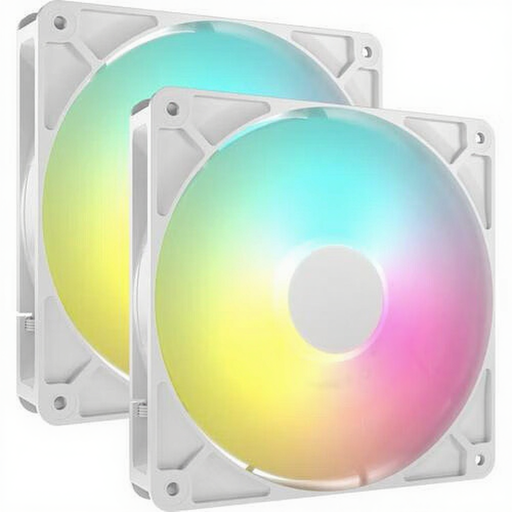
Why it suits this profile: This set contains two 140mm fans for a front-and-rear setup or two intake positions. The 4-pin PWM connection and 5V ARGB connection are suitable for a traditional PC build with motherboard control.
The product specifications mention both PWM and ARGB, so you do not have to rely solely on the RGB image. However, check beforehand that your case supports 140 mm fans.
Two fans, 330–1700 RPM, a maximum of 95.5 CFM and a stated noise level of 10–36 dB.
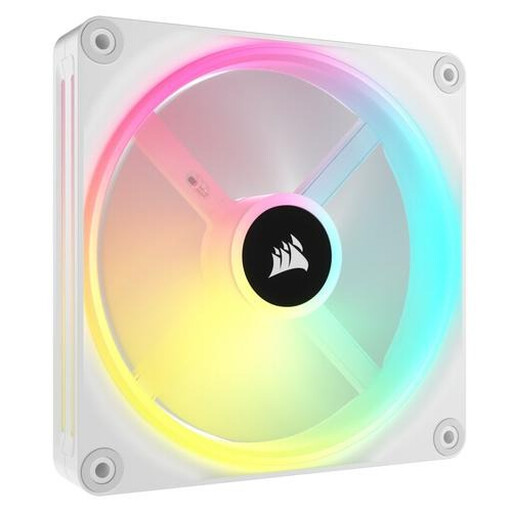
Why it suits this profile: This white 140mm fan is designed for users who want to expand an iCUE LINK build with individually addressable RGB lighting.
The specifications mention PWM, a range of 480–2000 RPM and 34 individually addressable LEDs. This clearly distinguishes control from lighting.
Up to 63.1 CFM, suitable for case and radiator cooling, with a stated noise range of 10–37 dB.

Why it suits this profile: For a new gaming PC or a case with several 120mm mounting positions, this Corsair case fan 3-pack provides three fans and an iCUE LINK System Hub.
The starter set explicitly lists the included hub and connection via iCUE LINK. This makes the required infrastructure clearer than with a standalone expansion.
Three 120mm fans, PWM, 400–2100 RPM, AirGuide technology according to the product description and a stated maximum of 36 dB.
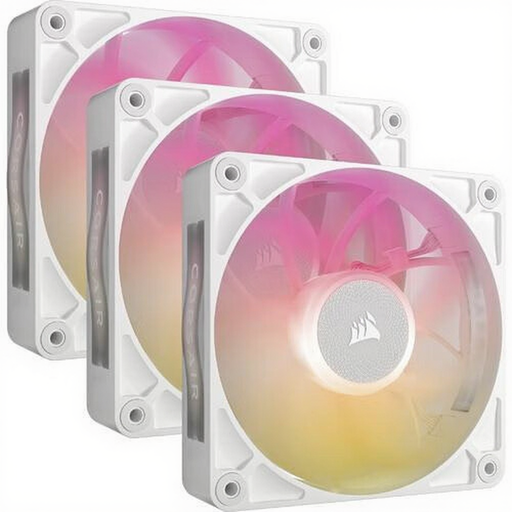
Why it suits this profile: This set is designed for users who want to fill three 120mm mounting positions and value a stated noise level of up to 29.5 dB at high speed.
The 30mm thickness is clearly stated. Measure the available space around your radiator and case before ordering to avoid problems caused by the thicker frame.
Three fans, up to 71.3 CFM according to the product information, PWM control and eight RGB LEDs per fan.
We have compiled a complete, up-to-date list of products that fully meet these strict selection criteria and the applicable European safety regulations.
Switch the computer off completely and unplug it from the mains before installing a fan. Check the arrows on the frame: they indicate the direction of airflow. In most cases, fans at the front or bottom draw air in, while fans at the rear or top exhaust warm air.
Secure the fan firmly, but do not overtighten the screws. Keep cables away from the blades and remove dust regularly using compressed air or a soft brush. Do not use water. Setting up an appropriate PWM fan curve also prevents the fan from running at high speed unnecessarily.
It can be, but check the static pressure and dimensions. According to their product information, several models in this overview are suitable for case and radiator cooling. A radiator can create more resistance than an open case grille.
PWM concerns fan speed control via a 4-pin connection. ARGB concerns individually addressable lighting via a compatible 5V connection. A fan can offer both functions, but the connections and controllers are separate.
Power consumption depends on the motor speed, the number of fans and the brightness of the LEDs. At low load, PWM control and a Zero RPM mode can limit how much the fans run, when the model supports this feature. Check the manual and the specifications of your chosen fan or hub for the exact connection limits.
