
Vandaag of morgen in huis

Kwaliteit gegarandeerd

Welkomstaanbiedingen ontgrendelen: GRATIS bezorging | Tot 80% korting | Gratis 30 dagen JoyPlus-proefperiode
Download de app
A Corsair RGB case fan can improve your PC’s cooling and give your case a distinctive look. However, a colourful fan is not automatically suitable for every PC. The size, connection and way air flows through your case are just as important as the number of RGB LEDs.
For gamers, PC builders and hardware enthusiasts, there are three common pitfalls:
Looking only at maximum rpm
A high speed can move more air, but it can also create more noise. A quiet PC fan benefits most from good PWM control and a suitable fan curve.
Confusing 120 mm and 140 mm
A 140 mm RGB case fan will not fit every mounting position. Check the cut-outs in your case, radiator or CPU cooler beforehand.
Underestimating the connection
A Corsair iCUE LINK fan works within a specific ecosystem. Some versions require a controller or hub. A standard 4-pin PWM case fan is different from a fan connected via iCUE LINK.
The most common sizes are 120 mm and 140 mm. A 120 mm fan is suitable for the front, rear and top of many PC cases. A 140 mm model has a larger frame and can move a lot of air at a lower speed, but it requires a suitable mounting position.
Check:
Arrows on the frame generally indicate the direction of rotation and airflow. For a simple set-up, you can draw air in at the front and bottom, then expel warm air at the rear or top.
Airflow, often specified in CFM, indicates how much air a fan can move at maximum capacity. Static pressure, expressed in mmH₂O, is particularly relevant when air has to pass through a radiator, dust filter or restrictive fan grille.
For an open case, the emphasis is usually on airflow. For a radiator fan or compact case, static pressure is more important. Always compare values within the same product range, as measuring methods and conditions may differ.
A quoted noise level, such as 29,5 to 36 dB, is a product specification measured under certain conditions and is not a guarantee of the noise level in your complete PC. Resonance, case panels and other fans also play a part.
A PWM case fan generally uses a 4-pin connection. This allows the motherboard to adjust the speed more accurately according to the temperature. It is more practical than a fan that only runs at a fixed speed.
Also note the difference between:
The product description should clearly state which cables, hub or controller are included. An additional controller may sometimes be required for expansion fans.

Why it suits this profile: A set of two 140 mm fans is practical for a case with large front or top mounting positions. The specified speed ranges from 300 to 1700 rpm, and PWM control is included.
The size and pack contents are clearly stated. This means you will not accidentally buy one fan when you want to fill two mounting positions.
140 mm size, magnetic bearing according to the product description, up to 94,7 CFM and RGB lighting.
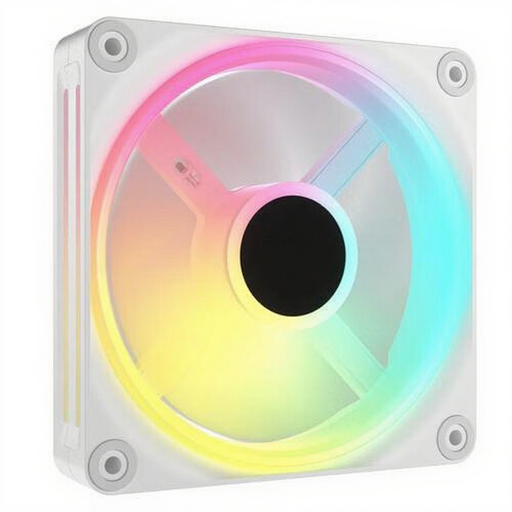
Why it suits this profile: This set is designed for a neat 120 mm build with three fans, PWM control and individually addressable RGB LEDs.
The product information states both the quantity of three fans and the 120 mm size. However, check that you have an iCUE LINK controller and the required cables available.
Up to 2400 rpm, up to 63,1 CFM, PWM support and individually addressable lighting.
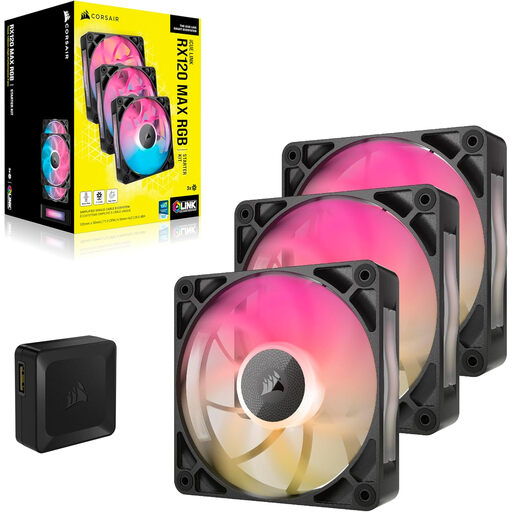
Why it suits this profile: These 30 mm-thick fans are aimed at users who pay close attention to airflow and noise levels, for example when using a radiator or building a compact high-performance system.
The extra thickness is clearly stated. Therefore, check the available space in your case before installing this radiator fan.
30 mm thickness, up to 71,3 CFM, a specified maximum noise level of 29,5 dB and an RGB controller included according to the product information.
We have put together a complete, up-to-date list of products that fully meet these strict selection criteria and the applicable European safety regulations.
Switch off the computer completely, unplug it from the mains and wait until all the fan blades have stopped. Mount the fan securely without overtightening the screws. Connect the PWM cable to a suitable 4-pin header and, with iCUE LINK models, check that the hub and power supply are connected correctly.
Use a soft brush or compressed air for maintenance. Do not clean the fan with water. Keep cables away from the blades and, after installation, check that there are no vibrations or unusual noises.
Not every fan is automatically suitable for every radiator. Check the stated compatibility, static pressure and available thickness. Models such as the LX120-R RGB and RX series are listed in the product information for both case and radiator use.
Possibly. Various iCUE LINK models require a hub or system controller. Check whether it is included with the set or needs to be purchased separately. A standard 4-pin PWM connection does not automatically replace the iCUE LINK connection.
According to the product description, a magnetic bearing can contribute to smooth operation and lower noise levels. However, the actual service life depends on dust, temperature, installation and usage time. Keep the fan clean and replace it if persistent vibrations or noticeably unusual noise occur.
