
Vandaag of morgen in huis

Kwaliteit gegarandeerd

Welkomstaanbiedingen ontgrendelen: GRATIS bezorging | Tot 80% korting | Gratis 30 dagen JoyPlus-proefperiode
Download de app
A Corsair RGB case fan combines airflow with customisable lighting. However, not every fan is automatically suitable for every computer case. A 140mm model, for example, will not always fit in a compact case, while a powerful 120mm case fan can become unnecessarily loud if the fan curve is configured incorrectly.
As a Joybuy Product Recommendation Officer, I filter product information based on practical considerations. Pay particular attention to three common pitfalls before buying a Corsair computer case fan.
An RGB PC fan may look attractive, but lighting says nothing about airflow, static pressure or noise levels. Always check the technical specifications. A fan fitted at the front of your case mainly needs to provide good airflow. For a radiator, static pressure is also important because the air has to pass through a dense fin array.
A 120mm case fan is a common size in many PC cases. A 140mm case fan can move more air at a lower speed, but it takes up more space. Check the mounting holes, maximum thickness and clearance around the RAM, radiator and motherboard coolers.
The product information for the Corsair iCUE LINK RX140 RGB lists a diameter of 140mm and a range of 300 to 1700 RPM. This makes this type of fan interesting for suitable larger mounting positions, but not for every mid-tower case.
Quoted noise levels usually apply at specific speeds. According to the product descriptions in this range, noise levels are around 10 dB at low speed, while some models list 35 to 37 dB at maximum speed. In practice, noise levels also depend on resonance inside the case, dust on the blades and the fan curve you have set.
A PWM case fan usually uses a 4-pin connector. This allows the computer to adjust the speed more precisely based on temperature. It is more practical than a fan that only runs at a fixed speed. However, check that your motherboard has enough fan headers, or whether you need a controller.
Airflow may be listed in the product information in CFM or m³/h, for example. Use these values mainly to compare models within the same series. High airflow is useful for an intake or exhaust fan in a case with an open design. For a radiator or dense dust filter, you should also look at static pressure, expressed in mmH₂O.
The Corsair iCUE LINK LX120 RGB, for example, is listed with a maximum of 69,9 CFM and static pressure of up to 5,22 mmH₂O. According to the product description, the RX120 MAX has a thickness of 30mm, a maximum airflow of 71,6 CFM and static pressure of 4,18 mmH₂O. However, a thicker fan will not fit every standard mounting position.
A Corsair iCUE LINK fan is designed for the iCUE LINK ecosystem. This allows multiple compatible components to be connected through a linked connection. Before buying, check whether a System Hub, cables or controller are included.
Not every RGB model uses the same connection. A standard 4-pin PWM connector controls the fan speed, while RGB lighting is connected via a compatible controller or RGB header. Follow the instructions for the specific model and switch the computer off completely before connecting internal hardware.

Why it suits this profile: A standalone 120mm fan is practical if you want to add a fan in one position or replace an existing fan. The 4-pin PWM connection makes this a straightforward choice for a first PC upgrade.
The size, PWM control and maximum speed of 2400 RPM are clearly stated. You therefore do not have to judge it based on the RGB image alone.
120mm size, 34 individually addressable LEDs, PWM and, according to the product information, maximum airflow of 63,1 CFM.

Why it suits this profile: This pack is designed for a larger case with two available 140mm positions. The combination of iCUE LINK, PWM and magnetic bearings is a good fit for a tidy, expandable build.
The pack contains two fans and the specifications list 140mm, 300–1700 RPM and PWM. However, check beforehand that your case supports this size.
Two 140mm fans, maximum airflow of 94,7 CFM according to the product information, RGB lighting and iCUE software support.
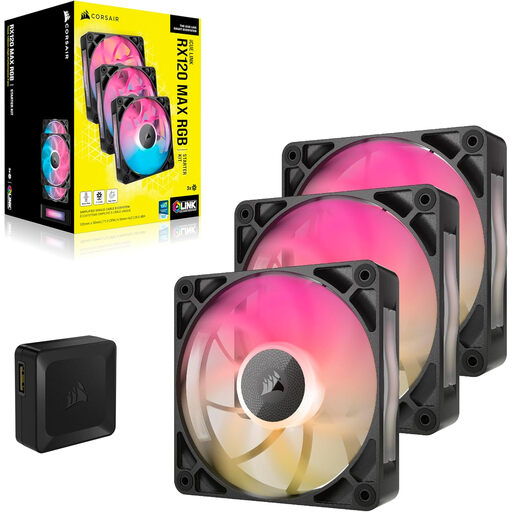
Why it suits this profile: A set of three 120mm fans is ideal for users who want to equip several positions in a gaming PC with the same lighting and control system. However, the extra thickness means you will need to check the available clearance.
The product description lists more than just RGB: it also specifies a thickness of 30mm, PWM and use for case and radiator cooling. This allows you to assess the physical fit in advance.
Three fans, maximum airflow of approximately 71,3 CFM according to the product information, RGB controller included and a quoted noise level of up to 29,5 dB.

Why it suits this profile: This starter pack is suitable for a new build or for anyone who wants to install several fans at once and manage them centrally.
The System Hub is included. This means you will not discover afterwards that a standalone iCUE LINK fan cannot be connected straight away without a suitable hub.
Three 120mm fans, PWM, AirGuide according to the product description and a quoted range of 400–2100 RPM.
We have put together a complete, up-to-date list of products that fully meet these strict selection criteria and the applicable European safety regulations.
Computer hardware is covered by statutory consumer rights in the EU. The product information for the models mentioned states a statutory warranty of at least two years; additional rights may arise under Dutch law.
No. Check your case’s specifications and the available mounting holes. Also look at the clearance around the RAM, radiator and motherboard coolers. A 120mm model can be used in more cases.
This depends on the model and the connections supplied. Starter kits often include a System Hub, while a standalone fan may require additional hardware. For this reason, check the contents of the package before placing your order.
Power consumption varies by model, speed and lighting brightness. PWM control reduces average consumption when the fan is not running continuously at full speed. For an exact calculation, consult the electrical specifications of your chosen model and its manual.
