
Vandaag of morgen in huis

Kwaliteit gegarandeerd

Welkomstaanbiedingen ontgrendelen: GRATIS bezorging | Tot 80% korting | Gratis 30 dagen JoyPlus-proefperiode
Download de app
A Corsair RGB case fan can improve your PC cooling while also giving your build a customisable look. However, not every RGB PC fan is automatically suitable for every case. The wrong size, a missing controller or an unclear connection can mean buying additional components or being unable to use the fan properly.
This buying guide helps you select a suitable computer case fan, radiator fan or 3-pack of fans based on verifiable specifications.
RGB, ARGB and Corsair iCUE LINK are not the same. A fan may have lighting but still not connect directly to every motherboard header. Therefore, check:
Some standalone iCUE LINK models do not include the required hub. This is not always clearly shown in a prominent product image. Therefore, check the package contents and technical specifications.
A higher speed does not automatically mean a quieter PC fan. Noise levels can increase at high speed. Always consider the combination of:
A fan that can run slowly under light loads is often a better choice for a quiet work or gaming PC than a model that only performs well at high speed.
A 120 mm PC fan fits many cases and radiators, but a 140 mm PC fan requires more spacious mounting points. Check your PC case manual before ordering. Also pay attention to thickness: standard models are often around 25 mm thick, while some MAX versions are thicker.
A 120 mm model is a practical choice when you have multiple mounting positions or use a radiator with 120 mm mounting points. In a suitable case, a 140 mm model can provide high airflow at a lower speed.
Examples from the range:
A PWM fan usually uses a 4-pin connection. This allows the motherboard or a compatible controller to adjust the speed automatically according to the temperature. This is useful when you want to balance PC cooling and noise.
Check that your motherboard has enough fan headers if you are installing several standalone fans. With a 3-pack of fans using an interconnected system, cable management may be simpler, but the required hub remains important.
For fans installed at the front or rear of the case, airflow is an important indicator. For a radiator fan, static pressure, measured in mmH₂O, is also relevant. A radiator creates more resistance than an open grille.
According to the supplied product specifications, the LX120-R RGB, for example, has maximum static pressure of 3.8 mmH₂O and maximum airflow of approximately 70 CFM. Use these figures to compare models within the same product category; measurements are not always taken under exactly the same conditions.
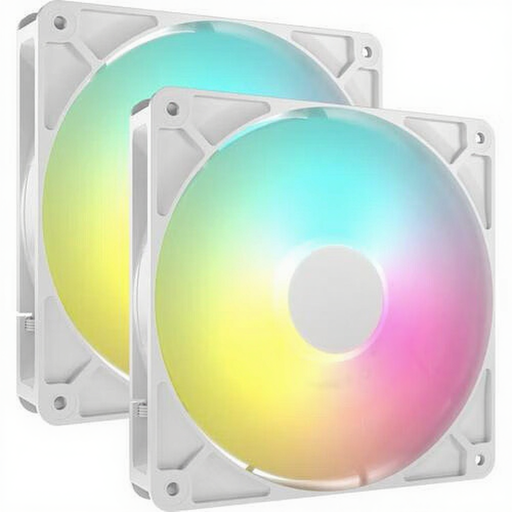
Why this product suits the profile: This 140 mm pack is suitable when your case has two large mounting positions and you want to install two fans straight away.
The product specifications list 4-pin PWM, a range of 330 to 1700 RPM and 8 individually addressable LEDs per fan. However, check that your motherboard has a suitable ARGB header.
Two 140 mm fans, PWM control, up to 95.5 CFM and a stated noise range of 10 to 36 dB.

Why this product suits the profile: A suitable choice for a spacious gaming PC where two 140 mm fans with iCUE LINK support are required.
The pack contains two fans and lists PWM support. However, the iCUE LINK connection means you should check your existing hub and cabling.
Magnetic bearing according to the product description, 300 to 1700 RPM and stated airflow of approximately 94.7 CFM.

Why this product suits the profile: This 3-pack of fans is suitable for users who want to fill several positions or install a radiator, while managing the cabling through an iCUE LINK system.
The three 120 mm models are designed for case and radiator use and support PWM. Check that an iCUE LINK hub is available before ordering.
Up to 2400 RPM, approximately 70 CFM airflow, 18 RGB LEDs per fan and a stated maximum noise level of 35.1 dB.
We have put together a complete, up-to-date list of products that fully meet these strict selection criteria and the applicable European safety regulations.
Switch off the computer completely and unplug it from the mains before installing a fan. Pay attention to the arrows on the frame: they show the direction of airflow. The front and bottom are often used as intake positions, while the rear and top exhaust warm air.
Connect PWM to a suitable fan header and keep cables away from the blades. When cleaning, use a soft brush or compressed air. Do not rinse the fan with water. According to the product information, the statutory warranty is at least two years within the EU; this is separate from the actual service life, which depends on usage, dust and installation.
It can be, but check the product specifications. Models such as the RX120, RX140 and LX series are listed for both case and radiator use. For radiators, static pressure, PWM control and the correct mounting size are particularly important.
Many iCUE LINK setups require a compatible system hub. Some starter packs include one, while standalone fans are often sold as expansions. Therefore, check the included accessories before ordering.
The power consumption of an individual fan is generally limited, but several fans, LEDs and a controller use more power together. Check the stated current and connect the system according to the instructions from Corsair and your motherboard.
