
Vandaag of morgen in huis

Kwaliteit gegarandeerd

Welkomstaanbiedingen ontgrendelen: GRATIS bezorging | Tot 80% korting | Gratis 30 dagen JoyPlus-proefperiode
Download de app
A Corsair RGB case fan can improve airflow through your PC while giving it a personal look. However, it’s easy to overpay for lighting, order the wrong size or choose a fan that isn’t properly compatible with your motherboard and case.
The key differences aren’t just about the number of RGB LEDs. Pay particular attention to size, connection, noise level, airflow, static pressure and mounting depth. These checks allow you to compare a Corsair PC fan using verifiable product specifications rather than marketing claims.
Most PC cases use a 120 mm case fan. Some cases and radiators have room for a 140 mm case fan. According to the product specifications, a 140 mm fan can move more air, but it won’t automatically fit an opening designed for 120 mm.
Measure your existing fan or check your case manual. Also pay attention to the thickness. The Corsair iCUE LINK RX120 MAX RGB, for example, is 30 mm thick, while many standard fans are approximately 25 mm thick. Check that there is enough clearance around the radiator, graphics card, cables or side panel.
PWM controls the rotational speed via a 4-pin connection. This allows the motherboard or controller to adjust the speed according to the temperature. RGB lighting uses a separate connection or system hub.
A Corsair iCUE LINK fan works within the iCUE LINK ecosystem. Several models require a compatible hub. A standard 5V ARGB connection on the motherboard is not automatically the same as iCUE LINK. So check:
A higher RPM rating does not automatically mean a quieter or more suitable fan. The maximum noise level generally increases when the fan runs faster. For a quiet PC fan, the minimum and maximum noise levels, PWM control and fan curve are therefore all relevant.
The stated noise levels are product specifications taken from the product information. Real-world results may vary according to the case, installation, ambient temperature and fan curve, based on a brand’s own research or measurements. Use the figures as a point of comparison, not as a guarantee of a particular listening experience.
Airflow, usually shown in CFM, indicates how much air the fan can move at maximum speed. This is relevant for intake and exhaust positions in your case.
For a radiator or dense dust filter, static pressure, measured in mmH₂O, is just as important. A Corsair fan intended for radiator use needs to be able to push air through resistance. On paper, a model with higher static pressure is better suited to this than a fan designed primarily for unrestricted airflow.
Choose 120 mm when your case, radiator or bracket is designed for that size. A 140 mm model may be worth considering for compatible front, top or bottom positions. The iCUE LINK RX140 RGB models, for example, state a speed range of 300 to 1700 RPM and maximum airflow of approximately 94.7 CFM.
Also check the direction of the airflow. The arrows on the frame usually show the direction of rotation and airflow. Front and bottom fans often draw air in, while fans at the rear and top exhaust warm air.
A single fan is useful as a replacement or for expanding your system. A 3-pack may be more practical if you want to fill several positions at once. Compare the package contents carefully: a product with one fan does not automatically include a controller, while some sets do.
Also consider the colour. A black Corsair RGB case fan will generally suit a dark build, while white models complement a light-coloured case and visible components.

Why it suits this profile: This single 120 mm fan is suitable when you want to expand one position or replace an existing fan without immediately buying a large set.
The product information clearly states 120 mm, PWM and a 4-pin connection. This allows you to check basic compatibility in advance.
34 individually addressable LEDs, maximum airflow of 63.1 CFM and a speed range of 480 to 2400 RPM.
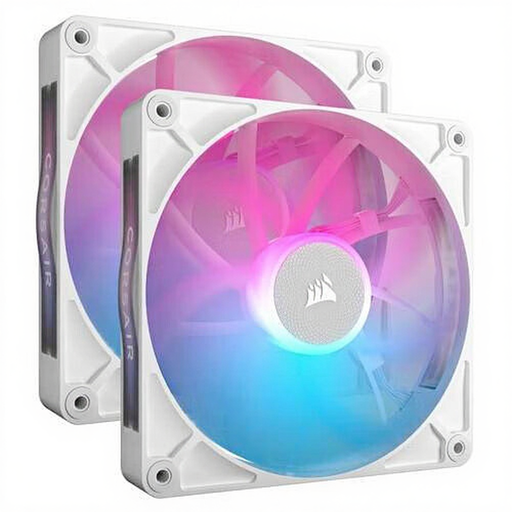
Why it suits this profile: This set is ideal for a spacious case with two 140 mm positions, where quiet operation and a uniform appearance are important.
The size, PWM support and maximum airflow and noise levels are listed in the product details, so you don’t have to choose based on RGB lighting alone.
Two 140 mm fans, 300–1700 RPM, approximately 94.7 CFM maximum and a stated noise range of 10 to 36 dB.
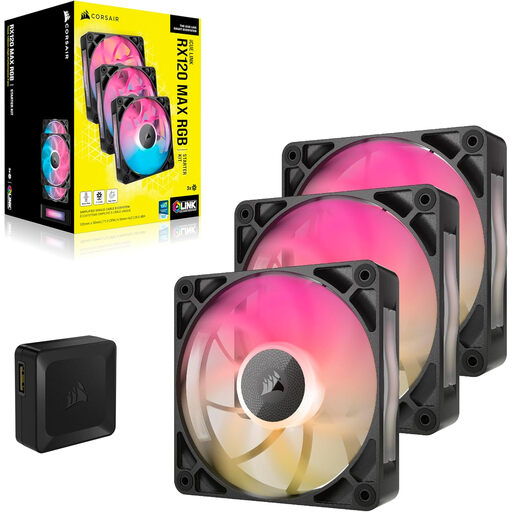
Why it suits this profile: This set is designed for users who want to fill three 120 mm positions and have room for a thicker fan for case or radiator use.
The product information explicitly states the 30 mm thickness and PWM control. This helps prevent the fan from coming into contact with cables or a radiator bracket.
3-pack, maximum airflow of 71.3 CFM, maximum static pressure of 4.16 mmH₂O and a stated maximum noise level of 29.5 dB.
We’ve put together a complete, up-to-date list of products that fully meet these strict selection criteria and the applicable European safety regulations.
Switch off the computer, unplug it from the mains and wait until all fan blades have stopped turning. Install the fan according to the airflow arrows and tighten the screws evenly. Keep cables away from moving parts.
Dust can reduce airflow. Clean the blades regularly with a soft brush or compressed air. Do not use water or dismantle the fan without the manufacturer’s permission. Rattling noises, excessive vibration or a cable touching the blades are reasons to switch off the PC and check the installation.
It can be, but check the static pressure, size and thickness. Models such as the RX120 MAX and LX120 are listed in the product information for case and radiator use. Always check whether the radiator supports 120 mm or 140 mm fans.
Often, yes. iCUE LINK models are designed to connect to a compatible iCUE LINK hub or system. Check each package to see whether the hub and required cables are included. A PWM header alone does not automatically control the iCUE RGB lighting.
That depends on the model, speed and connection. PWM reduces the rotational speed when full cooling performance is not required, which can help limit noise levels. For an accurate comparison, check the stated power consumption and the specifications of your motherboard or controller.
