
Vandaag of morgen in huis

Kwaliteit gegarandeerd

Welkomstaanbiedingen ontgrendelen: GRATIS bezorging | Tot 80% korting | Gratis 30 dagen JoyPlus-proefperiode
Download de app
A Corsair RGB case fan can improve airflow inside your PC case while adding ambient lighting. However, choosing the right model is not simply a matter of counting RGB LEDs or selecting the highest RPM rating. The wrong size, a missing controller or an incompatible connector can make installation unnecessarily expensive or complicated.
This guide helps gamers, PC builders and hardware enthusiasts compare the most important specifications and choose a suitable RGB PC fan, PWM case fan or radiator fan.
A fan capable of reaching 2400 RPM can move a significant amount of air, but that does not necessarily mean your PC will always run cooler or quieter. Noise levels generally increase at higher speeds. Always check the complete operating range: minimum and maximum speed, airflow and noise level.
In practice, a quiet PC fan performs best when its speed can be adjusted automatically. This is where PWM control becomes important.
A 120 mm case fan fits many PC cases, but not every case also supports 140 mm fans. A 140 mm fan can provide substantial airflow at a lower speed, but first check the mounting points and the available space around RAM modules, motherboard coolers and radiators.
Also pay attention to fan thickness. Most models are approximately 25 mm thick, while some MAX versions measure 30 mm. This can affect clearance in a compact case.
Not every RGB case fan uses the same connector. A standard fan may use a 4-pin PWM connector, while the lighting runs through a separate RGB or ARGB system. With a Corsair iCUE LINK fan, multiple fans are connected through a LINK system. A compatible hub may be required and is not included with every standalone model.
Before purchasing, check:
A 120 mm case fan is a practical choice for rear, top and radiator mounting. This size is widely supported and works well in cases with limited space.
A 140 mm case fan requires more room, but can be an attractive option for front or top mounting in a spacious mid-tower. For example, the Corsair RX140 RGB models have a stated diameter of 140 mm and a speed range of 300 to 1700 RPM. Always check the case manual rather than relying solely on the product name.
Airflow is commonly stated in CFM or m³/h. This indicates how much air the fan can move according to the product specification. Airflow is important for open case vents. On a radiator or behind a dense dust filter, static pressure, measured in mmH₂O, also plays an important role.
A radiator fan therefore has different requirements from a rear fan mounted in an open case. Use the stated airflow and static pressure as comparison points, not as a guarantee of a specific temperature in your PC. Actual performance also depends on the case, cable management, dust levels and the selected fan curve.
With PWM control, the motherboard or controller can adjust the fan speed according to the configured curve. The specifications for the selected Corsair models include speed ranges from 300 to 2400 RPM and maximum noise levels of approximately 29.5 to 37 dB, depending on the model.
Noise figures are manufacturer measurements taken under specific conditions. According to Corsair’s own measurements or stated specifications, results may differ in a real-world PC. For that reason, consider both the stated maximum noise level and the minimum speed, as well as whether a Zero RPM mode is available.

Why it suits this profile: A standalone 120 mm fan is a practical choice when replacing one existing case fan or gradually expanding your system’s airflow.
The product specification lists PWM, a 4-pin connector and a speed range of 480 to 2400 RPM. Make sure your case and RGB connection are compatible.
120 mm format, PWM control, 34 individually addressable LEDs and a stated airflow of 63.1 CFM.

Why it suits this profile: This 2-pack is ideal for a spacious case where you want to fill two 140 mm mounting positions with a single integrated Corsair system.
The number of fans and iCUE LINK compatibility are clearly stated. Before ordering, check whether your configuration requires a hub or an additional cable.
Two 140 mm fans, magnetic bearing technology according to the product specification, PWM and a stated airflow of 94.7 CFM.
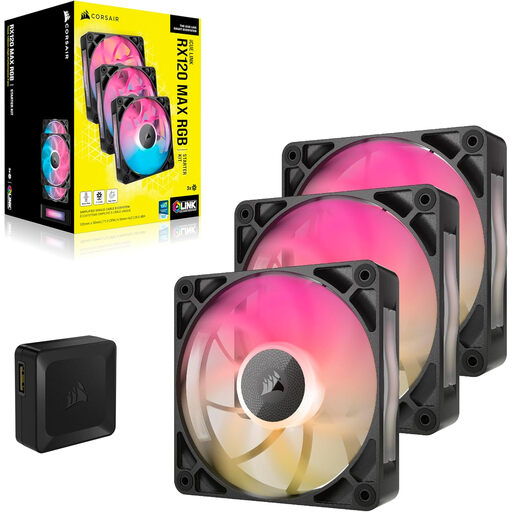
Why it suits this profile: A 3-pack is suitable for a complete airflow setup or for users who want to address multiple radiator or case positions at once.
The set includes three fans and specifies a thickness of 30 mm. Measure the available clearance carefully, particularly for radiator and compact-case installations.
Three 120 mm fans, PWM, a stated airflow of 71.3 CFM and a listed maximum noise level of 29.5 dB.
We have compiled a complete, up-to-date selection of products that fully meet these strict criteria and the applicable European safety regulations.
Shut down the PC completely and unplug it from the mains before installing a fan or modifying an iCUE LINK chain. Pay attention to the arrows on the frame: they indicate the direction of airflow. Then check that no cables can come into contact with the blades.
Clean the blades regularly using compressed air or a soft brush. Do not use water. Unusual vibrations or a sudden increase in noise may indicate an installation or bearing problem. If this occurs, stop using the fan and inspect the installation.
No. Check the mounting position, fan thickness, PWM connector type and RGB or iCUE LINK connection. A 120 mm model is widely compatible, but it will not work universally with every case or controller.
That depends on the product you choose. A starter kit may include an iCUE LINK System Hub, while a standalone fan often includes only the fan itself. Always check the package contents carefully before ordering.
Power consumption depends on the speed, lighting and number of fans. PWM control can reduce the speed under light loads. RGB lighting adds to power consumption, but in a multi-fan configuration, the most important consideration is whether the controller and power supply support the number of connected devices.
