
Vandaag of morgen in huis

Kwaliteit gegarandeerd

Welkomstaanbiedingen ontgrendelen: GRATIS bezorging | Tot 80% korting | Gratis 30 dagen JoyPlus-proefperiode
Download de app
A Corsair PCIe bridge connector might look like a simple component at first glance. However, choosing the wrong version could leave you with a connector that doesn’t fit, a cable under strain or a purchase that adds nothing to your PC build. It’s especially important to check exactly what type of connection you need before upgrading your graphics card.
Product details for Corsair models can also look similar. For example, the Corsair CP-8920370, CP-8920369 and CP-8920371 are all bridge or graphics card accessories, but they differ in colour, weight and model number. The CP-8920368 is described specifically as having a 12V-2x6 PCIe power connection. Always check the exact model before ordering.
The term “bridge” can refer to several different types of PC accessory. A PCIe bridge for a graphics card isn’t automatically the same as a power cable, riser or SLI accessory. Check the product category and the connectors listed. A bridge designed for a specific connection may not be suitable for a different type of port.
A white PCIe connector may look right in a light-coloured case, but its colour tells you nothing about compatibility. The Corsair CP-8920370 is white and weighs 52 grams according to the product information. The black CP-8920369 weighs 49 grams. These details can help you identify the product, but they’re no substitute for checking the model number and connection standard.
PCIe connections can look similar, even when their pin layouts or intended uses differ. A connector should fit without excessive force. If the orientation, notch or latch doesn’t line up, stop installing it. A connector that almost fits isn’t a safe fit.
Compare the model number on your existing connector, product packaging or PC documentation with the product page. Pay attention to the differences between:
This information comes from the relevant product descriptions. It doesn’t automatically confirm that a model will work with every graphics card or power supply. Check your motherboard, graphics card and power supply manuals too.
When replacing a PCIe connector, the connection type is crucial. An accessory for a 12V-2x6 power port is different from a bridge for another type of graphics card connection. Check:
If you’re unsure, consult the technical documentation from Corsair or your graphics card manufacturer. The product listing explains what the item is designed for, but compatibility ultimately depends on your complete setup.
Before buying, measure to make sure the connector will fit inside your case without sharp bends or pressure on the cable. Shut down your PC completely and unplug it from the mains before replacing an existing connection. Avoid static electricity, moisture and high temperatures. Stop using the connector if any pins are bent or it becomes damaged.
According to the product information, the Corsair accessories listed come with a minimum of 2 years’ statutory warranty under EU consumer rules. This doesn’t determine whether a particular model is suitable for your specific hardware.
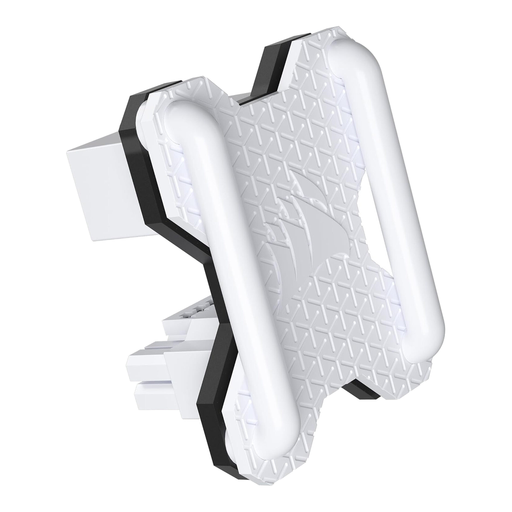
Why it suits this user: A straightforward option for anyone looking for a white Corsair graphics card bridge and wanting to replace or add the exact model to a compatible PC build.
The model number, white colour and stated weight of 52 grams make it easier to compare with your existing component. Be sure to check hardware compatibility first.
White finish; PCIe connector product type; weight according to product information: 52 grams.
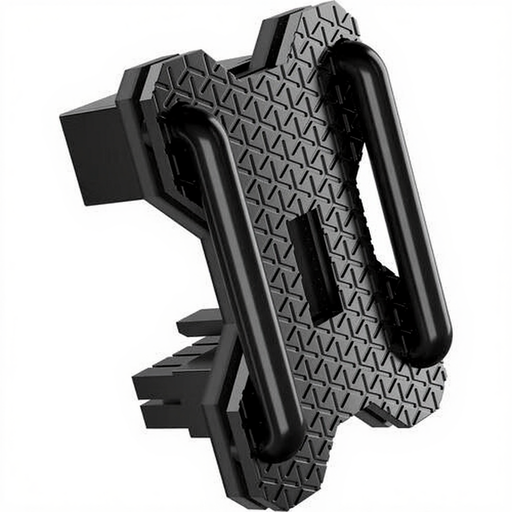
Why it suits this user: A good choice for PC builders looking for a black version to complement a dark case or match their existing hardware.
The black finish means you don’t have to limit your search to white versions. The model number and product description remain the key details to check.
Black finish; PCIe connector product type; stated weight: 49 grams.
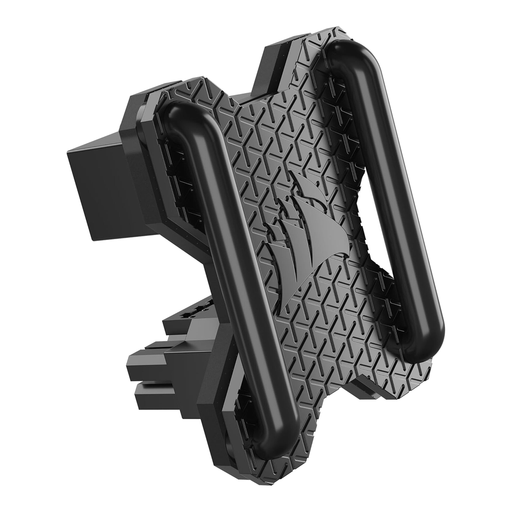
Why it suits this user: Designed for users who specifically need to bridge a 12V-2x6 connection and have already checked the pin configuration of their graphics card and power supply.
The product specifications explicitly list two 12V-2x6 PCI-E connections and a male/female configuration. This helps you choose the right option, but doesn’t replace checking the manufacturer’s documentation.
Black finish; 12V-2x6 PCI-E connections at both ends; male/female configuration listed in the specifications.
We’ve put together a complete, up-to-date list of products that meet these strict selection criteria and the applicable European safety regulations.
No. Compatibility depends on the exact Corsair model, the graphics card connection and the power supply or motherboard. Before ordering, compare the connector shape and pin configuration, and check the manufacturer’s documentation.
Replace a connector if it’s damaged, won’t latch securely, shows discolouration or no longer makes a reliable mechanical connection. Shut down your system and unplug it from the mains before removing the connector.
That depends on how it’s used. A physical connector usually doesn’t need a software setting, but the hardware must be suitable for the specific connection type. If you’re using a 12V-2x6 model, always check the power supply requirements and the manufacturer’s instructions.
