
Vandaag of morgen in huis

Kwaliteit gegarandeerd

Welkomstaanbiedingen ontgrendelen: GRATIS bezorging | Tot 80% korting | Gratis 30 dagen JoyPlus-proefperiode
Download de app
Choosing a new Corsair PC fan may seem straightforward: pick an RGB model, choose 120 or 140 mm and you’re done. In practice, problems often only appear after installation. The fan may not fit, be noisier than expected or fail to work with your existing RGB connection.
Joybuy Product Recommendation Officer has therefore filtered the most important product specifications of popular Corsair case fans. This makes it easier to see which features matter for your case, radiator and intended use.
A 120mm PC fan fits many ATX and micro-ATX cases, but always check the available mounting points. A 140mm PC fan can move more air at a lower speed, but it also takes up more space. Pay particular attention to the distance from the motherboard, RAM, radiator and cables.
A higher maximum speed does not automatically mean a quieter or more suitable fan. Noise levels depend on speed, airflow resistance and the fan curve. A model reaching a maximum of 2400 RPM can run quietly at a lower speed during normal desktop use when PWM control is available.
A Corsair RGB fan with iCUE LINK does not always use the same connection as a standard 5V ARGB fan. Several iCUE LINK models require a compatible hub. Before buying, check whether you already have an iCUE LINK system, which cables are included and whether a controller is required separately.
The two most common sizes are 120 mm and 140 mm. 120 mm offers plenty of choice for cases and radiators. 140 mm can be a good option for a front or top panel with suitable mounting holes. Also check the thickness. The Corsair iCUE LINK RX120 MAX, for example, is 30 mm thick, while many standard case fans are approximately 25 mm thick. A thicker fan may require more clearance around the mounting position.
Airflow, often listed in CFM or m³/h, indicates how much air the fan can move at maximum speed. This is particularly relevant for open case positions. Static pressure, measured in mmH2O, is important when air has to pass through a radiator, dust filter or restrictive front panel.
For a radiator fan, therefore, do not use airflow as your only selection criterion. A PWM case fan with higher static pressure may be more practical for a water cooler or CPU radiator. Note that product listings sometimes use different units. Compare CFM with CFM and m³/h with m³/h, and check the manufacturer’s product specifications if in doubt.
A 4-pin PWM connection enables precise speed control via the motherboard or a suitable controller. This helps the fan run more slowly under light loads. Listed noise levels are usually minimum and maximum values measured under specific conditions. For example, do not interpret 10 dB at low speed as a guarantee that your entire PC will be inaudible: resonance, dust, the case and other fans also play a part.
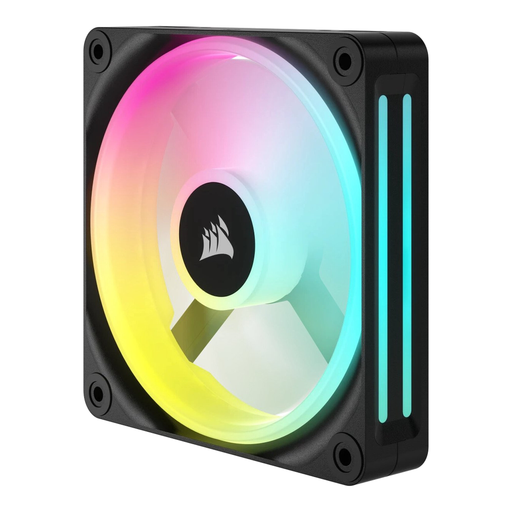
Why it suits this profile: This standalone 120mm model is ideal if you want to replace one existing fan or gradually improve your airflow.
The product specification lists a size of 120 mm, PWM control and a speed range of 480 to 2400 RPM. However, check that your motherboard or controller has a suitable connection.
Standalone packaging, maximum airflow of 63.1 CFM according to the product details and white LED lighting.
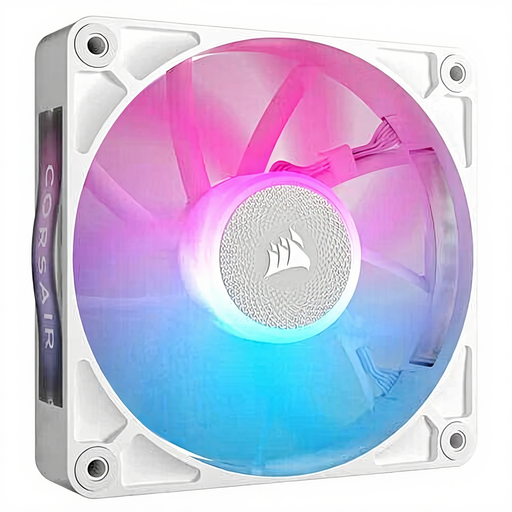
Why it suits this profile: A great choice for a modern build where quiet operation, RGB and the iCUE LINK system need to work together.
The listed speed ranges from 400 to 2100 RPM and the fan supports PWM. Check the required iCUE LINK controller and connections in advance.
Magnetic levitation bearing according to the product description, maximum airflow of 73.5 CFM and suitability for case and radiator cooling.
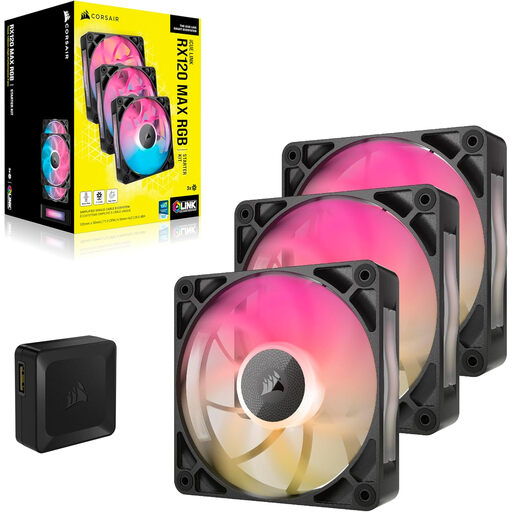
Why it suits this profile: Ideal for gamers and PC builders who want to fill several positions at once and have room in their case for a thicker fan.
The pack contains three fans, so you do not need to combine several standalone models. However, check the available clearance because the fans are 30 mm thick.
Maximum airflow of 71.3 CFM, PWM support and a quoted maximum noise level of 29.5 dB.
We’ve put together a complete, up-to-date list of products that fully meet these strict selection criteria and the applicable European safety regulations.
Switch off the computer completely and unplug it from the mains before installing a fan. Look for the arrows on the frame: these indicate the direction of airflow. Fans at the front or bottom often draw air in, while models at the rear or top expel warm air.
Connect a PWM fan to a 4-pin fan header or compatible controller. For RGB, check whether it uses iCUE LINK, a dedicated Corsair controller or 5V ARGB. Do not use a connector simply because it appears to fit physically.
Clean the blades and dust filters regularly with the PC switched off. Stop using the fan if it vibrates unusually, scrapes or suddenly becomes much noisier. The statutory warranty for the products mentioned is at least two years according to the product information and EU consumer rules; additional rights may arise under national legislation.
That depends on the mounting points in your case. 120 mm is versatile and is often used with radiators. 140 mm can provide a practical airflow solution when used with a suitable front or top panel. Measure the available space before ordering.
Several iCUE LINK models require an iCUE LINK hub or an existing system. For example, the Corsair iCUE LINK LX120-R RGB specifies connection to a hub, which may be sold separately. Check the included accessories and your current setup before buying.
A standalone case fan generally uses very little power compared with the rest of a desktop PC. Actual consumption depends on speed, the controller and how long it is used. With PWM control, you can reduce the speed when temperatures are low, which can also help keep noise levels down.
