
Vandaag of morgen in huis

Kwaliteit gegarandeerd

Welkomstaanbiedingen ontgrendelen: GRATIS bezorging | Tot 80% korting | Gratis 30 dagen JoyPlus-proefperiode
Download de app
Choosing a new Corsair PC fan might seem straightforward at first. But the wrong size, missing connections or an awkward RGB setup could mean it isn’t right for your PC. This applies to gamers, PC builders and anyone looking to replace a case or radiator fan.
So don’t just look at the RPM or appearance. Check the dimensions, airflow, noise rating and how the fan connects.
A high speed doesn’t automatically mean a fan is suitable for every situation. A higher maximum speed can move more air, but it can also create more noise. For everyday use, a PWM fan is more practical: its speed can be adjusted automatically according to the temperature via a 4-pin connection.
A fan rated to run between 400 and 2,100 RPM may run more quietly under light loads than a model that only runs at a fixed speed. Just check that your motherboard or fan controller has a suitable connection.
A 120 mm fan won’t necessarily fit a mounting point designed for a 140 mm fan. Measure your existing fan or check your PC case manual. Also check the thickness. For example, the Corsair RS120 MAX is 30 mm thick according to the product information, while many standard fans are around 25 mm thick. This difference could cause problems with cables, radiator mounts or a graphics card.
An RGB PC fan can use different systems. Some models work with a 5V ARGB connection on the motherboard, while iCUE LINK fans need a compatible hub and the appropriate cable. So a product with lighting isn’t automatically suitable for every PC.
For an iCUE LINK fan, check whether a System Hub is included. It may come with a starter pack, but a separate controller might be needed for an individual fan. According to the product description, the RX120 RGB Starter Pack comes with an iCUE LINK System Hub.
The most common sizes are 120 mm and 140 mm. A 140 mm PC case fan can move a lot of air at a similar speed, but it needs more space in the case. Check:
Arrows on the frame usually indicate the direction of rotation and airflow. For a standard airflow setup, fans at the front or bottom are often used as intakes, while those at the back or top are used as exhausts.
Airflow is often given in CFM or m³/h. This indicates how much air a fan can move without significant resistance. Static pressure, measured in mmH2O, is particularly relevant when air needs to pass through a radiator, dust filter or closed front panel.
That’s why static pressure is just as important as airflow for a radiator fan or a compact case. For example, the RS120 MAX is rated at up to 72 CFM and up to 4,2 mmH2O. According to the product description, this makes it suitable for both a case and a radiator.
A stated noise level is a product specification, but your actual experience will depend on the distance, installation, resonance and chosen speed. So compare both the minimum and maximum figures. For example, the RX120 RGB is rated at between 10 and 36 dB, with a speed of 400 to 2,100 RPM.
With PWM control, you can set a fan curve in the BIOS or compatible software. This lets a quiet PC fan run slowly during light tasks and only speed up when temperatures rise.
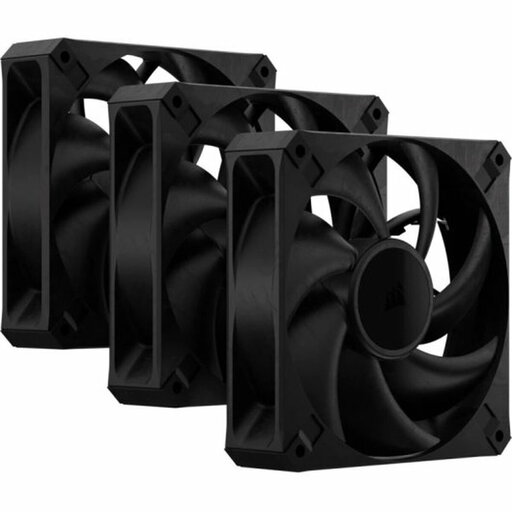
Why it suits this profile: A 3-pack is a practical starting point for a standard 120 mm case, without the need for an RGB controller or separate lighting.
The product information clearly lists three fans, PWM support and a 4-pin connection. Just bear in mind that they are 30 mm thick.
Up to 2,000 RPM, up to 72 CFM, up to 4,2 mmH2O and a maximum noise level of 29,5 dB according to the product description.

Why it suits this profile: A good choice for a tidy RGB build where cable management and centralised control matter.
The product description states that an iCUE LINK System Hub is included. Before buying, check that your power supply and system are compatible.
Three 120 mm fans, PWM, eight RGB LEDs per fan and a stated noise range of 10 to 36 dB.
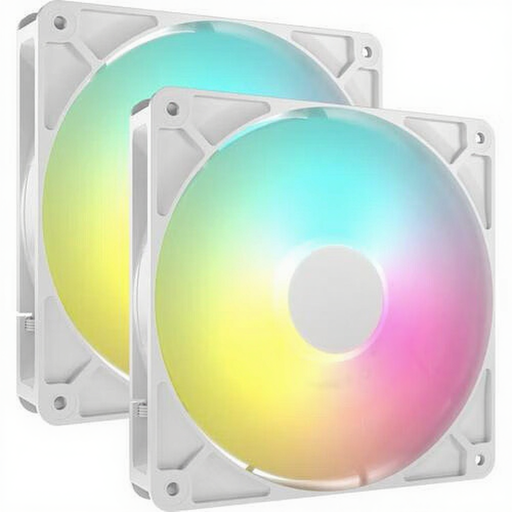
Why it suits this profile: A 140 mm set is a good option for spacious cases that support larger fans and can control RGB via a 5V ARGB header.
The set specifies the size, speed, PWM and ARGB connection. Measure the mounting points first, as a 140 mm fan won’t fit every case.
Two fans, up to 95,5 CFM, up to 3,46 mmH2O and a stated noise range of 10 to 36 dB.
We’ve put together a complete, up-to-date list of products that meet these strict selection criteria and the current European safety regulations.
Switch off your computer and unplug it before installing a fan. Secure the fan firmly, but don’t overtighten the screws. Connect a PWM model to a suitable 4-pin header. For RGB, check whether it uses ARGB, a Corsair controller or iCUE LINK.
Keep cables clear of the blades and regularly remove dust with compressed air or a soft brush. It’s best not to keep using a fan that has visible damage, makes unusual noises or vibrates heavily.
No. Check the size, thickness and available screw holes. A 120 mm model and a 140 mm model aren’t interchangeable unless the mounting points are suitable.
Not necessarily. Noise levels are mainly affected by the motor, bearing, speed and installation. Compare the stated dB figures and use PWM to adjust the speed.
It varies by model and speed. RGB lighting and a controller can add to power consumption. The effect on a desktop PC’s total power use is generally limited, but if you’re using several fans, check that the connection and controller stay within their stated limits.
