
Vandaag of morgen in huis

Kwaliteit gegarandeerd

Welkomstaanbiedingen ontgrendelen: GRATIS bezorging | Tot 80% korting | Gratis 30 dagen JoyPlus-proefperiode
Download de app
Buying new Corsair PC cooling seems straightforward until you have to choose between a CPU cooler, a 120mm PC fan, a 140mm PC fan, 240mm liquid cooling or 360mm liquid cooling. Terms such as RGB, quiet operation and high airflow are often prominently featured, while important details are less visible.
As a Joybuy Product Recommendation Officer, I therefore start by checking verifiable specifications. This helps you avoid choosing a cooler that does not fit your case, connect to your motherboard or performs more noisily than expected in practice.
A 360mm radiator sounds appealing for a powerful gaming PC, but its size does not only indicate cooling capacity. Also check whether your case supports a radiator of this size at the top or front. In addition, allow for space around the RAM modules, motherboard and graphics card.
With 240mm liquid cooling, the installation requirements are often simpler. A 360mm model generally has three fans and a longer radiator, making the available mounting space more important.
A stated noise level of, for example, 10 dB usually applies at a low fan speed. At maximum speed, the same product may produce 29.5, 36 or 37 dB. Always compare the full speed range rather than just the lowest figure.
A PWM fan can automatically adjust its speed via the motherboard. This helps it run more quietly under light loads and deliver more airflow under heavy loads. However, check that the product listing actually mentions PWM support. Some versions of the TITAN RX RGB list different connector or PWM specifications; check these details before purchase and installation in the manual.
RGB lighting does not determine whether a cooler fits your processor. For an ARGB cooler or RGB PC cooling, you need to look beyond the lighting at the connector, controller and software. iCUE LINK products use their own ecosystem with a System Hub or compatible connections. A standard 3- or 4-pin connection on the motherboard does not automatically work in the same way as iCUE LINK.
Check your processor’s socket before buying a CPU cooler for a gaming PC. The range includes models for:
According to the product information, the TITAN RX RGB models support LGA 1851, LGA 1700, AM4 and AM5. The Nautilus 240 RS ARGB and Nautilus 360 RS ARGB also list support for these sockets. Always use the correct mounting bracket and check that all the necessary fixing materials are included.
A 120mm fan is a common size for case ventilation and some radiators. A 140mm PC fan can move more air at a lower rotational speed in a compatible case, but it also takes up more space.
When installing, pay attention to:
For example, the iCUE LINK RX120 MAX RGB is 30mm thick according to the product information. That is more than the usual 25mm thickness of many standard fans. Check the available clearance before placing your order.
Airflow is usually expressed in CFM or m³/h. This indicates how much air the fan can move under specific testing conditions. Static pressure, expressed in mmH₂O, is particularly relevant when air has to pass through a radiator, dust filter or restrictive ventilation grille.
A radiator fan therefore needs different characteristics from a fan used solely as a case intake. Also look at the speed range. Models in this range, for example, run from 300 to 2,400 RPM. A higher maximum does not mean you need to run the fan at that speed permanently; it can, however, provide additional control headroom under heavy loads.
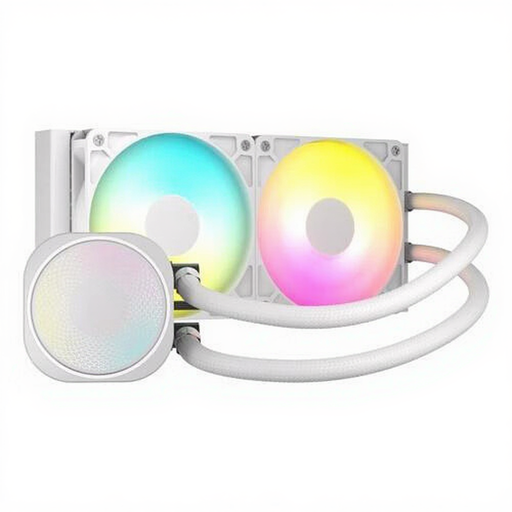
Why it suits this profile: This 240mm liquid cooler is a straightforward choice for a first PC upgrade, provided your case supports a 240mm radiator.
The listing states compatibility with LGA 1700, LGA 1851, AM4 and AM5, and mentions PWM control. Even so, check these points against your motherboard and case.
240mm radiator, two fans, ARGB lighting, stated maximum airflow of 74.37 CFM and a built-in fan controller.
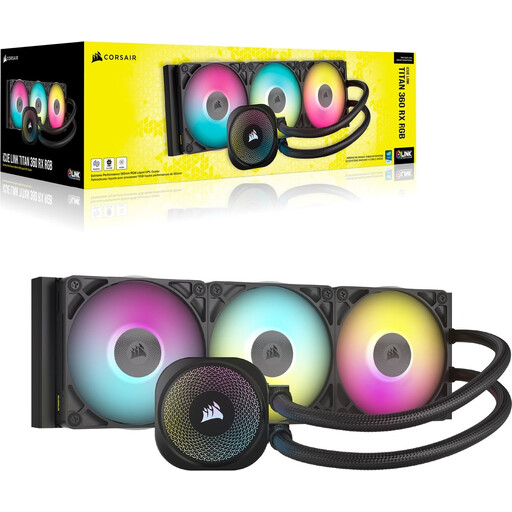
Why it suits this profile: Designed for PC builders who want to combine CPU liquid cooling with iCUE LINK connectivity and customisable lighting.
The radiator is 360mm and includes three RX RGB fans. Checking your case in advance is therefore more important than relying on RGB or marketing terms.
Support for LGA 1851, LGA 1700, AM4 and AM5; stated range of 300–2100 RPM; iCUE software and Zero RPM mode according to the product description.

Why it suits this profile: Suitable for a case with 140mm mounting points and for users who want to combine airflow with tidy cable management.
The stated speed range is 300–1700 RPM and PWM control is listed. This allows you to adjust speed and noise via the motherboard or software.
Two 140mm fans, stated airflow of up to 94.7 CFM, PWM support and an iCUE LINK connection.
Corsair iCUE LINK is designed for a connected ecosystem of compatible fans, coolers and a System Hub. The advantage is tidier cabling and central control via iCUE. On the other hand, you need to check the hub, power connection and compatibility of the entire chain.
A standard Corsair PC fan with PWM is more practical when you simply want to expand an existing case. For a straightforward upgrade, you could choose a standalone 120mm fan or a 3-pack, for example. With RGB models, check the difference between RGB, ARGB and iCUE LINK before planning the cabling.
Switch the computer off completely and unplug it from the mains before replacing internal components. Install fans securely and pay attention to the arrows indicating the airflow direction. Cables must never come into contact with the blades.
With liquid cooling, do not tilt, open or dismantle the sealed unit. The manufacturer advises this to prevent leaks. Clean the fan blades regularly with compressed air or a soft brush; do not use water. The statutory guarantee in the EU is at least two years for these products, while additional rights under national legislation may apply.
We have put together a complete, up-to-date list of products that fully meet these strict selection criteria and the applicable European safety regulations.
No. Check the socket and the supplied mounting bracket. Many models in this range support LGA 1700, LGA 1851, AM4 and AM5, but always check the current product listing and manual.
Not automatically. A 360mm radiator has three fans and may deliver sufficient airflow at a lower speed, but the final noise level depends on the fan curve, pump setting, case and processor load.
The fans and pump use power for their motors; RGB lighting adds a limited amount of extra load. Consumption varies depending on the model, number of LEDs and brightness setting. With iCUE LINK systems, the System Hub must be connected correctly to the power supply.
