
Vandaag of morgen in huis

Kwaliteit gegarandeerd

Welkomstaanbiedingen ontgrendelen: GRATIS bezorging | Tot 80% korting | Gratis 30 dagen JoyPlus-proefperiode
Download de app
A new processor, graphics card or compact case can quickly raise the temperature inside your PC. However, a bigger cooler isn't automatically the right choice. When it comes to Corsair PC cooling, many buyers focus on RGB lighting and maximum RPMs. This means important details like socket compatibility, radiator clearance and connectors can sometimes be overlooked.
The most common purchasing pitfalls:
For a modern PC, AM5 and LGA 1700 are common sockets. Some Corsair AIO coolers also support LGA 1851 and AM4. Don't just check the socket; make sure the correct mounting bracket is included too.
According to the product specifications, the Corsair iCUE LINK TITAN RX RGB models are suitable for LGA 1700, LGA 1851, AM4 and AM5. This makes them compatible with various recent Intel and AMD platforms. If you have an existing system, it's still wise to double-check your exact processor and the mounting instructions.
A 120mm PC fan is standard for many cases and radiators. A 140mm PC fan can move more air per revolution but requires a suitable mounting position. Therefore, you should measure the available space and pay attention to the fan's thickness.
With liquid cooling, the radiator size gives a practical indication of its configuration:
A 360mm AIO cooler therefore requires more space than a 240mm model. The Corsair Nautilus 360 RS ARGB states support for three 120mm fans and compatibility with LGA 1700, LGA 1851, AM4 and AM5.
A PWM fan typically uses a 4-pin connector that allows its speed to be controlled via the BIOS, motherboard software or a controller. This is more useful than just looking at the maximum RPM. A fan that constantly runs at high speed can produce more noise than necessary.
Pay attention to these values:
According to its product specifications, the Corsair iCUE LINK RX120 RGB has a range of 400 to 2100 RPM, PWM support and a stated maximum airflow of 73.5 CFM. The specified noise level ranges from 10 to 36 dB. Such figures are useful for comparing products within a range, but your actual experience will also depend on the fan curve, case insulation and your environment.
The term Corsair iCUE LINK refers to an ecosystem for connecting and managing compatible components. This can simplify your cable management, but you must check that your system has the necessary controller and connections.
With individual RGB fans, there are various connection options. For example, a model might have a 4-pin PWM connector for speed and a separate RGB connector for lighting. Therefore, you should check:
Choose white PC cooling or black PC cooling based on your case and cables, but don't let colour outweigh compatibility and size.
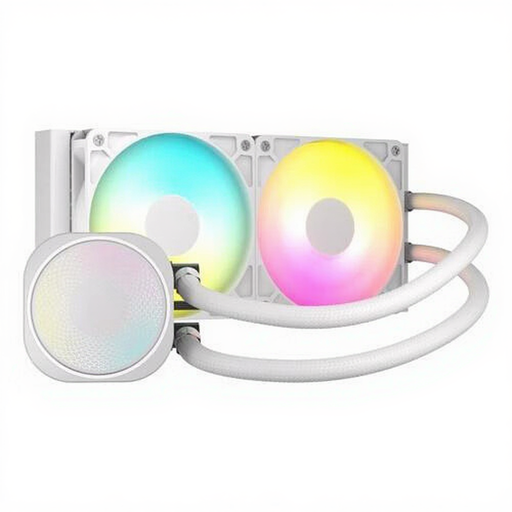
Why it's a good match: A 240mm size is manageable for a first liquid cooler and supports AM4, AM5, LGA 1700 and LGA 1851 according to the product specifications.
The clear 240mm radiator size makes it easier to measure beforehand. PWM support helps prevent the fans from running at unnecessarily high speeds.
Two fans, max 2100 RPM, stated airflow of 74.37 CFM and integrated ARGB lighting.
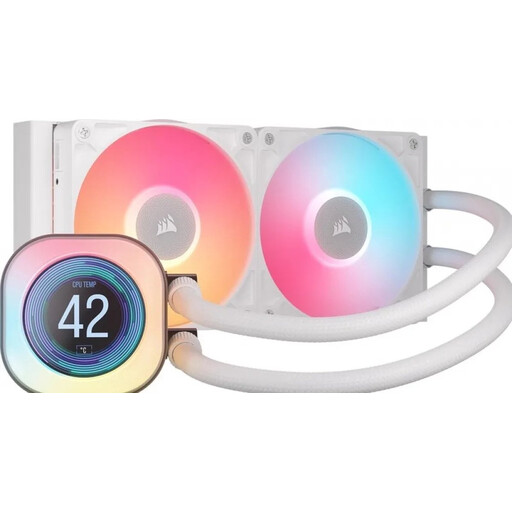
Why it's a good match: Aimed at PC builders who want to display CPU temperature or other information on a 2.1-inch LCD screen and use iCUE LINK.
The product combines the features mentioned with clear socket support. However, be sure to check the available space for the 240mm radiator beforehand.
240mm radiator, two 120mm RX fans, LCD screen, PWM support and lighting.
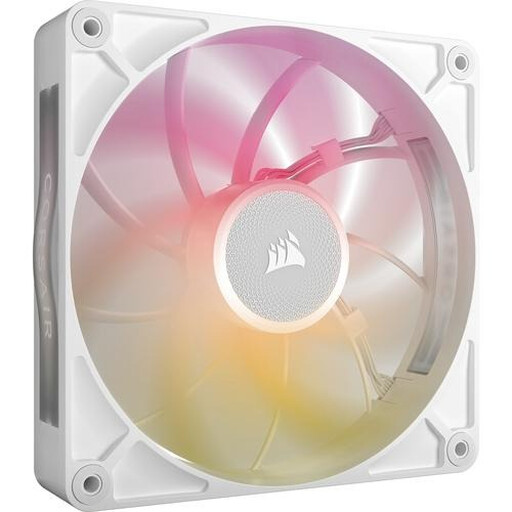
Why it's a good match: This 140mm fan is aimed at users looking for high airflow and iCUE LINK connectivity for case or radiator ventilation.
The product specifications list both PWM and the size, so you can check the connection and mounting requirements beforehand instead of just choosing based on RGB.
Stated airflow of 102.9 CFM, 300–1600 RPM, PWM control and eight RGB LEDs.
Completely shut down your computer and unplug it from the mains socket before installing a fan or liquid cooler. For case fans, pay attention to the airflow direction: front and bottom fans usually act as intakes, while rear and top fans exhaust warm air.
With a Corsair liquid cooler, check that the pump is connected to the correct header and that the radiator is securely fastened. Avoid sharp kinks in the tubing. Afterwards, set a fan curve in your BIOS or iCUE software that balances temperature against noise level.
Dust is a major cause of reduced airflow. Clean your filters and fans regularly, without touching the spinning blades. The product specifications for the models mentioned state a minimum of a two-year legal guarantee according to EU consumer rules; additional rights may depend on the applicable national legislation.
This varies by model. The TITAN RX, Nautilus 240 and Nautilus 360 models mentioned all state support for AM5 and LGA 1700. Always check the current product page and the included mounting hardware before you order.
A single PWM fan typically uses very little power. Consumption depends on the model, RPM and RGB lighting. If you're installing multiple fans, you need to check whether the motherboard or controller has sufficient capacity to power them all.
The lifespan depends on usage, dust, installation and pump load. An AIO system contains a pump and a closed liquid circuit, so it requires different checks than an air cooler. Look out for unusual noises, rising temperatures and any visible leaks. If you encounter problems, follow the manual and the warranty procedure.
We have compiled a complete, up-to-date list of products that fully meet these strict selection criteria and comply with current European safety regulations.
