
Vandaag of morgen in huis

Kwaliteit gegarandeerd

Welkomstaanbiedingen ontgrendelen: GRATIS bezorging | Tot 80% korting | Gratis 30 dagen JoyPlus-proefperiode
Download de app
Choosing the right cooling for your PC can sometimes feel like navigating a maze. You're flooded with marketing jargon, flashy RGB lights, and technical specifications. It's easy to get lost and make a purchase you'll later regret. As a Joybuy Product Recommendation Officer, I see where things go wrong every day. Let's expose the most common pitfalls in PC cooling so you can make an informed choice.
RGB fan purely based on looks. While a beautiful light show is appealing, it says nothing about cooling performance. A fan that looks stunning but moves insufficient air can lead to overheating and reduced performance of your components.water cooling radiator or behind a dense dust filter, it will do very little. This is where static pressure becomes more important—a specification that is often overlooked.CPU cooler from brand A, case fans from brand B, and an RGB strip from brand C. The result? A tangle of cables and three different software programs needed to control everything. This makes management unnecessarily complex and your build cluttered.To avoid these pitfalls, it's crucial to understand a few core specifications. These aren't complex technical details, but practical factors that determine whether a cooling product is right for your PC.
This is perhaps the most important distinction.
PC fan can move in an open space. A high CFM rating is ideal for a case fan that blows air into or out of your case without obstruction.AIO cooler) or in front of dense dust filters. A fan with low static pressure will struggle here, regardless of its CFM rating.Nobody wants a PC that sounds like a jet engine. The noise level, expressed in decibels (dB), is key. A quiet PC fan often produces around 10-15 dB at low speeds. Also, look for PWM support. This allows your motherboard to dynamically adjust the fan speed: quiet when the PC is not under heavy load and powerful during gaming.
Fans primarily come in two sizes:
An ecosystem like Corsair iCUE solves the aforementioned chaos. With iCUE LINK technology, you can connect multiple fans and components with a single cable and control everything through one software package. This significantly simplifies installation and management.
Based on these criteria, we have selected several Corsair products that suit specific needs and help bypass the common pitfalls.
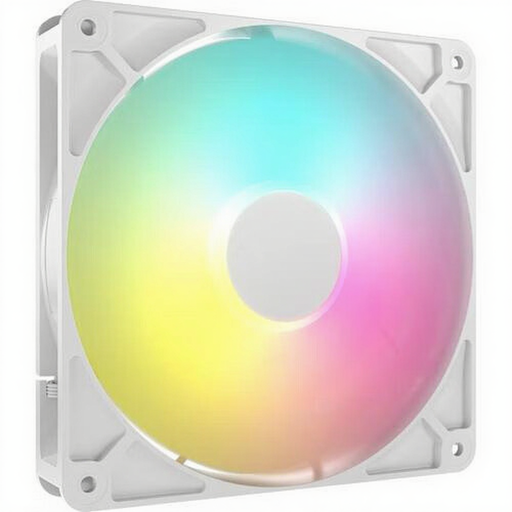
Why This Fits Their Persona: Ideal for those who want a visually appealing build without compromising on performance. This fan combines a sleek white design with vibrant ARGB lighting and is a perfect first upgrade.
This fan bypasses the RGB trap by combining its 8 addressable LEDs with strong airflow (up to 95.5 CFM), making it both beautiful and functional as a case fan.
High airflow for effective case cooling. PWM support for quiet operation (from 10 dB) at low loads.
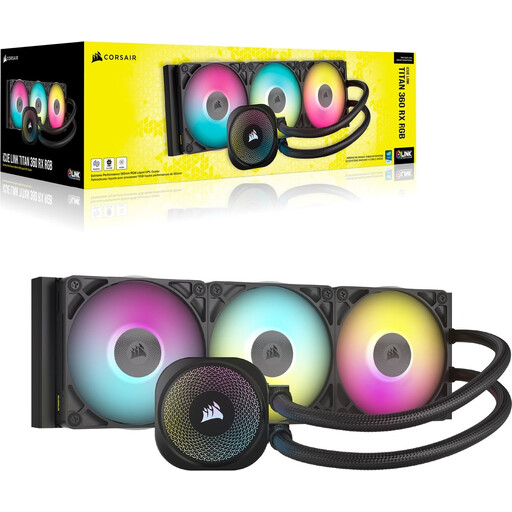
Why This Fits Their Persona: For users with a powerful CPU who demand maximum cooling performance with minimal noise. This AIO liquid cooler is designed to handle heavy loads, ideal for overclockers and demanding gamers.
This is a complete system where the fans are matched to the radiator, avoiding the pitfall of mismatched specifications. The iCUE LINK system also prevents ecosystem chaos.
Powerful cooling for high-end CPUs. Pre-applied XTM70 thermal paste and seamless iCUE LINK integration for a clean and efficient installation.

Why This Fits Their Persona: Perfect for those building a new PC or performing a major upgrade who value a clean case and centralized control. This kit lays the foundation for a tidy and expandable build.
This starter kit tackles ecosystem chaos head-on. The included iCUE LINK System Hub and the ability to daisy-chain fans with a single cable eliminate cable clutter and software conflicts.
Simplified installation and superior cable management. Full control over speed and lighting for all connected components via the powerful iCUE software.
We have compiled a complete, up-to-date list of products that fully meet these strict selection criteria and local regulations.
Not necessarily. A high-quality AIO cooler (All-in-One liquid cooler) often performs better when cooling top-tier CPUs under heavy, sustained loads. However, a premium air cooler can offer comparable performance in many scenarios, is often quieter at idle, and has fewer potential points of failure (like the pump or leaks). The choice depends on your budget, the CPU you're using, and your personal preference for aesthetics and maintenance.
For a standard gaming PC, a setup with two or three fans is a good starting point: one or two at the front for cool air intake and one at the back for warm air exhaust. This creates a positive or neutral air pressure that helps keep dust out and cools components effectively. For high-end systems with powerful components, additional fans at the top or bottom can further optimize airflow.
The biggest advantage is unification. With the Corsair iCUE software, you can manage the RGB lighting, fan speeds, and performance profiles of all your compatible Corsair products (fans, coolers, memory, keyboards, mice) from a single dashboard. The newer iCUE LINK technology drastically simplifies installation by connecting components with a single cable type, resulting in a much cleaner build with significantly less cable management.
