
Vandaag of morgen in huis

Kwaliteit gegarandeerd

Welkomstaanbiedingen ontgrendelen: GRATIS bezorging | Tot 80% korting | Gratis 30 dagen JoyPlus-proefperiode
Download de app
A new Corsair PC cooling solution can improve your computer’s airflow, noise control and visual appeal. However, a quick purchase is not always the right one. A fan with extensive RGB lighting may not fit your radiator, while a large 140 mm case fan can interfere with your memory modules or heatsink in a compact chassis.
As a Joybuy Product Recommendation Officer, I filter the most important product specifications and common pitfalls for you. This helps you compare a Corsair case fan, Corsair RGB fan or all-in-one CPU cooler based on the features that matter in real-world use.
A maximum speed of 2,400 RPM sounds impressive, but it does not tell you everything about everyday performance. Under normal use, you will often want low speeds and automatic control. Also check:
A PWM fan can adjust its speed more precisely according to temperature. That is more practical than a fan that constantly runs at full speed.
Not every RGB PC cooling product uses the same connector. Some models are designed for a motherboard header or a specific controller. Others operate within the Corsair iCUE LINK ecosystem.
The product information for the Corsair iCUE LINK LX120-R RGB states that an iCUE LINK hub may be required separately. Before buying, check whether you already have a compatible hub and the necessary cables. Daisy-chaining can reduce cable clutter, but only when all components are compatible within the same system.
A 3-pack is convenient when you want to populate multiple mounting positions, but not every case has three available 120 mm mounting points. A 140 mm case fan can move more air, but it requires sufficient clearance.
Pay attention to:
A 120 mm case fan is the most widely used size and fits many mid-tower cases and radiators. A 140 mm case fan can provide substantial airflow at a lower speed, but it is not automatically suitable for every chassis.
The Corsair CO-9051032-WW is a 140 mm fan supplied in a 2-pack. According to the product listing, it offers a speed range of 350 to 2,000 RPM, maximum airflow of 84.7 CFM and noise levels ranging from 10 to 36 dB, depending on speed. With this size, pay particular attention to whether the mounting holes and available clearance match your case.
For moving air through an open case, airflow is important. For a radiator or restrictive dust filter, static pressure plays a greater role. Manufacturers typically list these values in CFM and mmH2O.
The Corsair iCUE LINK LX120-R RGB is listed with up to 70 CFM and 3.8 mmH2O of static pressure. Based on the stated specifications, this makes it suitable for both case and radiator use. Always compare these values using the same measurement unit; m³/h and CFM are not equivalent.
A stated minimum of 10 dB does not mean the fan will be inaudible in every PC build. Noise is also affected by resonance, mounting, dust, other fans and the selected fan curve.
PWM control via a 4-pin connector helps you balance speed and noise according to system load. The Corsair iCUE LINK RX120 MAX RGB, for example, lists a range of 400 to 2,000 RPM, maximum airflow of 71.3 CFM and noise levels of 10 to 29.5 dB according to the product data. However, you should check in advance that your case has enough clearance for its thicker 30 mm frame.

Why This Fits Their Persona: A standalone 120 mm Corsair PC fan is a practical choice when you want to replace a single existing fan or expand airflow gradually.
The specifications list a 120 mm size, PWM, a 4-pin connector and a range of 480 to 2,400 RPM. However, check that your motherboard or controller supports the RGB connector.
Up to 63.1 CFM, 3.8 mmH2O of static pressure and 34 individually addressable LEDs according to the product information.
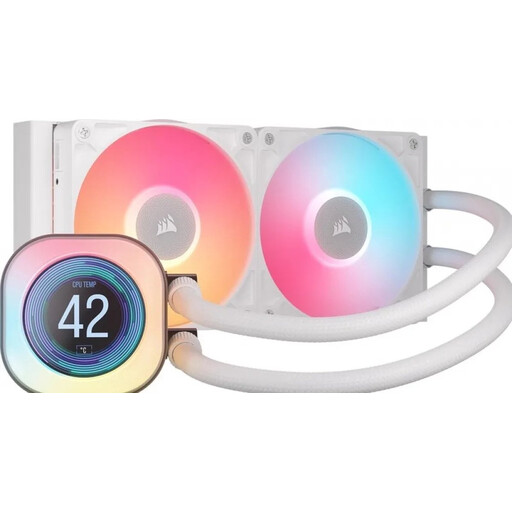
Why This Fits Their Persona: This 240 mm all-in-one CPU cooler is ideal for gamers and PC builders who want to combine CPU liquid cooling, RGB lighting and an LCD display in a single system.
The radiator size is clearly listed as 240 mm, with two 120 mm fans included. Before buying, check radiator clearance and compatibility with AM4, AM5, LGA 1700 and LGA 1851.
A 2.1-inch LCD display, PWM support and iCUE LINK connectivity according to the product description.
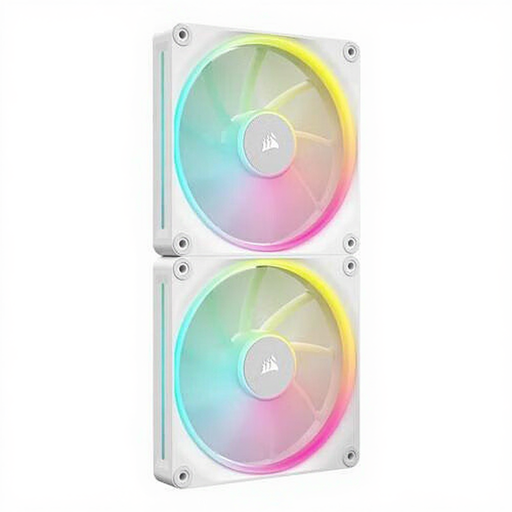
Why This Fits Their Persona: A 140 mm set is a compelling option for a larger case with two suitable mounting positions, for example as front intake or top exhaust.
The set contains two fans and lists PWM support. Before buying, check that your case supports 140 mm fans and that RAM or motherboard components will not obstruct installation.
Up to 84.7 CFM and a stated noise range of 10 to 36 dB, depending on speed.
Fully shut down your PC and unplug it from the mains before connecting a Corsair PC fan. Check the arrows on the frame: they indicate the direction of airflow. A common layout is:
Connect PWM fans to a suitable 4-pin header or controller. With iCUE LINK components, make sure the chain is connected correctly; do not exceed the maximum number of devices supported by the System Hub. Clean the fan blades regularly with compressed air and keep cables away from moving parts.
Never open, invert or disassemble a CPU liquid cooler with a sealed loop. Check the socket, radiator size and mounting brackets before starting the installation.
Compare the latest PC cooling selection by size, connectors, PWM control, RGB features and radiator compatibility.
That depends on your case. 120 mm is widely compatible and often fits radiators as well. Based on the stated product specifications, 140 mm can provide greater airflow, but it requires a suitable chassis and sufficient clearance.
No. Corsair offers several connection and control systems. With iCUE LINK models, check whether a System Hub is required. Other fans may use PWM alongside a separate RGB connector. Always check the connectors listed in the product information and compare them with those on your motherboard.
A case fan typically uses very little power; exact consumption depends on the model, speed, lighting and controller. RGB LEDs and higher speeds can increase power usage. With PWM control, you can reduce fan speed when the PC is under light load.
