
Vandaag of morgen in huis

Kwaliteit gegarandeerd

Welkomstaanbiedingen ontgrendelen: GRATIS bezorging | Tot 80% korting | Gratis 30 dagen JoyPlus-proefperiode
Download de app
A new fan or CPU liquid cooler can make your PC quieter and easier to manage, but only if the component fits your case and processor. With Corsair PC cooling, you’ll encounter different sizes, connections and control systems. An RGB fan with a high maximum speed is not automatically suitable for every PC.
Pay particular attention to these common pitfalls:
A Corsair 120mm fan is a common choice for the front, top or rear of a PC case. As well as the diameter, check the thickness. Most models are approximately 25mm thick, while some variants require 30mm of space.
A Corsair 140mm fan can move more air at a similar speed, but requires larger mounting points. So check your case manual before ordering. Also consider the direction of airflow: fans at the front or bottom usually draw in cool air, while models at the top and rear expel warm air.
A PWM fan usually uses a 4-pin connection. This allows the motherboard or controller to adjust the speed automatically based on temperature. It is more practical than a fan that constantly runs at a single speed.
Pay attention to the combination of:
A low quoted dB value does not mean that the fan will remain quiet in all conditions. After installation, set an appropriate fan curve via the BIOS/UEFI or Corsair iCUE.
An ordinary PWM case fan can be connected directly to a suitable 4-pin fan header. For RGB, you will also need a compatible lighting connection or controller. With an iCUE LINK fan, multiple devices are connected through the iCUE LINK system. This can simplify cable management, but check whether a system hub and the correct power cable are included.
The product information should be your main reference. Some models feature RGB lighting, while other versions with a similar name do not. Always check the exact model number, the number of fans and the included controller.
A case fan is sufficient if you simply want to improve airflow inside the case. If you regularly put your processor under heavy load, you may want to consider a CPU liquid cooler or all-in-one liquid cooler. An AiO generally consists of a pump, radiator and one or more fans. The radiator must physically fit inside the case, and the pump must be compatible with the CPU socket.
The Corsair Nautilus 240 RS ARGB lists support for, among others, Intel LGA 1700 and AMD AM4/AM5. The set uses a 240mm radiator, two fans, PWM control and ARGB lighting. Before buying, check the current socket list and the available radiator positions in your case.
Always work with the PC switched off and disconnected during installation. A sealed liquid cooler must not be opened or tilted unnecessarily. Follow the installation instructions and check after installation that the tubes, cables and fan blades remain clear.
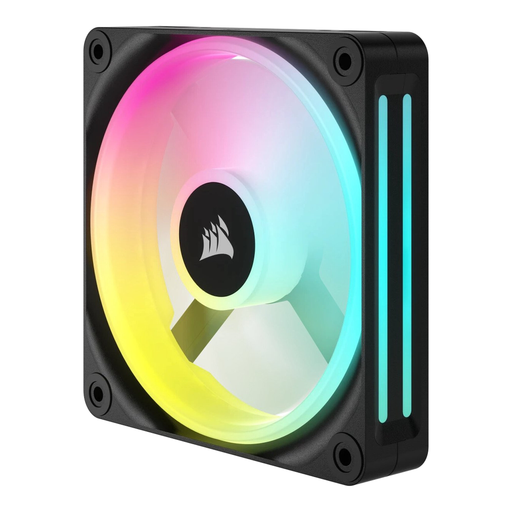
Why it suits this profile: A single 120mm case fan is a straightforward choice for a first upgrade or to replace a faulty unit.
The specifications state that one fan is included, with a speed range of 480–2400 RPM and maximum airflow of 63,1 CFM. This tells you exactly what you will receive.
120mm size, LED lighting and adjustable speed. Check the available connection on your motherboard.

Why it suits this profile: Ideal for a coordinated build with three 120mm fans, RGB lighting and an included iCUE LINK System Hub.
The starter pack clearly states that three fans and the system hub are included. This prevents you from buying separate components without the required connection.
PWM control, 400–2100 RPM, maximum airflow of 74,2 m³/h and a quoted noise range of 10–36 dB.
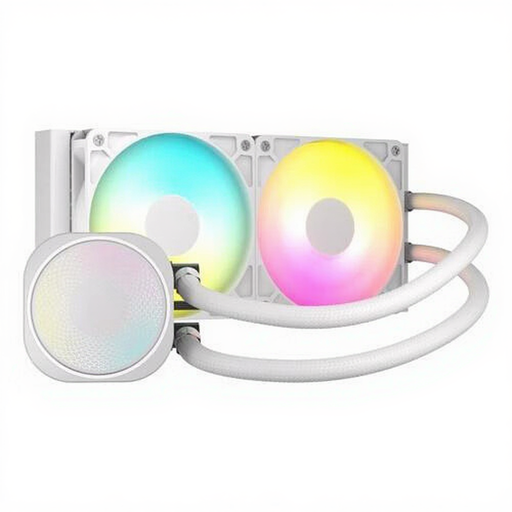
Why it suits this profile: A 240mm AiO is well suited to users who combine sustained CPU loads with a tidy liquid-cooling setup.
The radiator size, two included fans and stated socket support can all be checked in advance. Measure your case before ordering.
240mm radiator, PWM support, ARGB lighting and compatibility with LGA 1700, AM4 and AM5 according to the product details.

Why it suits this profile: Two larger fans are a good option when your case supports 140mm mounting and you want to run them at lower speeds.
The 140mm size and two-pack are clearly stated. However, check the mounting holes and the available space around the RAM and motherboard heatsinks.
PWM control, RGB lighting, 300–1700 RPM and quoted maximum airflow of 94,7 CFM.
We have put together a complete, up-to-date list of products that fully meet these strict selection criteria and the applicable European safety regulations.
Products are listed with a minimum of two years’ statutory warranty under EU consumer rules. Your statutory rights may also depend on the situation in the Netherlands and the seller.
No. Check the size, available mounting holes, thickness and connection. A 120mm fan will not automatically fit a 140mm position. For RGB, the controller or header must also be compatible.
A PWM model generally uses a 4-pin connection, allowing its speed to be controlled more precisely. This means you can run the fan more quietly under light loads and increase its speed when temperatures rise.
Its lifespan depends on usage, dust, temperature and the quality of the installation. Look out for increasing vibrations, rattling bearings or a fan that no longer starts. With an AiO liquid cooler, it is advisable to check the pump and tubes visually at regular intervals without opening the sealed unit.
